
How to Combine Chat Apps With Dedicated Event Tools
The question is never “chat or tools?” — your group will keep chatting no matter what you adopt. The question is how to divide the work so the conversation stays a conversation while the plan gets a structure of its own.
Quick answer
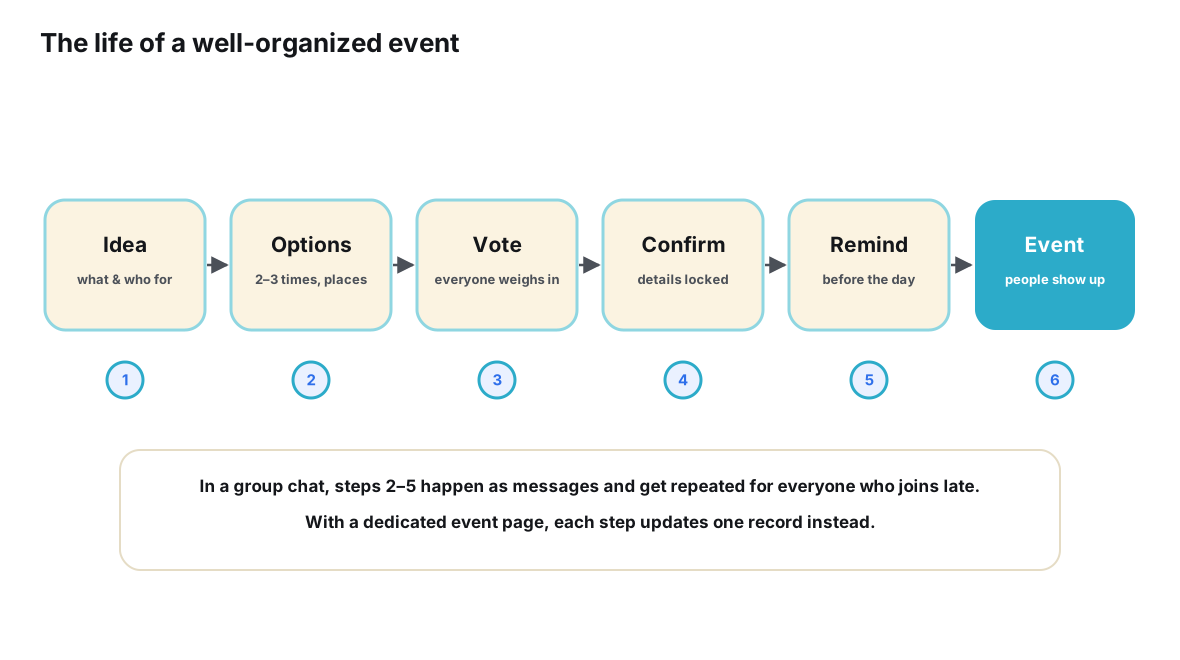
The combination that works is a division of labor, not a replacement. Your messaging app keeps everything it is genuinely excellent at: negotiating options, joking, arguing about restaurants, being the place the group already lives. A dedicated event tool takes the parts chat was never shaped to hold: the current time and place, who has committed to coming, changes that reach everyone, reminders before the date, and a self-serve entry point for late joiners. The two connect through one link, posted deliberately and repeated as the standing answer to every “what’s the plan?” question. The pattern fails when either side leaks into the other’s job — commitments negotiated in reactions, banter filed in a database — so the real skill is learning what belongs where, and holding that line gently.
The false choice
Most advice about planning events with technology presents a fork: keep using your group chat, or move the event into a proper tool. The framing is wrong, and it produces predictable failures in both directions. Groups that stay in chat inherit the well-known decay — decisions buried under later messages, headcounts made of reactions, changes that reach only whoever was listening. Groups that abandon chat for a planning tool inherit something equally predictable: a ghost town. The tool holds the plan perfectly, and the people hold their conversation somewhere else, which means the tool stops being updated the moment attention drifts back to where the humans actually are.
The failure of the second scenario is instructive, because it is the one people choose when they are being most disciplined. Chat apps are not a bad habit to be broken; they are the most successful category of software ever built for keeping small groups talking. A group chat with an active conversation is an asset no event tool can replicate — and no event tool should try. What chat lacks is not liveliness but state: a place where the current facts of the event live as facts, rather than as things people said. That is a precise, small gap, and it is the only thing you need to fill from outside.
So the correct architecture has two rooms, not one. The chat is the living room — everything social happens there. The event tool is the filing cabinet by the door — it holds exactly one thing, the current state of the plan, and it never asks anyone to hang out inside it.
What each side is actually for
Division of labor only works when the division is legible to everyone, not just the organizer. The test for any given piece of event work is simple: is it part of the conversation about the plan, or part of the plan itself? Talk is exploratory, provisional and social; state is settled, current and referenceable. Run every task through that test and the sorting becomes almost mechanical.
| Piece of event work | Where it belongs | Why |
|---|---|---|
| Debating Friday versus Saturday | Chat | Exploratory and opinion-rich — it is conversation by definition |
| The settled date and start time | Event tool | A current fact people will need to look up repeatedly |
| Jokes, side conversations, banter | Chat | The social glue that makes the group want to meet at all |
| Who is coming, going or maybe | Event tool | A per-person status that changes and must roll up into a count |
| Negotiating the restaurant choice | Chat | Persuasion happens among people, in real time |
| The final address and meeting point | Event tool | A reference fact needed on the day, findable in seconds |
| “Can’t make it after all, sorry!” | Event tool | A status change — announced in chat, but recorded as state |
| Coordinating who brings what | Both | Negotiate in chat; write the settled assignments into the plan |
| Reminding people it’s tomorrow | Event tool | Repetition and timing are exactly what automation is for |
Notice the pattern in the “why” column: chat handles everything where the value is in the exchange itself, and the tool handles everything where the value is in being reliably true later. Misfiled work is the root cause of nearly every planning mess — the commitment filed as a reaction, the address filed as a sentence, the reminder filed as good intentions.
The link is the contract
Two rooms need a hallway, and in this architecture the hallway is embarrassingly simple: one link to the event. The link is not a minor convenience; it is the contract that keeps the division of labor honest. Because the plan lives at an address, the conversation never needs to carry a copy of the plan — it can point at it. Because the conversation points at it, the record stays current without anyone being dragged into a new app to socialize.
The contract has terms, mostly obligations on the organizer, and they are worth stating plainly. Post the link early — before the debate peaks, not after it becomes a rescue operation. Post it everywhere the group talks, not just in your favorite channel. Make it the standing answer: every “what time?” gets the link, every time, without apology — not because you are being pedantic, but because every time the link answers a question, the group learns one more time that the answer lives there. And keep the record worthy of the link: a link that shows stale facts teaches people to go back to asking humans.
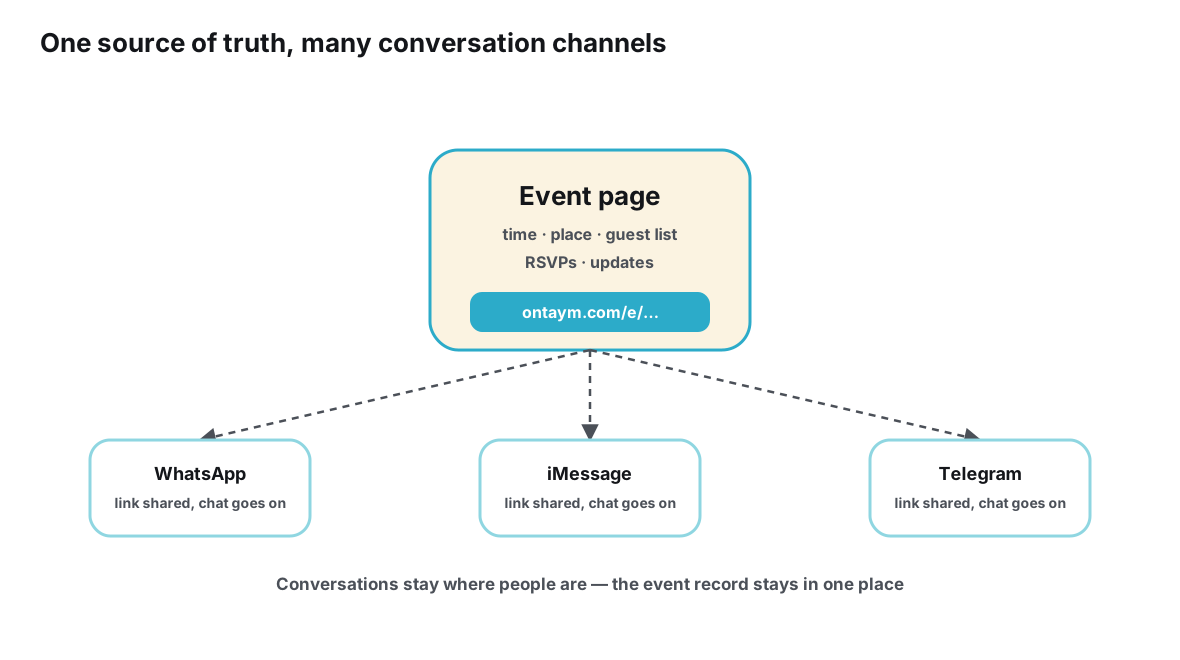
This is also the honest answer to a worry organizers often voice quietly — that using a separate tool will fragment the group’s attention. Fragmentation comes from the plan being copied into several places, not from the plan living in one place that everyone can reach. Five chats each holding a private version of the details is fragmentation; five chats each pointing at one page is the opposite.
Setting up the combination
The setup is a short, one-time procedure per event. Done in this order, it takes minutes and prevents the most common failure — the tool arriving after the plan has already congealed in the thread, when migration feels like punishment rather than relief.
- Pick the record before the event needs it. Choose where the plan will live — an event page or similar record with RSVP statuses, updates and reminders — at the moment the event is first mentioned, not when the chat is already drowning.
- Create the event with what is known. Give the event a page containing the working facts, marking anything undecided as open, so the record exists as a container before it exists as an answer.
- Post the link with intent. Announce it in the chat with one sentence explaining the division: talk here, plan there, link always current.
- Collect commitments on the record. Ask people to set their own going or maybe status rather than answering in thread, and let the count build where it can be read.
- Decide in chat, write to the record. Whenever the group settles a question — place, time, who drives — update the event page within a minute, so the link is never wrong for long.
- Answer questions with the link. Route every what-when-where question to the record, politely and consistently, until the group does it for each other.
- Let the tool handle the calendar work. Send changes as updates from the record and let reminders fire on schedule, reserving the chat for things that deserve human warmth.
The tool choice matters less than the wiring, but it must support the four load-bearing functions: a shareable link, per-person RSVP statuses, updates that reach people who already responded, and reminders tied to the date. Ontaym is designed around exactly this pairing — one link per event that the chat can point at — but any system with those four functions will carry the pattern. If your group is starting from a chat that has already swallowed the plan whole, do the extraction first: the companion guide on moving from group chats to structured event planning covers how to lift a buried plan into a record without losing anyone.
Running the combination day to day
Setup decays without maintenance, and maintenance here is a handful of small habits rather than a regime. The first habit is the one-minute write-through: any decision that lands in chat gets copied to the record immediately, while the conversation moves on. The gap between “decided in chat” and “written in the record” is where parallel versions of the plan are born, and the gap is only cheap to close when it is young.
The second habit is status discipline around changes. When Tom reports at noon that he can no longer come, two things should happen: the human response in chat (“sorry to hear it, next time!”) and the quiet update — Tom flips his own status, or the organizer does. The first is courtesy; the second is bookkeeping. Groups that only do the first end up with a headcount and a thread that disagree; groups that only do the second end up feeling like an office. Both, always, in that order of warmth.
The third habit is event-day reverence for the record. On the day itself, the chat is for live coordination — “parking at the north entrance”, “table’s booked under Priya” — while the record is the thing people check for the immutable facts: start time, address, what they promised to bring. Keeping that separation on the day is what makes the address field trustworthy precisely when everyone is hurrying. And after the event, the record closes the loop — a final list of who came, and a clean starting point for the next one.
When the combination fails
The pattern is robust but not self-sustaining, and it fails in recognizable ways. The value of cataloguing the failure modes is that each has a small, specific correction — none of them require abandoning the approach, only repairing the leak that caused it.
| Symptom | Root cause | Correction |
|---|---|---|
| The link gets posted once, then buried | No standing answer; every question answered from memory | Answer every plan question with the link, every time, until the group self-serves |
| The record goes stale; people stop trusting it | Decisions settle in chat and never get written through | Adopt the one-minute write-through; delegate it to whoever settled the question |
| Two plans exist and disagree | The chat thread kept its own running copy of the facts | Repeatedly reframe the thread as commentary; the record is the only place facts live |
| People treat the tool as another chat | No stated division of labor at setup | Re-post the one-sentence contract: talk here, plan there |
| The organizer burns out maintaining both | All write-through and updating centralized in one person | Have guests control their own statuses; let reminders automate the repetition |
| Tool sprawl: a different app per event | Each event adopted ad hoc | Standardize on one record system for the group’s recurring events |
Most of these corrections are behavioral, which is the honest news: the technology is the easy third of the problem. The other two-thirds is a small social contract, restated occasionally and enforced mostly by the organizer’s own consistency. In practice, groups converge on the pattern within two or three events, because the pattern is aligned with what everyone already wants — less repetition, fewer contradictions, one place to look.
What about the event features inside chat apps?
A fair question at this point: the major chat platforms have shipped their own event-adjacent features, so is a separate tool even necessary? The honest answer starts from what these features genuinely do. WhatsApp Communities let organizers link related groups and share announcements with all members, and the platform’s group chats scale to over a thousand participants — capabilities documented in the WhatsApp Help Center. Telegram offers polls that can be anonymous or show visible votes, and its ecosystem separates broadcast channels from discussion groups, as described in the Telegram FAQ. Discord servers support events with interest markers, roles, channels and bots at community scale — Discord’s support pages cover how these pieces fit together.
These are real capabilities, and for a group whose every member already lives inside one platform, they cover a meaningful slice of the coordination problem. The boundaries appear at the edges of each platform’s membership. An in-app event exists for people who have joined that app’s group or community; the moment your dinner includes one friend on a different messenger, or a guest who declines to join the community at all, the in-app event stops being the shared record and becomes one more private copy. Discord’s own vocabulary makes the general point crisply: marking yourself “Interested” in a server event is an expression of interest, not an RSVP — a soft signal inside a community, not a commitment that rolls into a headcount.
This is why the division of labor recommended here assigns chat-native features to the conversation side of the ledger. They excel at informing an existing community and sensing interest. What they cannot be, by construction, is the neutral, cross-app object that every guest can open regardless of which app they woke up in — and that neutrality is precisely the property the record needs. The deeper architectural reason is laid out in why messaging apps were never designed to be event databases; the practical consequence is simply that the record should live somewhere that owes allegiance to no particular chat.
Frequently asked questions
Won’t people refuse to open yet another app?
Most event records are not really an “app” in the social sense — nobody is expected to live there. Guests tap a link, see the plan, set a status, and leave. The demand on their attention is one tap, occasionally. What people actually resist is being forced to join a group or install something just to know what time dinner starts, and a well-set-up record asks for neither.
How do I get the group to stop answering questions in chat?
You mostly can’t, and shouldn’t try — questions in chat are fine; it’s the answers that need a home. Answer each question with the link, warmly and without commentary. Within a few rounds, the group internalizes that the link is the fastest way to an answer, and the questions that remain in chat are the interesting ones: opinions, not facts.
Should the event tool replace my group chat entirely?
No — and any workflow that requires abandoning the chat will decay, because the conversation will drift back to where the people are. The chat remains the group’s living room. The event tool is a filing cabinet: consulted often, inhabited never. Replacement fails; pairing endures.
My messaging app has events and polls built in. Isn’t that the same thing?
For a group entirely inside that one app, the built-in features cover a real slice of the work. The boundary is membership: in-app events reach people who joined that app’s community, and can’t serve guests on other apps or outside the community. If your group spans two messengers — or includes one holdout — the neutral record still earns its keep.
Who should update the record when plans change?
Guests own their own status; the organizer owns the facts. When a detail changes, whoever settles it writes it through — which in practice means the organizer for venue and time, and each guest for coming, maybe or not going. Splitting ownership this way is what keeps the organizer from becoming the group’s human database.
Is this worth it for a single small event?
The setup cost is one event page and one posted link, so the bar is low — but the payoff scales with messiness. A stable plan for four people on one app needs almost nothing. Add a headcount, one venue change, two apps or a late joiner, and the pairing pays for itself in the first avoided re-explanation.
Conclusion
Chat apps and event tools are frequently presented as rivals, and the presentation costs groups a lot of thrash — either drowning in the thread or shouting into an empty planning app. The working arrangement is simpler and older than either failure: let the conversation be a conversation, and let the plan be an object. The chat negotiates; the record remembers. The link between them is the whole integration layer, and its maintenance is three small habits — write decisions through within a minute, answer questions with the link, and keep the record worthy of it.
Set the division up front, keep the boundary gentle, and resist both purisms: never exile the group from its chat, and never let the chat be the plan. Groups that settle into this rhythm stop experiencing planning as an argument with a scroll-back, and start experiencing it as what it always should have been — people talking, and one page being right.
Keep the conversation in your chat — give the plan one address.
Plan it with Ontaym