
How to Use Messaging Apps for Conversation and Ontaym for Coordination
Your group chat is where the event gets talked into existence. Ontaym is where the event actually lives once it exists. This article is about running those two halves side by side — what stays in the chat, what moves to the event page, and how the handoff works on an ordinary weekend.
Quick answer
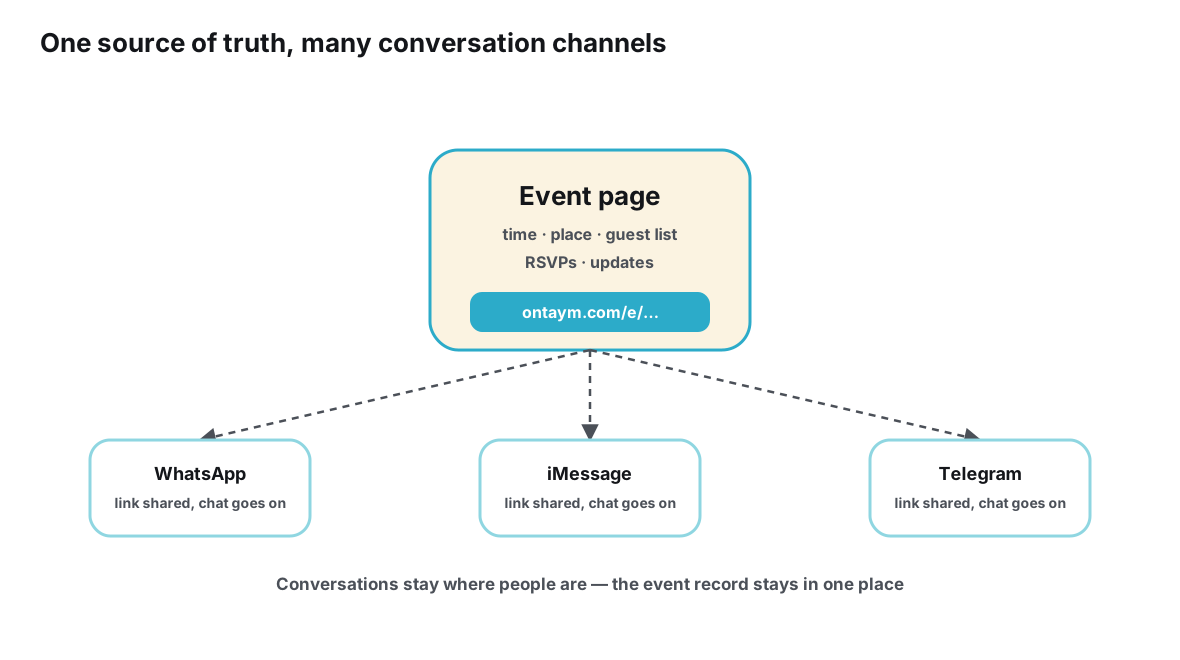
The pairing works because the two tools hold different things. Messaging apps are superb at conversation — negotiating, joking, sensing the room — and no planning tool should compete with that. Ontaym holds coordination: an event page per plan, one link every guest can open, going and maybe statuses each person controls, updates that reach people who already responded, and reminders tied to the date. In practice you keep chatting exactly as before, but every settled fact gets written to the event page within a minute, and every “what’s the plan?” is answered with the link. The chat stays warm; the plan stays current; nobody scrolls through three weeks of messages to find out what time to show up.
Two jobs that look like one
Planning an event feels like a single activity, which is why groups reach for a single tool and then argue about which one. But the activity is secretly two jobs wearing one coat. The first job is conversation: floating the idea, arguing about which Saturday, vetting restaurants, talking someone into coming. The second job is coordination: holding the settled facts, knowing who has committed, telling everyone when something changes, reminding people it’s tomorrow. The jobs have opposite requirements. Conversation wants to be fast, messy, emotional and app-native. Coordination wants to be stable, structured, current and reachable by everyone — including people who never join the chat.
When one tool is asked to do both, it does one well. A group chat does the conversation beautifully and simulates the coordination with pins, reactions and repeated questions. A planning tool can hold the coordination perfectly, but it cannot conjure the conversation — the social energy that makes people want to show up doesn’t transfer to a form. Groups oscillate between these failures and conclude that planning is just hard. It isn’t. The two jobs simply need to be given to the tools shaped for them.
The pairing named in this article’s title is deliberately concrete: messaging apps for conversation, Ontaym for coordination. But read it as an instance of a general pattern — the specific apps matter less than the split. If you already grasp the split and want the generalized version that works across any combination of apps, the companion piece on the best workflow for planning an event across multiple apps develops it fully.
What the chat side does best
It is worth being explicit about the chat’s strengths, because the biggest mistake in this migration is treating the group chat as the problem. It isn’t. Messaging apps are, by most measures, the most successful software ever made for keeping small groups in contact — the WhatsApps and Telegrams of the world carry a substantial share of all human coordination, and platforms like WhatsApp support group chats of over a thousand participants for exactly that reason. The WhatsApp Help Center and the Telegram FAQ both read as catalogs of conversation-first design: replies, reactions, voice notes, media, communities built around discussion.
For event planning specifically, the chat contributes things no record ever will. It is where the event is persuaded into existence — the enthusiasm that turns “we should hang out” into a date. It is where preferences get aired and vetoes get delivered with the right amount of humor. It is where the social proof lives: watching four people say “I’m in” in quick succession does more for the fifth person’s decision than any status list. Strip the conversation out of planning and you don’t get efficiency; you get attendance dropping, politely, for no stated reason.
So the pairing begins with a commitment: the conversation is not being migrated. The jokes stay. The negotiation stays. The thread stays exactly as alive as it wants to be. The only thing moving house is a small, sharp list of facts — and only because facts deserve better than to be messages.
The coordination load
Now look at the other job. Once an event exists in embryo, a predictable set of questions begins arriving, and keeps arriving until the event ends. When is it? Where exactly? Who’s coming? Can I still bring my cousin? What changed since yesterday? What do I need tomorrow morning? Behind those questions sit five coordination tasks that every organizer performs, usually invisibly:
- Holding the current facts. One final time, one final place, one meeting point — findable in seconds by anyone, at any hour.
- Tracking commitments. A per-person going, maybe or not going list that changes as life interferes, and a headcount that follows it.
- Broadcasting changes. Telling everyone who already said yes that the plan moved — including the people who missed the message.
- Reminding. Reaching the oblivious on the eve of the event without the organizer personally becoming a notification service.
- Onboarding late joiners. Handing a newcomer the current plan in one step, rather than a syllabus of required reading.
These tasks have a common signature: each one is a small piece of state that must stay current and be readable on demand. That is the whole reason chat performs them poorly — a message stream keeps history, not state. It is also the reason they compress so neatly into an event page, which is nothing but state with an address.
| Task | In the chat | On the Ontaym event page |
|---|---|---|
| Deciding between two Saturdays | The argument, the jokes, the persuasion | A poll on the options, and the winning date as a field once it settles |
| The final time and place | Mentioned once, then scrolled away | The headline of the page, always current |
| Saying you’ll come | “I’m in!” — one message among hundreds | A going or maybe status you set and own |
| Dropping out the day before | An apology the organizer must catch | A status flip that updates the headcount itself |
| A venue change | A broadcast that some will miss | An update every guest sees on their next visit |
| The day-before nudge | A message someone has to remember to send | A reminder attached to the event |
| The friend added on Thursday | “Scroll up, it’s all there” | The link — current plan, no reading required |
| Afterward: who came | A fog of impressions | The final list on the closed event page |
The pairing in practice: one trip, end to end
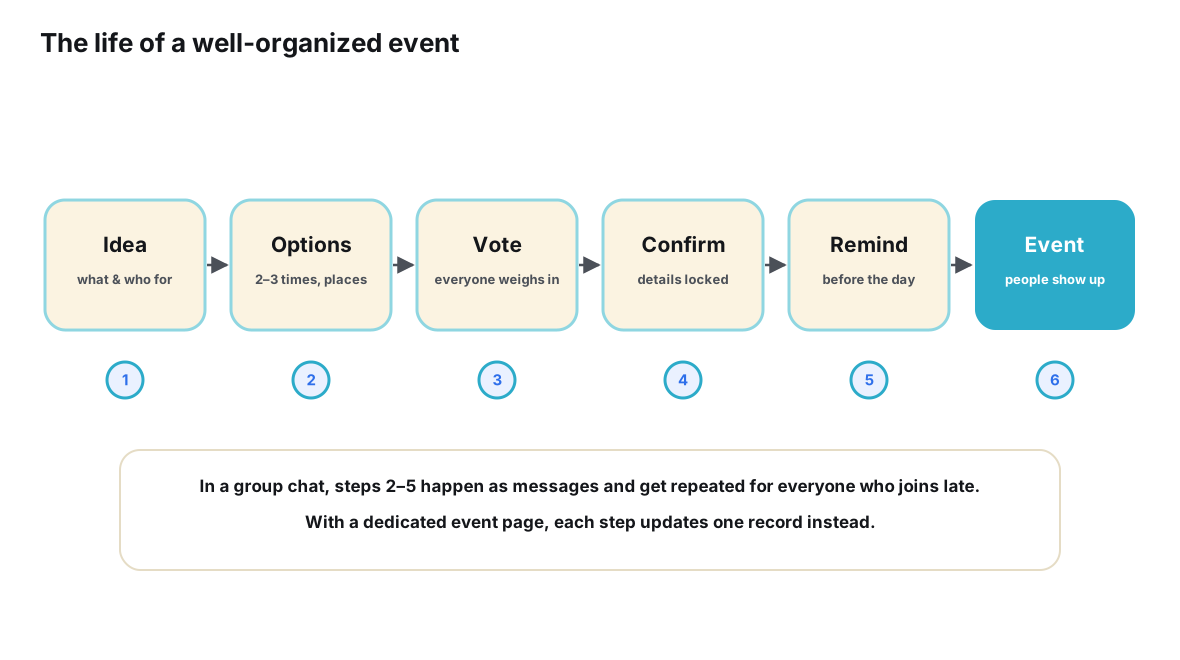
Abstract divisions of labor are best checked against a concrete weekend, so consider Priya organizing a day hike for eleven friends spread across one WhatsApp group and a handful of iMessage holdouts. On Monday, the idea appears in the chat: someone’s photo from an old trail, three replies of enthusiasm, the familiar drift toward “we should do this.” This is the moment the pairing begins — not with a tool mandate, but with Priya doing thirty seconds of setup while the idea is still warm.
She creates the event in Ontaym while the chat is still buzzing. The page is deliberately unfinished: working title, “one of the next three Saturdays”, trail marked as “picking between two options”. She posts the link into the WhatsApp group with one sentence — “making this a real plan, details and dates will live here, chat stays for chat” — and texts it separately to the iMessage friends who were never going to join the WhatsApp group anyway. Nobody has to install anything that evening; the link just opens.
The date debate happens where it should: in the thread, over two days, with the usual tangents. Ontaym’s role is that the two candidate Saturdays sit as options on the event page, and friends vote on them there between contributions to the argument. When the second Saturday emerges as the winner, Priya closes the poll and the page simply says the date. The chat debate is not deleted or migrated — it just stops mattering, because the answer now lives at a fixed address.
The middle week is where the pairing earns its keep. Statuses accumulate on the event page — eight going, two maybe — without anyone posting “confirm you’re coming!” into the thread. One friend who broke an ankle on Tuesday flips herself to not going, and the headcount adjusts without a single message of overhead. On Thursday the park service closes the first-choice trail, and Priya swaps in the backup on the page; the update reaches everyone who holds the link, including the maybe whose decision it directly affects. The chat, meanwhile, has spent the week doing what it does: route gossip, a playlist argument, someone’s photo of new boots.
Saturday morning, the two surfaces do their final jobs. The reminder has already fired. The thread handles the live stuff — who’s carpooling, running ten minutes late, bringing the good thermos — while the page holds the still facts: trailhead, meeting time, the packing note. Sunday, Priya marks who actually came, and the event quietly closes as a record. Total organizer overhead for the week: creating one event, closing one poll, making one update, answering two questions with the link.
What Ontaym contributes to the pairing
Since this article names the pairing explicitly, it is fair to spell out what the Ontaym side consists of — not as a pitch, but so the shape of the coordination half is concrete. Each event gets a page with one link. Guests open that link and set their own status — going, maybe, not going — and change it whenever reality changes, without asking anyone’s permission. Options such as candidate dates can be listed on the page and voted on, so the exploratory decisions have somewhere to land beside the thread. When the organizer changes a fact, the update applies at the source: the next person to open the link sees the new truth, including people who missed every message about it. Reminders are attached to the event, so the eve-of nudge happens without anyone composing it. And because each event has exactly one link, the link itself becomes the shorthand the group uses — “send me the hike link” is a complete, self-updating answer.
Notice what Ontaym does not do in this pairing. It does not host the conversation, and it is not trying to. There is no ambition for the event page to replace the thread’s humor or warmth, because that warmth is not overhead to be optimized — it is the reason the event exists. The design assumption is the one this whole article argues from: conversation and coordination are different jobs, and a tool should hold state, not simulate sociability. If you already have a group chat that works socially, Ontaym is not asking you to leave it; it is asking to hold the part the thread was never going to hold anyway.
For groups whose plan is currently buried in an existing thread, there is also a clean extraction path — the step-by-step version is in how to move an event from WhatsApp to a dedicated event page, which covers lifting a live plan out of a busy chat without losing the stragglers. The broader migration, for groups deciding to change their default way of planning rather than rescuing one event, is covered in moving from group chats to structured event planning.
Making the split stick
The pairing is simple to set up and easy to let decay, so the difference between groups where it works and groups where it quietly dies is a handful of norms. None of them require policing; all of them require the organizer to go first, consistently, for roughly two events.
- Declare the split once, in your own words. When you post the link, say plainly that the chat stays for talking and the page holds the plan — one sentence, no manifesto, so nobody suspects a software sermon.
- Write every settled fact through immediately. The moment a decision lands in the thread, put it on the event page — the gap between “decided” and “recorded” is the only place a second, conflicting version of the plan can be born.
- Answer with the link, warmly and indefinitely. Every what-time-where question gets the link, even the tenth one, even from the same person — consistency is the entire teaching method.
- Let people own their status. When someone reports a change in the thread, sympathize in the thread and point them at their own status — the bookkeeping is theirs to do, one tap.
- Never scold the chat for being a chat. Tangents and banter are not noise to be suppressed; they are the fuel. The moment the split starts feeling like discipline, it is being run wrong.
Groups typically internalize the pattern by the second or third event, because the incentives point the same way for everyone: guests get a faster answer than typing a question and waiting, and the organizer stops being the group’s memory. The end state is not that people stop talking about the event — it is that talking about it becomes optional, and pleasant, rather than load-bearing.
Where the pairing doesn’t fit
Honesty about limits is what separates a workflow from a sales pitch, so: this pairing is not always the right amount of process. For two friends deciding on a coffee, the event page is pure ceremony — send the time, show up. For a surprise party where secrecy is part of the design, a broadcast-friendly event link may cut against the plan’s grain, and a tighter guest list handled personally can serve better. For very large open gatherings built around an existing community — the Discord server with hundreds of members, the neighborhood association — the chat side of the pairing may itself be a structured community with its own event features, and the question becomes where the record of truth lives at that scale, which is a somewhat different problem than the friend-group one this article addresses.
The general rule of thumb: the pairing earns its keep in proportion to the number of facts that must survive contact with time — changes, commitments, reminders, late joiners. A plan with none of those needs nothing but a message. A plan with two or more needs a record, and the only remaining question is whether the record deserves its own address. That question — why one address beats several scattered copies — is examined in detail in how to create one source of truth for a group event.
| Situation | Recommended setup | Reasoning |
|---|---|---|
| Coffee for two, time already agreed | Chat only | No facts need to survive; a record would be ceremony |
| Small dinner, one app, everyone punctual | Chat, plus a link if a reservation needs a count | One fact — the headcount — may still deserve state |
| Friend group split across two messengers | Chat everywhere, one event page | The plan needs a home that belongs to neither app |
| Weekend trip with logistics and shared costs | Full pairing | Many changing facts, many commitments, long runway |
| Recurring club night | Full pairing, reused each time | The same coordination repeats; the pattern compounds |
| Surprise party | Tight list, minimal links | Secrecy outweighs broadcast convenience |
Frequently asked questions
Do my friends need to install Ontaym to be part of this?
No — the pairing is designed around the link. Guests open the event page from whatever message it arrived in, see the plan, set a status and move on. Nobody is asked to leave their chat app, join a community or maintain a new social presence. The people who interact with Ontaym most are usually just the organizers.
Won’t this make the group chat quieter?
In practice the opposite happens, though the content shifts. The repetitive logistics traffic — “what time?”, “where again?”, “are we still on?” — moves to the link, and what remains in the thread is the part people actually enjoy: the argument about the playlist, the photo of the boots. Coordination noise decreases; conversation doesn’t.
What if someone refuses to click links on principle?
Every group has one. Answer their questions in chat as always — the pairing is a convenience, not an oath — but answer with the link attached, so the cost of asking stays slightly higher than the cost of clicking. Most holdouts convert the first time a link saves them from a genuinely consequential mix-up.
Does the organizer have to do all the updating?
The design splits ownership deliberately: guests control their own going or maybe status, and the organizer controls the facts — time, place, notes. In a healthy pairing, the organizer’s work is a few minutes per event: create the page, write decisions through, send updates when reality shifts. The repetitive part — chasing confirmations and re-answering questions — is exactly the part that disappears.
Can I use this for work events, or is it just for friends?
The pairing itself — conversation in chat, state on a page — applies anywhere people plan together. For work contexts, the chat side may be a team messenger and the stakes are calendars and rooms rather than thermoses, but the failure mode being avoided is identical: facts stored in a stream. The etiquette differs; the architecture doesn’t.
What happens to the chat after the event?
Nothing — that is rather the point. The thread returns to being a thread, unburdened of its temporary job as a database. The event page quietly becomes the record of what happened, useful for the next iteration, while the chat moves on to whatever it talks about when it isn’t being interrogated for a time and place.
Conclusion
The productive question was never which app should win the event. Conversations and records are different things, and the groups that plan with the least friction are the ones that stopped making them compete. Keep the talk in the messaging apps it already lives in — that is where enthusiasm, negotiation and the group’s actual personality reside. Give the plan a page with one link, statuses guests control, updates that reach the already-committed, and reminders that fire on schedule. Write decisions through while they are fresh, answer questions with the link, and let the thread be as chaotic as it pleases, because nothing important is stored in the chaos anymore.
Run this way, an event leaves behind two clean artifacts: a conversation that was worth having, and a record that was worth keeping. Neither could have done the other’s job — and neither, in this pairing, is ever asked to.
Let the chat be the chat — give the plan a page.
Plan it with Ontaym