
Discord Events vs Dedicated Event Pages
Discord’s server events and a dedicated event page both answer “when and where is this happening?” — but they answer it for different audiences, with different ideas of what a “yes” means. A neutral look at where each one wins.
Quick answer
A Discord server event is at its best when the whole audience already lives in the server: it appears where members already look, sits beside the channels where conversation happens, and costs members nothing to react to. Its “Interested” marker is an expression of interest rather than an RSVP, and the listing is visible to server members. A dedicated event page is at its best when the audience is wider or looser: it is a single link anyone can open without joining anything, it holds a current version of the facts, and it can collect real sign-up statuses — going, maybe, not going — that update as plans change. Neither is universally better. Server events win on intimacy; event pages on reach and dependable headcounts. Most recurring communities end up using both, with the server announcing and the page recording.
Two answers to one question
Every event has to answer the same handful of questions for every potential guest: what is happening, when, where, who else is going, and how do I say I’ll be there? Discord’s server events and dedicated event pages both answer those questions — which is why they’re so often discussed as rivals, and why organizers can feel they must pick one.
The rivalry is mostly illusory. The two tools were shaped by different pressures. A server event is a scheduling feature built into a community platform: its job is to help an existing group see what’s happening in the place they already gather. An event page is a standalone object: its job is to be a neutral, complete, current representation of one event that can travel anywhere — posted in a server, messaged to one friend, printed on a poster, linked from a calendar invite. One is a room in a house; the other is a letter that works in any mailbox.
In practice, the question of which to use arrives at a specific moment: the day the event stops being hypothetical. For weeks a meetup can live happily as a listing and a running joke in general chat. Then the venue asks for a deposit, or a member asks whether their partner can come, or the date has to move — and suddenly the organizer has to decide which tool is in charge of the answers. Deciding consciously at that moment beats drifting into an accidental hybrid where the listing says one thing, the pinned message says another, and the thread contains a third.
This article compares them squarely on their merits. It looks at what each one concretely is, where each wins, where each needs help, and how to choose — or combine them — for the kinds of real-world meetups Discord communities actually run. The broader context of how Discord communities experience offline planning is covered in the cluster’s pillar piece, why Discord is excellent for communities but complicated for offline plans; this one stays focused on the tool comparison.
What a Discord server event is, concretely
A server event is a scheduled entry an organizer creates inside a Discord server: a title, a description, a start time, and an associated location — a channel, a voice room, or a written place for real-world meetups. Once published, it becomes discoverable to members browsing the server’s events, and members can mark themselves interested. The event can sit beside the community’s everyday life: the announcement lands among familiar channels, questions get asked where conversation already flows, and the whole thing feels like an extension of the server rather than a separate errand.
That embeddedness is the feature’s superpower, and it’s worth pausing on why. Community platforms succeed by keeping interaction inside one place; a scheduling tool that required members to leave would undercut that. So the server event meets members where they are — a real design achievement, and the reason in-server events work so well for gatherings whose audience is the server: weekly voice hangouts, watch-alongs, game nights, study sessions. For those, the event, the conversation and the venue are all in one app, and the listing is genuinely all you need.
The same embeddedness defines the limits. The listing lives inside the server’s membership: to see it, react to it or discuss it, you generally need to be a member of that server. The “Interested” marker — as Discord’s own support documentation describes the feature — is a way for members to express interest, which makes it a reaction to a listing rather than a reservation. And the event’s details live where the feed lives: an edit to the plan competes with everything else the server generates on a busy night.
What a dedicated event page is
A dedicated event page is a standalone web page representing exactly one event: its time, its place, its description, its updates, and — depending on the tool behind it — a sign-up list where each guest holds a personal status such as going or maybe. It has a URL. That single property changes more than it seems to.
Because the page has an address, it can travel. The organizer posts the link in the server’s announcement channel; a member forwards it to a friend who has never heard of the server; someone pastes it into a group chat on a completely different messaging app; it goes into a calendar note, a bio, a flyer with a QR code. Every recipient sees the same current version — the page is edited once, and every future reader arrives after the edit. Nobody needs an account on the organizer’s platform of choice, and nobody needs to join a community to find out whether the picnic is Saturday or Sunday.
Because the page is an object rather than a message, it can also be understood by machines. The web has a shared vocabulary for exactly this: schema.org’s Event type lets a page declare “I am an event, here is my start time, here is my location,” and companion types describe a person’s response to an invitation — the kind of thing a calendar app or search engine can use. A message in a channel, whatever its virtues, is prose; a page can be both prose and data.
What the page lacks is equally structural. It has no community attached. A link posted into an active server starts a conversation in the server, not on the page; the page doesn’t know who your members are, doesn’t sit inside their daily habits, and can’t borrow the warm, always-on social context that makes servers such good incubators for events in the first place. Its neutrality is both its reach and its coldness.
Side by side: where each one wins
The clearest way to compare the two is dimension by dimension. The table below walks through the ones that matter for real-world meetups.
| Dimension | Discord server event | Dedicated event page |
|---|---|---|
| Where it lives | Inside the server, beside channels and community life | At its own URL, independent of any platform |
| Who can see it | Server members, in the context of the community | Anyone with the link — members, friends, outsiders |
| What a “yes” means | “Interested” — an expression of interest, not an RSVP | A sign-up status (going / maybe) that can change as plans do |
| Headcount quality | Enthusiasm gauge; unknown relation to turnout | A commitment list you can reconcile against a venue |
| Updates | New messages compete with the feed; older versions linger | One edit updates the record every future reader sees |
| Late joiners | Must find the event and catch up on the thread around it | Open the link and see the current state in seconds |
| Social context | Excellent — the event sits inside daily conversation | None — the page is neutral and standalone |
| Commitment from guests | Lowest friction; near-zero cost to express interest | Slightly more friction; a status is a small commitment |
| After the event | The listing fades with the calendar; no record of who came | The page can hold the outcome and feed the next event |
Notice how few of those rows are about quality. Both tools do their core job — stating an event exists, with a time attached — competently. The differences are about audience (who can see and respond), semantics (what a response means) and persistence (what happens to the information over time). Those three axes decide which tool fits a given event, which is the subject of the decision guide below.
The membership boundary
The single most consequential difference is the membership boundary. A server event is a benefit of membership: it exists to serve the people inside, and it draws its warmth from that enclosure. An event page is deliberately outside any enclosure: its whole point is to be openable by anyone, anywhere, without ceremony.
For a community’s internal life, the enclosure is right. The weekly game night genuinely is for members; making it public would change it. But real-world meetups have a way of leaking past the boundary the moment they become concrete. A member wants to bring a partner. A former regular who left the server still lives in the city and would love the picnic. A friend-of-a-friend visiting from out of town would come to the meetup if attending didn’t require joining a server, accepting its rules, and figuring out its culture first.
Organizers feel this as a recurring awkwardness: the event is in the server, but the guest list is in the real world, and the real world doesn’t join Discord servers as a favor. Every workaround — adding outsiders to the server temporarily, fielding questions by direct message, keeping a side list on paper — is a small tax on the organizer for crossing the boundary by hand. A link, by contrast, crosses it automatically. Whether that matters depends entirely on whether your event’s audience is exactly your server’s membership — and for real-world gatherings, it usually isn’t, quite.
Interest markers versus RSVP statuses
The second big difference is what each tool treats as a “yes.” This is worth slowing down on, because the two signals look deceptively similar in an interface — a count next to an event — while meaning different things.
An interest marker is a reaction to a listing. It is given in seconds, it costs nothing socially or practically, and it obliges the giver to nothing afterward. That low cost is precisely what makes it useful: because it’s easy, many people give it, and the organizer gets a readable signal of how much enthusiasm an idea has generated. If you want to know whether your server wants a summer barbecue, the interested count is a decent early instrument.
An RSVP status is a personal, updatable commitment recorded against a name. Saying “going” still isn’t a contract, but it is a distinct act from applause: it usually involves a moment of calendar-checking, it persists after the moment of enthusiasm passes, and — on a decent event page — it can be flipped to “maybe” or withdrawn when life intervenes. The organizer’s list therefore converges on reality as the date approaches, instead of freezing the excitement of announcement day. There’s even a shared vocabulary for this act on the web: schema.org models an RSVP as a typed action, a formal acknowledgment that responding to an event is a different kind of thing than liking one.
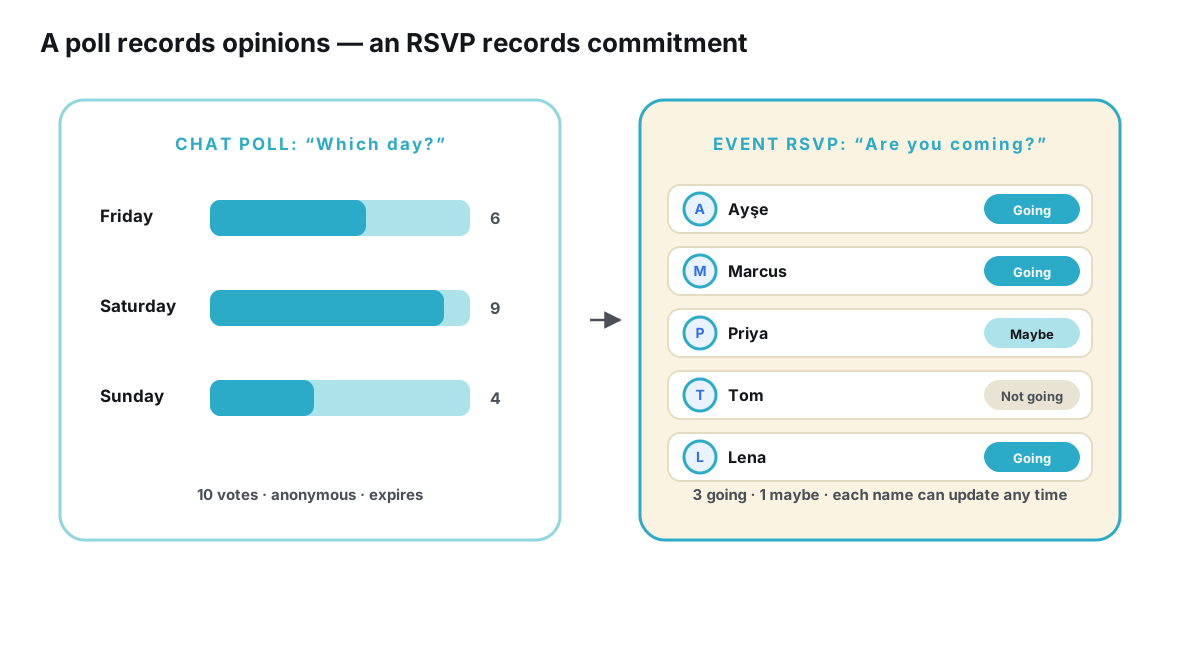
The practical consequence: a venue, a table reservation, a carpool plan or a catering order is a decision about people, and only one of these signals is about people. Booking against an interested count means booking against applause. If this gap is the specific problem you’re trying to solve — turning a lively server’s warmth into a dependable list of humans — the step-by-step treatment is in how Discord communities can track real attendance.
Choosing between them: a decision guide
Since neither tool dominates, the useful question is which fits a given event. The decision table below maps the common situations organizers face to the better-fitting tool and the reason.
| Your situation | Better fit | Why |
|---|---|---|
| Weekly voice hangout or game night for members | Server event | The audience is the server; event, conversation and venue all live in one place |
| Real-world meetup where members bring friends or partners | Event page | Guests outside the membership need details and a way to sign up without joining |
| You must give a venue a firm headcount by a deadline | Event page | Going / maybe statuses reconcile to a number; interest markers don’t |
| Testing whether the community wants an idea at all | Server event | Low-friction interest is exactly the right signal for measuring enthusiasm |
| Plans may change (venue, time, weather) | Event page | One edit updates everyone’s version; feed announcements decay with scroll |
| Attendees span several apps, not just Discord | Event page | A link works everywhere; an in-server listing only works inside the server |
| Small internal hangout with people you see daily | Server event | Social memory covers the gaps; adding structure would be overhead |
| Recurring series you want to run without re-explaining | Both, in combination | Server keeps the rhythm; each session’s page holds its own current facts |
Two patterns in that table deserve emphasis. First, the more real-world an event is — physical venue, travel, money, reservations — the more the balance tips toward a page, because reality demands commitments and updates. Second, the more the event is the community — voice rooms, in-jokes, member-only culture — the more the server event is not merely adequate but genuinely the right shape. The tools fail when asked to do each other’s jobs.
Using both together
In practice, the strongest setup isn’t a choice at all. The server and the page do different jobs in the same event’s life, and the pairing is stronger than either half.
The rhythm works like this. The idea is born in general chat, the way ideas are. When it firms up, the organizer gives it a page with everything currently known — even if half of it is marked “to be decided” — and announces it in the server with the link attached. A server event listing can still go up for members, pointing at the same plan; its job is presence in the community calendar. Debate continues in the channels, because channels are for talking. When decisions land — the date vote closes, the venue is chosen — the page is edited, and the next person to open the link sees the new reality without anyone re-announcing it. Guests from outside the server never see the debate at all; they see only the current facts and the sign-up list, which is precisely what they came for.
The discipline that makes the pairing work is small: the link travels with every mention. Whenever the event comes up — announcement channel, thread, someone asking in chat — the answer includes the address. Each time the link is the answer, the server’s conversation gets one repetition lighter and the page gets one reader more authoritative in the community’s habits. This is the same division between conversation and record that runs through this whole blog library — most directly in why messaging apps were never designed to be event databases — applied with Discord’s specific tools. Tools like Ontaym are built for the page half of that split: one link per event, statuses guests can update, and edits that reach everyone who holds the link.
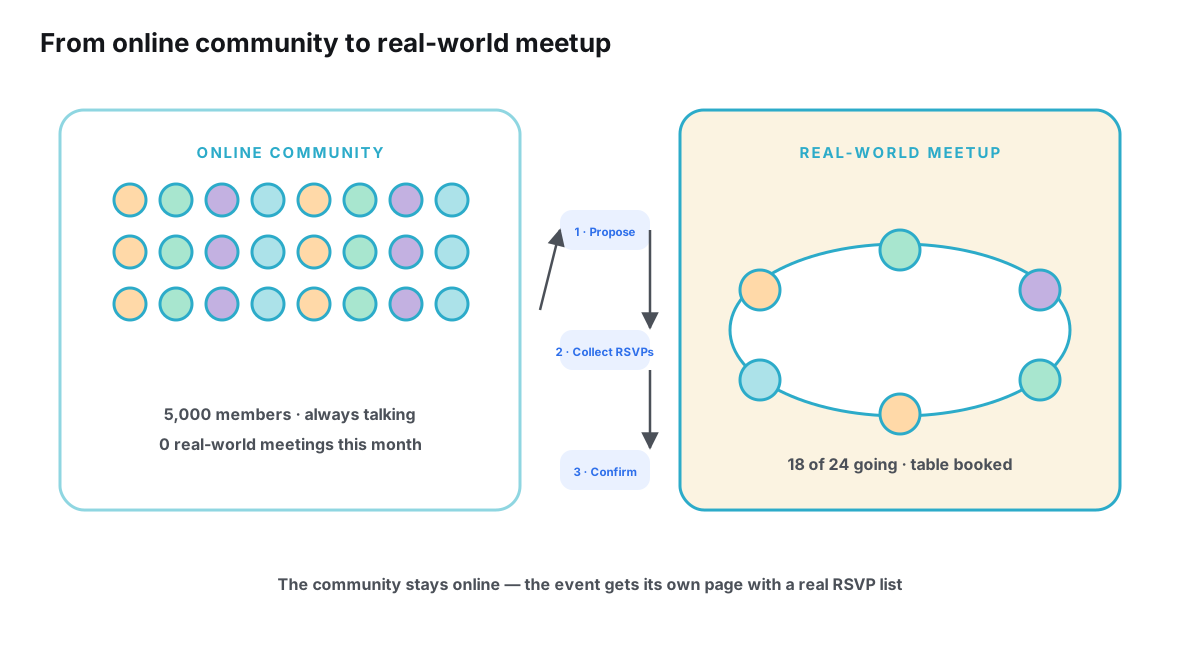
One caution about the combined setup: keep the page singular. The failure mode of hybrid organizing is link sprawl — one page for the plan, a second document for the address, a poll thread for the date, a pinned message that partially duplicates both. Every additional container re-creates the fragmentation the page was meant to cure. One event, one address, everywhere the event is mentioned.
A month of one meetup, both tools at work
To make the comparison concrete, here is a single event — a Saturday dinner for a city-based hobby server — run through the combined pattern. Call the organizer Jordan. On the first of the month, someone proposes dinner in general chat; by evening there is a lively thread of restaurant suggestions. Jordan lets it run; conversation is the server’s job. On the third, the debate has settled on a neighborhood and a budget, and Jordan creates the event page: date still provisional, restaurant shortlist, a sign-up list, and a note that the table will be booked once the list reaches its target. The announcement goes out on the fourth — one message in the announcement channel, plus a server event listing, both pointing at the page.
The middle of the month is where the division of labor shows. The thread keeps buzzing: someone asks about vegetarian options, someone else proposes pre-dinner drinks, a member named Sam wonders aloud whether the date could move a week. All of that belongs to the server, and all of it stays there. Each time a question resolves, Jordan edits the page — menu notes added, drinks plan added, date confirmed unchanged — and posts nothing else. Members who open the link always see the current plan; members who never open it are no worse off than under any other arrangement, and considerably better off than under a pinned message last edited two weeks ago.
In the final week, the page earns its keep. The sign-up list tells Jordan the dinner has reached the number the restaurant needs; two members switch from going to maybe as work schedules shift, and Jordan watches it happen instead of discovering it at the table. Sam’s cousin, who has never joined the server and never will, receives the link in a text message and adds himself as going. On Saturday, the reservation matches the list to the person, and the only question anyone asks Jordan all evening is where to sit.
Frequently asked questions
Is a dedicated event page overkill for a small Discord meetup?
Often, yes. If everyone who matters is an active member of the server, the plan is simple and stable, and the group is small enough that social memory covers the gaps, a server event plus a thread is completely adequate. The page earns its keep when any of those three conditions break: outsiders attend, the venue needs a real headcount, or the details are likely to change.
Can a server event listing work as an RSVP list if I ask members to keep it updated?
Not reliably, and the reason is structural rather than behavioral. Interest markers are designed as expressions of interest — near-costless to give, with no natural moment that prompts revisiting them. Asking every member to manually maintain a reaction against a listing fights the design, and the people least likely to comply are exactly the ones whose plans changed: the busiest. A sign-up list with explicit going / maybe statuses has the update path built in.
What about guests who don’t use Discord at all?
They simply use the link. A dedicated page is platform-neutral by construction — it opens in any browser, asks nothing about membership, and shows the same current plan the server members see. This is the cleanest answer to the plus-one problem, and it removes the awkward choice between adding someone to a community they didn’t ask to join and handling them entirely by direct message.
Do event pages hurt the community feel of a server?
They shouldn’t, because they don’t replace any of the community’s life — the chat, the banter, the voice rooms all stay exactly where they were. What moves to the page is the plan’s state, not its conversation. In practice the effect is usually the opposite of dilution: with fewer “what time is it again?” messages to answer, the channels have more room for the talk that made the server worth gathering in the first place.
Which one should I use for a recurring weekly event?
Use both, with fixed roles: the server event (or a standing announcement) provides the recurring rhythm members can rely on, and each session gets its own page holding that week’s specifics — venue confirmation, headcount, any change from the usual pattern. Recurrence multiplies the cost of manual repetition, so the more often you meet, the more the page’s edit-once behavior pays for itself.
Conclusion
Discord server events and dedicated event pages are not competitors so much as specialists. The server event is embedded, warm and nearly frictionless — ideal for events whose audience is the membership and whose logistics stay light. The event page is open, current and commitment-aware — ideal for real-world gatherings that leak past the membership, need dependable headcounts, and change along the way.
The comparison becomes a workflow when you let each side do its natural job: the server carries the community and the conversation, the page carries the plan and the sign-ups, and a single link joins them. Organizers who adopt that split stop choosing between reach and intimacy — they get both, and their Tuesdays get measurably quieter.
Announce in your server. Give the meetup one link that holds the plan.
Plan it with Ontaym