
How Discord Servers Can Organize Real-World Events
Plenty of real-world meetups start inside a Discord server: the community is already there, talking every day. Here is how organizers actually use server events, channels, roles, threads, bots and polls to move a plan from chat to a real room — and where the toolkit needs help.
Quick answer
Discord servers organize real-world events with four kinds of native machinery: scheduled server events that appear to members and collect “Interested” markers; channels and threads that host discussion; roles that act as sign-up labels and permission keys; and polls and bots that automate decisions and reminders. This machinery is genuinely effective at the community stage of an event — telling members something is happening and letting them react to it. It is thinner at the commitment stage: an interest marker is an expression of interest rather than an RSVP, discussion splits across channels, and details scroll away in busy servers. The pattern most organizers converge on is a split — keep the conversation in the server, and give each event its own address holding the current facts and a real sign-up list.
Real-world events are a natural byproduct of server life
Discord began as a place for people playing games together, but the server has since become a general-purpose container for communities of every kind: study groups, running clubs, language learners, fan communities, photography circles, local hobby groups. A server can hold very large communities — into the hundreds of thousands of members — and it combines persistent identity, topic-scoped channels, always-available voice rooms, and automation through bots. That combination produces something few other platforms produce so easily: a group of people who talk to each other most days.
Any community that talks daily will eventually want to meet. The climbing server where regulars trade beta in the chat channel decides one Thursday that an outdoor trip is overdue. The language-learning server with members in the same city realizes a coffee meetup would beat another week of typing. Nobody plans for this; it emerges from the social fabric the server creates. That makes Discord one of the most common places today where a real-world event is first proposed, argued about, and half-organized.
The interesting question is not whether servers can organize real-world events — clearly they can, and thousands do. It is how the native machinery is actually used, which parts do the heavy lifting, and where organizers end up improvising because the machinery runs out. This article walks through the toolkit in that spirit: factually, and with an eye on the seams.
The native toolkit organizers draw on
Every server that runs real-world events is working with the same small set of building blocks. Discord provides scheduled server events, text and voice channels, threads for branching conversations, roles with permissions, native polls, and the ability to add bots. None of these was designed exclusively for offline meetups, which is exactly why organizers use them in combination. The table below summarizes what each block contributes and where it tends to run out.
| Building block | What organizers use it for | Where it runs out |
|---|---|---|
| Server event | Putting a dated, discoverable entry in front of members; collecting “Interested” markers | The marker signals interest, not commitment; only reaches server members |
| Announcement channel | Broadcasting the plan once, loudly, to everyone | A broadcast is a moment in the feed — it scrolls and it can’t hold updates |
| Event channel or thread | Containing the discussion and logistics in one place | Discussion still fragments if a second channel, thread or DM appears |
| Roles | Sign-up labels, permission gates, organizer teams | A role is one bit per person — no going / maybe, and it lingers after the event |
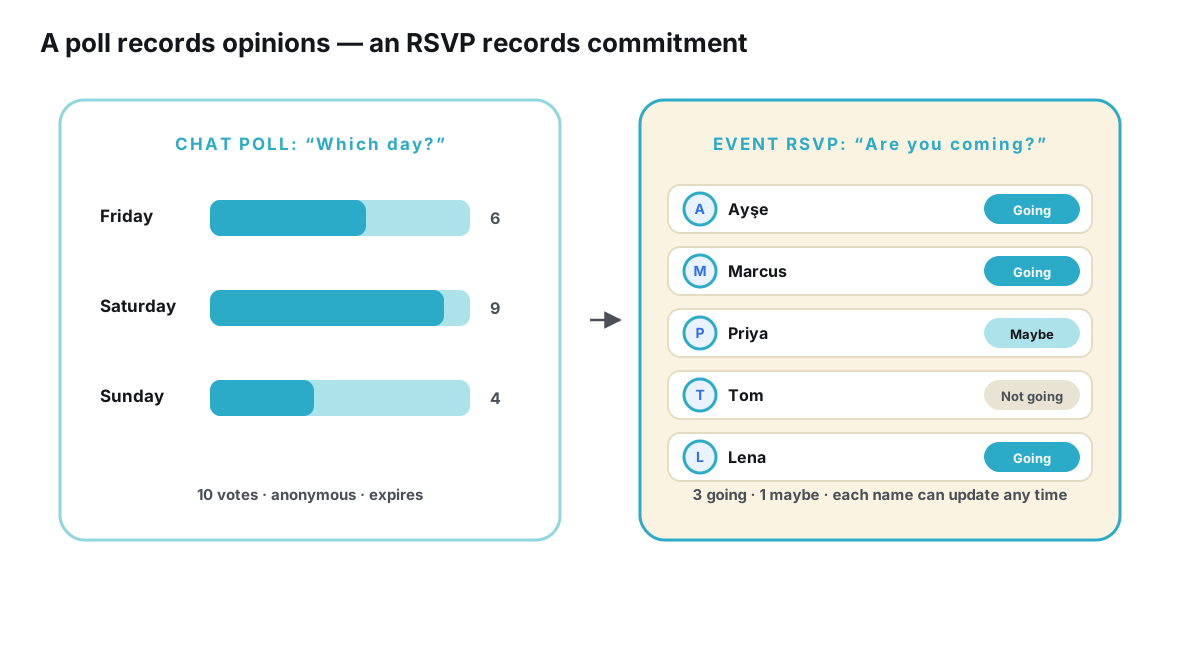
| Polls | Choosing a date, a venue or a format quickly | A poll captures preferences at one moment, not commitments that evolve |
| Bots | Scheduling, reminders, sign-up collection, timezone conversion | Bots serve the server only; guests outside Discord can’t touch them |
Read as a whole, the toolkit covers three of the four jobs of event organization: awareness (people learn the event exists), discussion (people talk it into shape), and decisions (dates and venues get chosen). The fourth job — commitment, knowing who is actually coming — is the one the toolkit handles least natively, and it is the job that matters most the week before a reservation or a venue booking. The rest of this article looks at each block in turn and then at that fourth job.
Server events: the built-in way to put a date on the calendar
Server events are Discord’s most direct nod to real-world organization. An organizer schedules an event, gives it a title, a description, a start time and an associated channel or voice room, and the event becomes visible to members in the server’s events view. Members can mark themselves as interested, and the platform anchors reminders around the event so that interest has something to attach to. Compared with typing “meetup Saturday 7pm” into a fast-moving channel and hoping, this is a real improvement: the event has structure, a time, and a home in the interface.
The feature is at its best for events that live inside the server’s rhythm — a weekly voice hangout, a watch-along, a game night that starts in a voice channel. For those, the distance between the calendar entry and the event itself is zero. A real-world meetup stretches that distance: members must leave the app, travel to a place, and commit time in the physical world. That is where the “Interested” marker shows its nature. By design it records that someone reacted positively to an event listing; it is an expression of interest, not an RSVP. A member can mark it in two seconds without checking their calendar, and nothing in the marker obliges them to update it when their plans change.
A quick illustration of the difference. Maya runs a monthly board-game café night for a mid-sized server. For the in-server warm-up — a voice channel hour before people head out — the server event listing is perfect: it appears in the calendar, interested members get their nudge, and the event simply begins where it was announced. The café itself is another story. The venue wants a table size by Wednesday. The interested list reads like a festival of enthusiasm; the actual table needs eight definite people. Maya’s Wednesday task is converting one kind of number into the other, and the listing gives her no tool for it — she has to ask, in the channel, and count replies.
None of this is a hidden flaw — Discord’s support pages describe the feature plainly, and for in-server gatherings the marker is entirely adequate. The organizer of a real-world event simply has to know that the count of interested members is a measure of enthusiasm, not a headcount, and plan around it. The dedicated treatment of that gap — what it takes to get from interest markers to a dependable list of who will actually be in the room — is a topic with enough depth for its own discussion in how Discord communities can track real attendance.
Channels and threads: where the plan actually lives
Channels are the server’s fundamental organizing device, and event organization leans on them in two recognizable patterns.
The announcement channel pattern
The first pattern is top-down: a read-only or low-chat announcement channel where a small number of people post things the whole server should see. The event announcement goes there, ideally once, with the essentials in the first message. The strength of this pattern is reach and signal-to-noise; its weakness is that an announcement is a snapshot. If the venue changes on Thursday, the Tuesday announcement is now wrong, and the correction lives somewhere else — usually below forty newer messages. Announcement channels age like every other feed: newest on top, truth scattered through time.
One channel or thread per event
The second pattern is bottom-up: a dedicated channel, or a thread spawned from the announcement, where everyone who cares about the event can talk logistics. Threads are particularly well suited to this, because they keep the main channels clean while giving the plan a container. The discussion has a home, questions accumulate in one place, and the most engaged members do the organizing work in the open.
Both patterns share a ceiling, and it is set by activity rather than by anything Discord did wrong. A busy server generates an enormous amount of message volume, and channels are chronological streams. The plan’s current state — the final time, the meeting point, the headcount rule — exists only as sentences distributed through that stream. A member returning after three quiet days faces reconstruction work: which message is authoritative, which proposal won, is 7pm still 7pm. Multiply that by a hundred members and the organizer’s week becomes answering questions the server technically already contains.
Roles: membership, permissions and improvised sign-ups
Roles are where server organizers show the most creativity. A role is a labeled attribute attached to a member, and servers use them for three distinct event jobs. First, identity: a “Saturday Meetup” role marks who intends to come. Second, access: that role can unlock a private channel where the address, carpooling arrangements and other details are posted. Third, authority: separate roles define the organizer team, who can post announcements or manage the event channel.
As a sign-up mechanism, the role pattern has real strengths. It is native, it is instant, it composes with permissions, and many servers run role assignment through bots or reaction-based self-service so members opt in without bothering anyone. For the private-channel trick, roles are arguably the cleanest tool Discord offers: it lets organizers share the meeting address with committed people without broadcasting it to every lurker in a large server.
But a role is a blunt instrument for attendance. It is binary — you have it or you don’t — so there is no way to distinguish “definitely coming” from “might come” from “came last time and never removed the role.” It carries no count the organizer can reconcile against a reservation, no deadline, and no memory of who dropped out. After the event, roles linger unless someone cleans them up, which quietly corrupts the next event’s numbers. Organizers who want a live going / maybe / not-going list end up maintaining it by hand next to the role system — a spreadsheet quietly growing in the gap.
Polls and bots: decisions and automation
Two more tools round out the toolkit. Native polls are the fastest way to settle a question with options: which Friday, which bar, which format. Discord polls are good at what polls are always good at — aggregating a moment of preference — and communities with members across timezones lean on them heavily because they let asynchronous people vote without a meeting. What a poll cannot do is carry the decision forward. Once “Friday” wins, that fact becomes a sentence in a message somewhere, and the poll that produced it slowly scrolls into history.
Bots fill the gaps that neither events, channels nor roles cover, and serious event-running servers almost always end up with at least one. Scheduling bots post events and reminders; timezone bots translate “7pm” for a global community; sign-up bots collect structured responses; moderation bots keep the event channel usable. Bots can be genuinely powerful, and some servers build elaborate flows with them.
The honest caveat about bots is scope and durability. A bot serves one server, so anyone who has not joined — a friend of a member, a former regular, someone curious but not ready to commit — is outside the flow entirely. The data a bot collects lives with the bot; if it is removed or goes offline, the sign-up list goes with it. And bots add maintenance: permissions, updates, occasional breakage. As a community’s events grow, organizers often notice they are running a small distributed system whose pieces don’t share a source of truth — a theme explored at length in why messaging apps were never designed to be event databases.
The three pressures every big server event feels
Put the toolkit to work on a real meetup and three pressures appear with remarkable consistency. They are worth naming, because they explain most of the chaos organizers report — and none of them is a defect. They are straightforward consequences of building events on top of a live community platform.
Pressure one: activity buries the plan. The better your server is doing — the more conversation, the more channels alive — the faster event details scroll out of view. A healthy community is, perversely, the harshest environment for a static plan. The announcement that was perfectly placed on Monday is deep in the feed by Friday, and “what was the address again?” is asked by people who genuinely looked.
Pressure two: parallel containers fragment the plan. The event starts in the announcement channel, gets discussed in a thread, spills into general chat when someone asks casually, continues in DMs for carpool details, and — if there is an external venue or ticketing link — exists outside Discord too. Each container holds part of the truth. Members who saw only the announcement hold one version; members who read the thread hold another.
Pressure three: interest is not attendance. The friendliest, most enthusiastic server still produces no-shows, because marking interest is nearly costless while showing up costs an evening. Organizers who book a venue against the interested count learn this once and never again. The deeper treatment of this gap — including how it shapes what organizers should measure — is in what actually happens after someone says “Interested” to a Discord event.
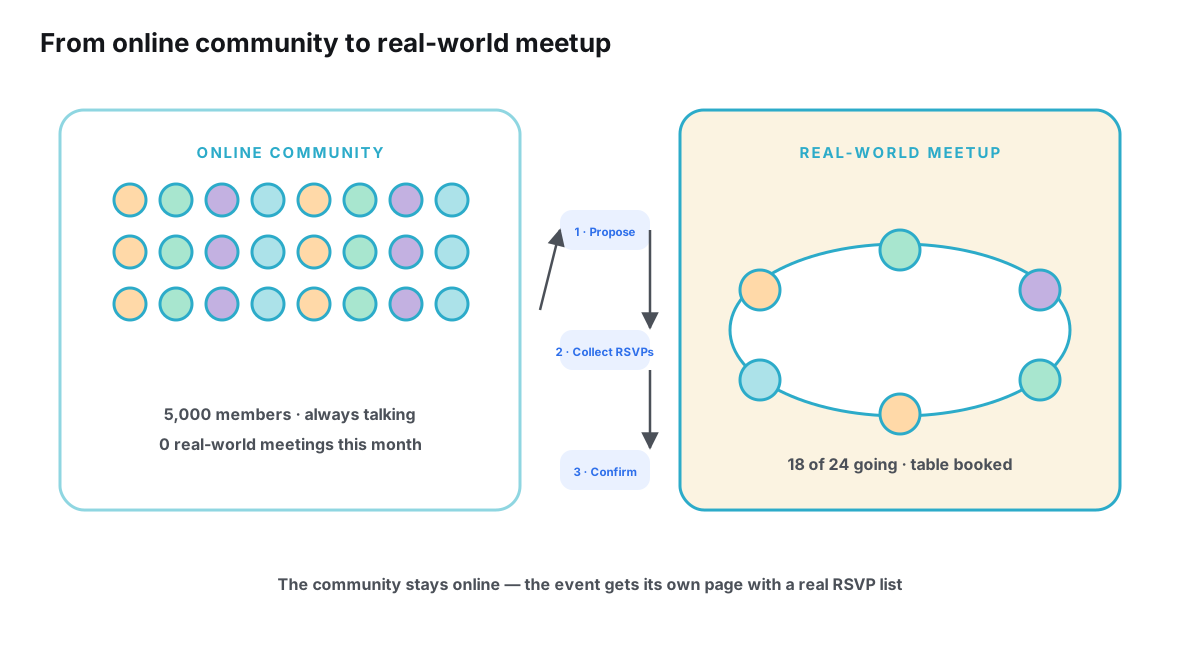
These pressures compound at scale. A small server planning a modest meetup absorbs them through social memory — everyone reads everything, and the organizer knows every face. A server with thousands of members cannot. The bigger the community, the more the organizer needs structures that survive activity, fragmentation and optimism — which is the subject this cluster’s pillar article covers in depth in why Discord is excellent for communities but complicated for offline plans.
A division of labor that holds up
The organizers who run recurring real-world events from Discord servers without burning out tend to land on the same division of labor, whether or not they call it that. The server keeps the jobs it is superb at: building the community, generating the idea, hosting the debate, keeping the social fabric warm between events. The event itself gets a small structure outside the stream: a page or link that holds the current facts — final time, meeting point, what to bring, the cost — and collects real sign-ups with going and maybe statuses that people can update.
The two halves connect through one repeated habit: whenever the event is mentioned — in the announcement channel, in the thread, in general chat — the link travels with it. “Saturday, 7pm, details and sign-up here” is a complete answer that never goes stale, because the page behind the link carries the current state. The announcement channel stops being a snapshot to maintain and becomes a pointer that is always right. This is the same division between conversation and record that underlies why an event needs its own digital space, applied to the specific shape of a Discord community.
There is a standards dimension to the “event page” half, too. A page with a stable address can carry structured data that machines understand — schema.org defines an Event type for exactly this — which is part of why a dedicated page behaves differently from a message: it is an object with fields, not a sentence in a stream. Tools like Ontaym exist to be that second half — one link per event, RSVP statuses, updates that reach everyone who has the link — while the server keeps doing what it does best.
Recurring events sharpen the argument. A one-off meetup can survive on announcements and memory, because there is no last month to compare against and no next month to prepare. A weekly run, a monthly dinner or a seasonal tournament cannot: each session generates details, changes and stragglers, and every piece of manual repetition the organizer performs is multiplied by the calendar. Communities that meet regularly are therefore the first to formalize the split — the server stays the town square, and each gathering gets its own small page with its own sign-up list, so that last month’s page is history and this month’s page is current, without anyone re-announcing anything.
What to settle before you announce
Most server-meetup problems are settled or created before the announcement goes out. This checklist is the set of questions experienced organizers answer first — and, crucially, the place whose answer should live somewhere more durable than the announcement message.
| Question to settle | Why it matters | Where the answer should live |
|---|---|---|
| What is the commitment signal? | Interest markers are not RSVPs; you need a defined line between “curious” and “coming” | A sign-up list on the event page (or a role, if the server is the whole audience) |
| When does the headcount close? | Venues need numbers; open-ended sign-ups produce soft totals | On the event page, stated in the announcement |
| Who is invited beyond the server? | Plus-ones and non-member friends break server-only tracking | The link, which anyone can open regardless of membership |
| Where do updates go? | Time and venue changes must reach people who saw the first version | Edits to the event page, mentioned once in the thread |
| Who is the single organizer? | Committees answer questions slowly; one named person does not | Named in the announcement and on the page |
| What is the day-of meeting point? | “The bar” fails when the bar has three entrances | On the page, with a map link if possible |
Notice the third column: nearly every durable answer points outside the message stream. That is not a coincidence, and it is not a criticism of channels — it is the difference between a conversation about an event and the event’s record. The servers that run smooth meetups are the ones that stopped asking the feed to be a database.
Frequently asked questions
Do I need bots to organize a real-world event in a Discord server?
Not necessarily, though most active servers end up using at least one for scheduling or timezone help. The core machinery — a server event, an announcement, a thread and a role — is native and covers small meetups well. Bots earn their place when a community is large, spread across timezones, or running many events in parallel, because they automate repetition. They are a convenience layer, not a requirement.
Can people outside my server attend an event organized in it?
Only by joining or by being reached another way. Server events, roles, threads and bots all live inside the server’s membership, which is a deliberate design: it keeps community life coherent. For plus-ones and friends-of-members, organizers typically share something external — a page or link anyone can open — so guests can get details and sign up without joining the community.
Is the number of “Interested” markers a headcount?
No. An interest marker records a positive reaction at the moment someone saw the event; it does not check a calendar, cost nothing to give, and is rarely updated when plans change. Treat it as a measure of enthusiasm with an unknown relationship to turnout — useful for reading the room, unsafe for booking a venue.
How large can a Discord community be before real-world events stop working?
Discord servers support communities into the hundreds of thousands of members, and large servers run real events all the time — member count itself is not the blocker. What changes with scale is that informal coordination stops scaling: announcements scroll faster, discussion fragments more, and a bigger share of members are strangers to each other. The bigger the server, the more the event needs structure outside the conversation.
What is the first thing to fix if our server meetups keep underdelivering?
Separate the commitment signal from the interest signal. Most underperforming meetups have one number — interested, or a role count — being used as two things: gauging enthusiasm and booking space. Give the event a real sign-up list with a deadline, then compare it to who actually came. One event later you will know your community’s real interest-to-attendance pattern instead of guessing.
Conclusion
A Discord server is one of the best environments ever assembled for the front half of a real-world event: the community, the daily conversation, the spark of “we should actually meet,” the debate over dates. Server events put the plan on the calendar; channels and threads contain the discussion; roles identify the willing and gate the details; polls settle the options; bots automate the repetition.
The back half of the event — knowing who is truly coming, updating everyone when things change, and handing late joiners the current plan in seconds — asks for something the stream was never shaped to provide: a durable, current-state record per event. Organizers who accept that division of labor early, keep the community in the server and give each event its own address, get the best of both: a server that stays alive, and meetups that actually fill the room.
Your server keeps the conversation. Give the meetup one link that carries the plan.
Plan it with Ontaym