
How Discord Communities Can Track Real Attendance
A Discord server will happily tell you how many people are interested in your meetup. Turning that into a number you can hand to a venue — and then finding out who actually came — takes a deliberate workflow. Here is one, step by step.
Quick answer
To track real attendance from a Discord community, stop treating interest as data about attendance and build a short pipeline instead. Define what “attending” means and when the headcount locks. Collect commitments as named, updatable going / maybe statuses on a single event page — not as interested markers, reactions or roles, which measure enthusiasm. Confirm at the halfway point and again at the deadline, so maybes convert or drop while there is still time. Check people in on the day against the commitment list. Record who came, and compare that against interested and committed counts once. After a couple of events you will know your community’s real interest-to-turnout pattern, and every future headcount gets easier — the goal being that the number you give the venue finally matches the people at the door.
Two different questions that look like one
“How many people are coming?” feels like a single question, but inside a Discord community it is secretly two. The first — how much does the community want this? — the server answers beautifully and instantly. Post the idea in general chat or create a server event listing, and within a day you have reactions, replies and a tidy pile of “Interested” markers. The second — how many specific humans will be in the room? — is not a sentiment question at all. It is a ledger question, and ledgers require structure: named people, per-person states, deadlines, and a moment where the number freezes.
Communities get into trouble by letting the first question impersonate the second. It is an honest mistake — the signals look similar in an interface, all of them counts next to an event — and the correction is not cynicism about members’ sincerity. People who mark interest mostly mean it. The problem is that meaning it on Tuesday and being free on Saturday are different facts, and only the second fills a table. This is the same gap explored from the member’s side in what happens after someone says “Interested”; this article takes the organizer’s side and turns the insight into a working process.
The conflation is easy to fall into because the two questions arrive wearing the same clothes. Both surface as counts beside the event’s name; both rise when the community is warm; both are, in their way, sincere. An organizer who reports “we have forty interested” to a venue is not being careless — they are reading the only dashboard the server provides. The correction is to build a second dashboard, and the first step of building it is refusing to let the first one stand in for it.
Why does this matter enough for a workflow? Because real-world events have hard numbers attached: a restaurant table, a block of lanes at the bowling alley, a deposit on a pavilion, a carpool count. Every one of those is a commitment the organizer makes on behalf of the community’s sentiment. Good tracking is how you keep that proxy honest — and, just as importantly, how you learn your community’s actual behavior instead of guessing at it forever.
The signals Discord gives you, honestly measured
Before building anything, it helps to inventory what a server actually tells you and what each signal is worth. Discord provides several native signals around an event, and each one carries real information — just not the information a headcount needs. The table below is the honest scoreboard.
| Signal | What it genuinely tells you | What it does not tell you |
|---|---|---|
| “Interested” marker on a server event | How much enthusiasm the listing generated | Calendar availability, commitment, or any per-person plan that updates |
| Reactions to the announcement | Who saw it and felt something positive | Whether they read the details or intend to come |
| Poll votes (date, venue) | The group’s preference among options | Whether voters will attend the winning option |
| Role holder count | Who opted into event-related access | Going vs. maybe; holders who never removed the role after the last event |
| Thread and channel chatter | Who is engaged enough to talk about it | Anything about the quieter half of the guest list |
| Voice room presence | Who showed up to the online portion | Who will travel to the offline portion |
| Direct messages to the organizer | Individual plans, one person at a time | Anything until it is written down somewhere aggregated |
Notice that none of these signals is useless — the table’s right column is about absence, not worth. Interest markers are excellent enthusiasm gauges; chatter is excellent at surfacing problems early; direct messages often contain the truest information in the whole system. What the table shows is that no native signal is a commitment ledger: named people, per-person status, updatable as plans change. That is the one thing attendance tracking cannot function without, and it is what the workflow below adds.
Two readings of the table are possible, and both are fair. A pessimist sees a list of things that don’t work. An organizer should see a division of labor: every row in the left column is a promotional signal, valuable exactly where it sits, in the community’s bloodstream — and the right column is simply noting that promotion and commitment are different jobs that happen to share an interface.
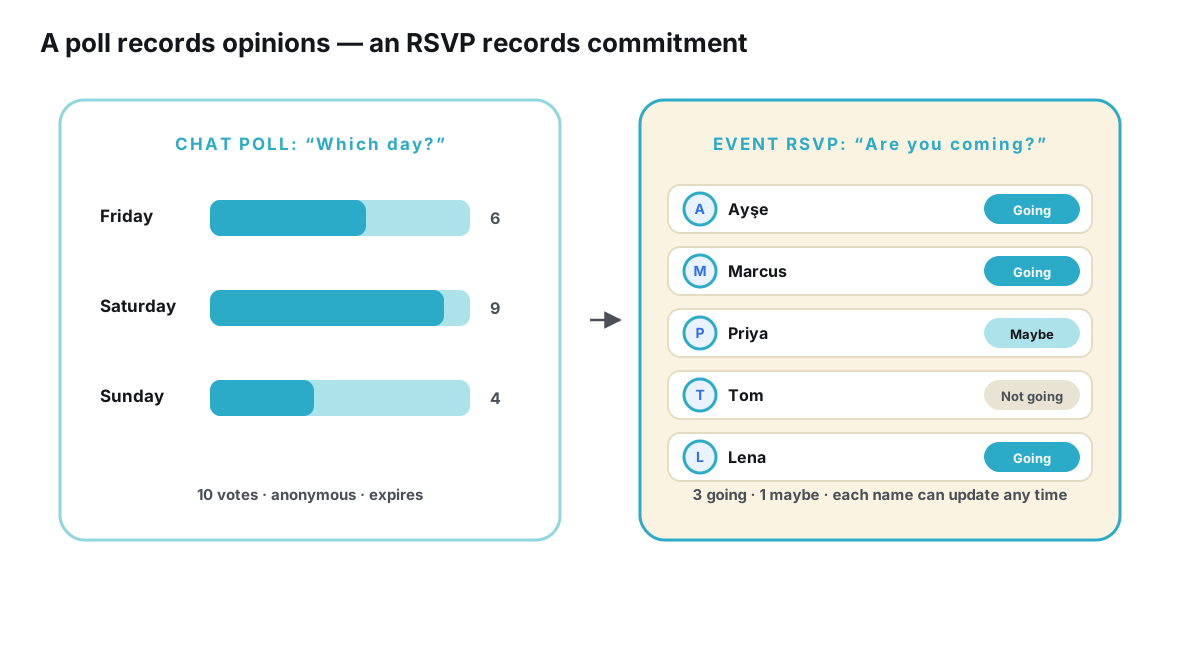
One more framing note: the difference between these two pictures is not a Discord quirk. It is the general difference between aggregate signals and per-person records — the same distinction that makes a conversation different from an event object. Discord simply happens to be unusually rich in the first kind and, like every chat platform, naturally short on the second.
The workflow: from announcement to recorded headcount
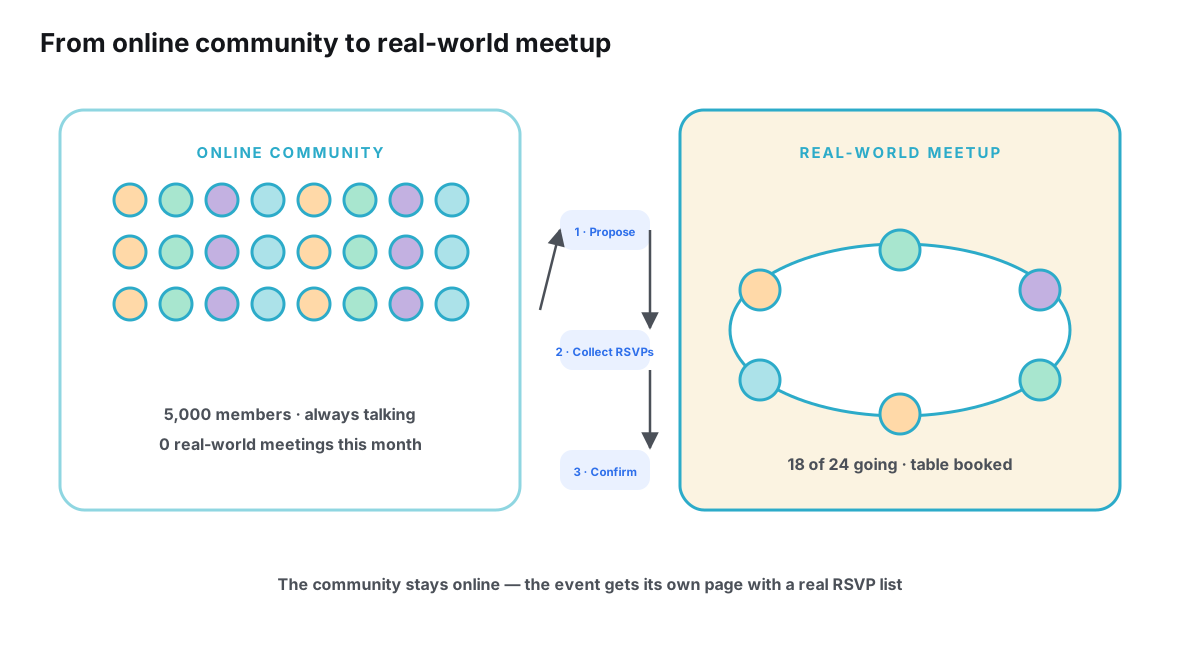
What follows is the full pipeline, seven steps from empty calendar to a recorded, compared attendance count. It assumes the common case: a real-world meetup with a venue that wants a number, organized from a server whose members are enthusiastic but busy. Adapt the timing to your event’s size; the sequence itself does not change.
- Define what “attending” means before you announce anything. Decide the three boundaries now: who counts as a guest (members only, or members plus friends), what the venue actually needs from you (a table size, a deposit trigger, a headcount deadline), and the date the number locks. A target defined late is a target people argue with; defined early, it becomes a shared rule everyone can plan around.
- Put the event in one canonical place with a real sign-up list. Create an event page — or, if the audience is strictly server members, one fixed post that you will maintain — holding the current facts and a sign-up list where each person has a named status: going, maybe, not going. This list is the ledger every later step reads. Without it, commitments evaporate into reactions, replies and DMs the moment they are given.
- Announce once in the server, and let the link carry the details. Post in the announcement channel — with a server event listing beside it if you like, since listings are good visibility — pointing at the canonical page. Then hold the line politely: when members ask “what time?” or “where?” in chat, answer with the link. Every answer the link absorbs is a question four other people did not need to ask.
- Chase the maybes at the halfway point, not the night before. Midway to the deadline, sweep the maybe list with one warm, public reminder — and a short personal message to the handful of people whose presence changes the event (the member driving the carpool, the friend everyone wants to see). Converting maybes while there is still runway is what makes the deadline calm instead of chaotic.
- Lock the headcount at the stated deadline. When the deadline arrives, freeze the going list, send the venue its number, and post a one-line confirmation in the server: final count, final time, final place. Note who never confirmed — they are your day-of wildcards, and it is better to know that in advance than to discover it at the door.
- Check people in against the commitment list on the day. Bring the going list with you — on your phone, printed, whatever survives the venue — and mark arrivals as they happen. This is the moment the pipeline pays out: the check-in is not bureaucracy, it is the only honest measurement of whether your tracking worked, and it takes seconds per person.
- Record who actually came, and compare once. Within a day or two, write down the true attendance next to the committed list and the interested count. Do not skip the comparison, and do not skip writing it down: this single record converts the whole exercise from guesswork into a calibrated instrument for the next event.
Run honestly, the pipeline produces three numbers per event: interested, committed, attended. The first measures your community’s enthusiasm, the second your tracking’s discipline, the third your event’s reality. Communities differ enormously in the ratios between them — which is precisely why copying another server’s assumptions about “how many usually show” is worthless and your own recorded comparison is gold.
A note on timing, since events differ: the halfway sweep and the deadline must sit relative to your event’s hard edges, not to the calendar in the abstract. For a restaurant dinner, the deadline is the reservation call — often days ahead of the event. For a park meetup with no booking, the deadline can be the morning itself, and the check-in is a head-count at the picnic tables. For a convention meetup attached to a ticketed event, the deadline is effectively the convention’s schedule release, the moment members learn whether they can come at all. The sequence is invariant; only the clocks move.
Tools at each stage
The workflow is tool-agnostic, but tools decide how much effort each step costs, and it is worth being concrete about what plays each role well.
Inside the server, Discord covers the visibility stages admirably: the server event listing gives the community calendar presence, the announcement channel gives reach, and threads give the discussion a home. Bots can help with scheduling and timezone conversions — Discord’s support center documents the native event features, and it is worth reading as an organizer precisely to see what the marker is designed to be. Where the server needs help is the ledger stages: steps one, two, five and six all require a per-person, updatable, deadline-aware list, and nothing native provides one. Roles are one bit per person; reactions are attached to messages; DMs are private by definition.
The cleanest resolution is the same division of labor this cluster keeps arriving at: the server carries awareness and conversation; a dedicated event page carries the ledger. A page gives each guest a going / maybe status they can update themselves, shows the organizer a live reconciled list, and — usefully for step three — works for guests who are not server members at all, which removes the awkward “join our server to find out where the picnic is” step for plus-ones. The RSVP concept is standardized on the web for exactly this purpose; schema.org treats an RSVP as a first-class action type, a formal acknowledgment that responding to an event is its own kind of data. Tools like Ontaym implement this pattern — one link per event, statuses, updates, reminders — so the ledger stages stop costing the organizer an evening of message archaeology.
| Pipeline stage | Server-native tools | External event page |
|---|---|---|
| Defining attendance and deadlines | Discussion of the rules | Written where guests see them at sign-up |
| Collecting commitments | Signals (markers, roles) as promotion | Named going / maybe statuses per guest |
| Announcing | Announcement channel, event listing | The link being announced |
| Confirming maybes | Public nudge, personal messages | The maybe list to sweep |
| Locking the headcount | One confirmation message | The frozen list and its number |
| Checking in on the day | Not practical in the feed | The list in hand, arrivals marked |
| Recording and comparing | Impossible from the feed alone | Attended vs. committed vs. interested |
The pattern in the right column is not incidental: every stage that needs a record leans on the page, and every stage that needs a voice leans on the server. Trying to run the right column entirely inside the server is possible — with a disciplined post, a maintained role and a lot of DMs — but the effort scales with guest count, while a page’s does not.
None of this forbids a middle path, either: some communities run the ledger with a bot inside the server for member-only events, and reach for a page only when the guest list leaks past the membership. The test is simply whether the ledger’s qualities survive the choice — named, updatable, deadline-aware, and visible to everyone who needs it, including the guests the server cannot see.
One dinner, run through the pipeline
Consider a mid-sized server — a few thousand members, a weekly voice night, and a core of locals who have been saying for months that they should meet in person. The organizer, Lena, proposes a Saturday dinner. On day one she does the unglamorous work first: the event is for members and their guests, the restaurant needs a final number by Thursday, and after Thursday the list locks. Those three sentences go at the top of the event page before a single person has seen anything, because rules written early feel like structure and rules written late feel like veto.
The announcement goes out once, in the server’s announcement channel and as a server event listing, both carrying the link. The first day is the loud one: reactions bloom on the announcement, a few dozen members mark interest on the listing, and the thread fills with menu jokes. Lena resists translating any of it into a number. What she watches instead is the page’s sign-up list, where the community’s real answer accumulates one named status at a time — by the second evening, a dozen going and a cluster of maybes, which is precisely the information no marker count could have given her.
Wednesday is the halfway sweep. One message in the thread — warm, short, carrying the link and the Thursday deadline — plus personal notes to two members whose presence decides the carpool. Several maybes convert; one going flips to maybe and says so, which is the system working, not failing. Thursday evening Lena freezes the list, calls the restaurant with the number, and posts the confirmation line in the server. Saturday, she brings the list on her phone and ticks names at the door of the private room. Sunday, she writes three numbers on the event page: interested, committed, attended. The next time this community proposes a dinner, the first thing its organizer reads is last time’s numbers — and the first honest headcount of the community’s life begins with evidence instead of hope.
Failure modes to watch for
Four failure modes account for most broken attendance tracking. All four are process errors, not tool errors — which is good news, because process is free to fix.
Booking against interest. The classic: the venue asks for a number, the organizer glances at forty interested markers, and books for thirty. The correction is mechanical — venues get the committed number, never the interested one — and the halfway sweep in step four exists to make the committed number as good as it can be.
The shadow ledger. The organizer keeps the real list in direct messages: eleven private conversations, each slightly stale, none visible to co-organizers. If you have ever answered “is Priya coming?” by scrolling your own inbox, you are the shadow ledger. The fix is step two: one canonical list, and a habit of moving every private commitment into it on arrival.
Deadline denial. The headcount was due yesterday, but a few key maybes have not answered, so nothing is sent and the venue is told “probably around twenty.” Vague numbers are worse than small ones, because they transfer the organizer’s uncertainty to the venue. Deadlines work when they are announced as deadlines; announce them, keep them, and let the unconfirmed be unconfirmed.
Skipping the comparison. The event happens, everyone had a lovely time, and nobody writes down who actually came. The next event starts from zero assumptions again. Step seven costs five minutes and is the difference between tracking attendance once and knowing attendance forever.
Frequently asked questions
Can’t I just ask in the channel who’s coming and count the replies?
For a small, casual event, you can — counting replies is a ledger built by hand, and hands get tired as the guest list grows. The failure is quiet: replies are spread across days of chat, contradicted by later replies, joined by “+1” messages that don’t say for whom, and invisible to anyone who checks the channel less than daily. A written list survives all of that without effort.
How do I get maybes to decide without nagging?
Give them a real decision point rather than repeated pokes: a stated headcount deadline (“I confirm the table on Wednesday”) converts an open-ended “someday” into a concrete “by when.” One warm public reminder at the halfway mark, plus personal notes only to load-bearing people, respects both the event and everyone’s patience. Maybes who stay maybe past the deadline have answered; record them as unconfirmed.
Should I track attendance for online events too?
If attendance matters to you, yes — and for in-server events the tracking can be lighter, since showing up is one click. A voice channel’s participant list during the event is effectively your check-in; note who was present at the start, because it is the one measurement that needs no guest effort at all. The comparison against interested counts still teaches you your community’s turnout pattern.
What if committed people still don’t show up?
Some won’t — life intervenes even after honest commitments, and a good tracking system expects it rather than resenting it. That is exactly why the recorded comparison matters: over a few events you learn your community’s genuine committed-to-attended ratio, and you budget with it. Tracking does not force anyone to come; it stops you from being surprised by the people who don’t.
How do I handle plus-ones in the headcount?
Count them as people, not as modifiers. A “+1” buried in a reply is invisible to every aggregate; a guest added by name to the sign-up list — even recorded as “Priya’s guest” — is a real row the deadline can count. This is also where server-only tracking breaks first, because the plus-one is usually the one person who cannot join the server and can only use the link. Give the list a convention for guests, state it in the sign-up instructions, and the venue’s number stops wobbling at the last minute.
Does all this matter for a recurring event, or can I just carry numbers over?
Recurring events benefit most from tracking, because they compound: each session’s recorded comparison refines the next booking, and the per-event pages accumulate into the community’s actual attendance history. Carrying numbers over unexamined is how a stale headcount from three months ago ends up booking this month’s table — the one failure mode that hides inside “we always do it this way.”
Conclusion
Real attendance tracking in a Discord community is not about distrusting members’ enthusiasm — it is about respecting the difference between enthusiasm and a table for twelve. The server’s native signals measure the first honestly. The second needs a small, deliberate pipeline: define attendance and its deadline, collect named commitments on one canonical list, confirm while there is still time, lock the number, check people in, and write down what actually happened.
The payoff is cumulative. After two or three events run this way, the organizer stops guessing entirely: the interested count becomes a known gauge, the committed list a known instrument, and the gap between committed and attended a known, stable fact about this particular community. That knowledge — not any tool — is what makes the fortieth meetup as calm as the fourth. For the wider context of why servers make this harder than it sounds, see why Discord is excellent for communities but complicated for offline plans, and for the natural next step once attendance is under control, turning a Discord community into an offline community.
Know who’s coming — really coming — before the venue asks.
Track it with Ontaym