
iMessage vs Event Invitations: When Should You Use Each?
For most groups of friends, the fastest invitation ever written is a message dropped into an existing iMessage thread. That speed is real, and sometimes it is all you need. The honest question is where the convenience stops holding up.
Quick answer
Use an iMessage group when the event is small, close-range and stable: everyone uses Apple devices, the plan fits in a sentence or two, details are unlikely to change, and nobody needs a dependable headcount. Use a dedicated event invitation when any of those conditions break — mixed devices, more than roughly a dozen guests, details still in motion, plus-ones to track, or a plan people will still need to check days later. The two are not rivals; experienced organizers combine them. The thread is where you ask, because that is where the people already are. The invitation is where the plan lives, because a conversation cannot hold a final time, a guest list and a history of changes in a form anyone can look up later.
Two tools that look alike
On a phone screen, a group chat and an event invitation sit in the same place and arrive in the same way, which is why they get treated as substitutes. Structurally, they could hardly be more different. An iMessage group is a channel: a place where people who know each other exchange messages in real time, with everything the group ever said preserved in the order it was said. An event invitation is an object: a small record with labeled fields — what, when, where — plus a status for each guest and a stable identity that survives being forwarded, screenshotted and reopened next week.
Mixing the two up is the root of most invitation frustration. When you “invite people in the group,” the invitation exists only as one more message, and every subsequent message buries it a little deeper. That is not a defect of iMessage; it is simply what a chronological stream does. The stream is built to carry talk, not to preserve a final state. So the real decision in front of any organizer is not “which app should I use?” but something more basic: does this event need an object of its own, or is a mention inside the conversation enough?
Everything else in this article is a way of answering that question well. And the answer genuinely varies — which is why absolutist advice (“never plan in chat” or “event tools are overkill”) fails real groups. A Tuesday coffee between three colleagues and a sixtieth-birthday weekend for thirty relatives are both events, and they need entirely different amounts of structure.
What an iMessage group does remarkably well
Before cataloguing the weaknesses, the strengths deserve a straight description, because they explain why the group chat remains the default invitation channel for millions of small gatherings.
Reach without onboarding is the first one. Every iPhone owner already has Messages set up, signed in and receiving notifications. Inviting someone costs zero installs, zero account creation, zero link-opening. For a circle of Apple users, there is no invitation mechanism on earth with less friction — you type a sentence into a thread that already exists, and within seconds everyone has reacted.
Social momentum is the second. An invitation is a social act before it is a logistical one, and a lively thread does the social work beautifully. One person’s enthusiasm triggers another’s; jokes accumulate; someone volunteers to bring dessert; a side plan for pre-dinner drinks spins off naturally. The thread where you invite people is also the room where the event’s mood gets built. A formal invitation, arriving alone in a quiet inbox, does less of that. Organizers who move every last bit of banter out of chat sometimes discover they have moved the life out of the plan along with it.
Speed and informality complete the picture. For small events, a group can go from “should we?” to “yes, Friday, 8pm, the usual place” in under ten minutes, with the decision ratified by a row of thumbs-up. No tool improves on that loop for a stable group of five or six people who all see each other’s messages. And because iMessage is built into Apple devices and syncs across the iPhone in a pocket and the Mac on a desk, the conversation follows members around the Apple ecosystem rather than asking them to visit it. The practical behaviors of these groups — how members mute, leave or manage notifications — differ from cross-platform apps precisely because the thread is woven into the device; Apple’s support pages describe those mechanics from the source, and they are worth knowing before you rely on a thread for anything important.
The seams begin to show
The moment an event outgrows the shape of the thread, specific seams appear. They are worth naming one by one, because each one maps to a criterion later in the decision framework.
The answer problem comes first. Ask “who’s in?” in a busy thread and you collect a thumbs-up here, a “maybe!!” there, a “I’ll try to make it” and a wall of silence from whoever is at work. None of it is countable. A reaction is a gesture, not a status with a name attached and a current value; the organizer who needs twelve covers for a reservation ends up re-reading the thread and privately double-checking with half the list. On the difference between an RSVP and a group chat reaction hangs the entire reliability of your headcount.
The device problem is second. iMessage is tied to Apple devices, so the moment your guest list includes a friend or relative on another platform, the thread has to reach them some other way — historically by falling back to ordinary text messaging, which changes how the group behaves and what it can carry. One Android cousin should not dictate your group’s tooling, but their experience of your “invitation” is a real constraint the organizer owns. Mixed-device groups are the single most common trigger for reaching toward a dedicated invitation, and for a broader treatment of that situation, why Messenger conversations make poor event records covers the same dynamics on the other side of the ecosystem divide.
Then come the quieter seams. The change problem: a thread cannot edit its own past, so a time change is a new message competing with older, now-wrong messages that stay perfectly visible. The archaeology problem: anyone added on Thursday inherits “scroll up” as their onboarding. The headcount problem: plus-ones arrive as sentences (“bringing my sister, is that ok?”) that no one aggregates. And the aftermath problem: once the event is over, the thread keeps rolling — the final details dissolve into history, and the next organizer of the next event starts from zero.
What a dedicated invitation changes
A dedicated event invitation gives the event an identity separate from any single conversation. The date, time and place become labeled fields rather than sentences; each guest holds a named status — going, maybe, not going — that they can update themselves; changes to the plan update one record that every guest reopens, rather than adding one more message to a pile. The invitation can be sent into any thread, on any app, from anyone; the object travels while the conversations stay where they are.
This is not a new idea; it is how the open web has modeled the act for years. When schema.org defines an RSVP as a first-class action with a responder and a status, it is capturing exactly the structure a chat message lacks: who answered, when, and with what current value. A message can contain that information as prose; an invitation is that information.
Three practical capabilities fall out of the structure. First, a legible headcount: the organizer sees the current tally and the names behind it without reconstructing anything. Second, durable updates: a venue change edits the record, and late lookers see the new value — the update never scrolls away, because there is no scroll. Third, forwardability: a guest can pass the invitation to a partner or a friend without adding that person to a private group, which is the socially cheapest mechanism for plus-ones ever devised. None of this makes the invitation “better” than the thread in general; it makes it better at three specific jobs the thread visibly cannot do.
| Dimension | Invite in an iMessage group | Dedicated event invitation |
|---|---|---|
| Reach and access | Instant for Apple users already in the thread; awkward for anyone outside Apple devices or the group | One link works the same way for every guest, on any device, including people the host has never messaged |
| The answer you get back | Reactions and prose replies that fade into the stream and cannot be tallied reliably | A named status per guest — going, maybe, not going — that the guest can update at any time |
| Changing the plan | A new message that must outshout the older, wrong messages still sitting above it | An edit to the record; every future visit shows the current details |
| Late joiners | “Scroll up” — reconstructing the plan from history, message by message | Open the invitation; current state in seconds, no history required |
| Plus-ones and headcount | Counted by hand from sentences, then recounted, then guessed | Guests RSVP for themselves and companions; the tally maintains itself |
| What remains afterwards | Details dissolve into a long thread that keeps growing | A stable record of what was planned, changed and decided |
| Organizer effort | Low at the start, climbing with every change, question and late joiner | Slightly higher at the start, roughly flat afterwards |
Seven criteria that settle the choice
Instead of rules of thumb, it helps to run the actual decision criteria. Seven questions cover nearly every situation, and the answers usually point the same way without much debate. Run them in order; the first two disqualify more often than the last five.
- Devices. Does every guest use Apple devices and iMessage comfortably? A single meaningful exception nudges you toward a link-based invitation that treats all phones equally.
- Size. Up to about a dozen people, a thread’s answers remain roughly countable by a patient organizer. Beyond that, reactions multiply, silence becomes ambiguous and counting by hand stops being realistic.
- Stability. Are the time, place and date essentially settled? Invitations shine when details may still move, because they can be edited rather than re-announced.
- Circle boundaries. Does the guest list extend beyond the thread’s members — partners, colleagues, friends of friends? Adding outsiders to a private friend thread carries social cost and disclosure you may not intend.
- Headcount stakes. Does anything depend on numbers — a reservation, a venue capacity, tickets, a shared-cost calculation? If yes, you need statuses, not vibes.
- Lifespan. Will anyone need the details again after the thread has moved on — recurring events, expense settling, “what was that place called?” If yes, the plan deserves a persistent address.
- Change likelihood. Outdoor plans, large parties and anything weather- or travel-dependent will change at least once. Each change multiplies the thread’s confusion; it costs an invitation one edit.
Three or more “invitation” answers make the case clear. One borderline answer — a stable twelve-person dinner where everyone is on iMessage and the restaurant is forgiving — is exactly the case where the thread remains the kinder, simpler choice. Judgment is the feature, not a failure of the framework.
| Situation | Better fit | Why |
|---|---|---|
| Same-week dinner for five friends, all on iMessage | iMessage group | Small, warm, settled; the thread is the venue for the mood as much as the plan |
| Thirtieth birthday, twenty-plus guests, mixed phones | Dedicated invitation | Headcount matters, devices vary, plus-ones appear; statuses beat scrollback |
| Weekend trip with shared costs | Dedicated invitation | Details churn (rooms, trains, payments) and people re-check the plan for weeks |
| Recurring weekly five-a-side football | Thread for banter, standing page for the facts | The same details get re-checked every week; a permanent link ends the weekly re-explaining |
| Family gathering with older relatives on Android | Dedicated invitation | Mixed devices and uneven confidence with group chats; one link treats everyone the same |
| Surprise party requiring secrecy | Dedicated invitation, shared carefully | The guest list must be exact and the plan invisible to the guest of honor — impossible to guarantee inside their own family thread |
When one invitation quietly becomes several apps
There is a failure mode the decision framework cannot prevent, and it deserves its own section: the iMessage invitation that fragments. It starts innocently. Two guests who see each other at work continue the plan at their desks on Messenger. A couple coordinates childcare over WhatsApp. A cautious cousin asks to be kept updated over Signal instead. Nobody did anything wrong — each pair simply used the channel that was natural to them — but the organizer now runs one event across three or four conversation streams, each holding a partial, slightly different copy of the plan.
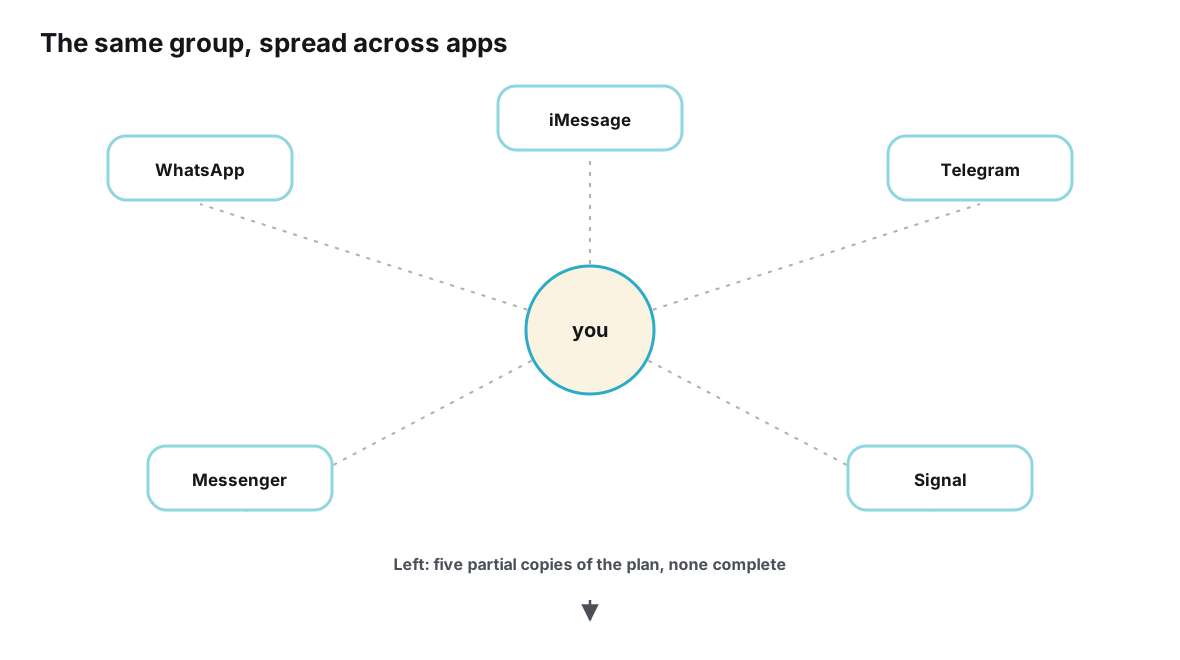
This is why the choice between “group chat” and “invitation” is rarely final. Events migrate. What began as an iMessage convenience becomes a cross-app operation, and the event needs a home that is not owned by any one of them. The full anatomy of that situation — the version drift, the who-missed-what accounting, the organizer as a human bridge — is laid out in what happens when an event is planned across multiple messaging apps, and the privacy-minded corner of the same problem is covered in how Signal communities can organize offline gatherings without pulling every member into a bigger, noisier group.
The hybrid: ask in the thread, host the plan at one address
The strongest pattern is not a choice at all but a division of labor: use iMessage for what it is peerless at — asking people, building momentum, being the green room — and give the plan itself a small, structured address that every guest can open from any device. One practical solution built around this division is Ontaym, where each event gets a single link, its own RSVP statuses and updates that reach every guest at once; but the pattern works with any tool that gives your event a stable page. Running it smoothly takes five habits:
- Create the invitation when the plan is half-formed. Do not wait for certainty. A page with a working title, a rough date and “details to follow” earns its keep from day one, because it exists before the first misunderstanding does.
- Drop the link into the thread with one honest sentence. “Dinner’s taking shape — details live here, I’ll keep them current.” The message carries the warmth; the link carries the facts. Say it once, not five times.
- Let the debate stay in chat; record the outcomes on the page. The thread remains the arena for negotiating dates and lobbying for restaurants. When something settles, update the invitation — that is where decisions go to become facts.
- When details change, edit once, mention briefly. A venue swap is one edit on the page plus, if it is significant, one line in the thread pointing to it. No cascade of corrections, no “wait, which place is final?”
- Point latecomers and re-checkers at the link. “What time Friday?” gets answered with the invitation, every time. Each repetition avoided is the pattern paying for itself.
Guests experience this as consideration rather than bureaucracy: nobody is asked to install anything, nobody is added to a group they did not choose, and the answer to every logistical question is one tap away in the same thread where the question was asked. If you want the underlying theory of why splitting the conversation from the record works so reliably, read the difference between a conversation and an event object — it is the shortest complete explanation of everything in this section.
Changing details: one edit versus many messages
The hybrid earns its keep most visibly at the moment of change. Picture a Friday dinner, twenty-two guests, and a Thursday-evening call from the restaurant: the party must move from 7:30 to 8:15, or to the sister venue down the street. In a thread-only world, the organizer types the update, watches it get three reactions, then spends Friday afternoon privately relaying it to everyone who did not see it, while two guests arrive at 7:30 anyway because they remembered the first plan and never scrolled far enough to unlearn it.
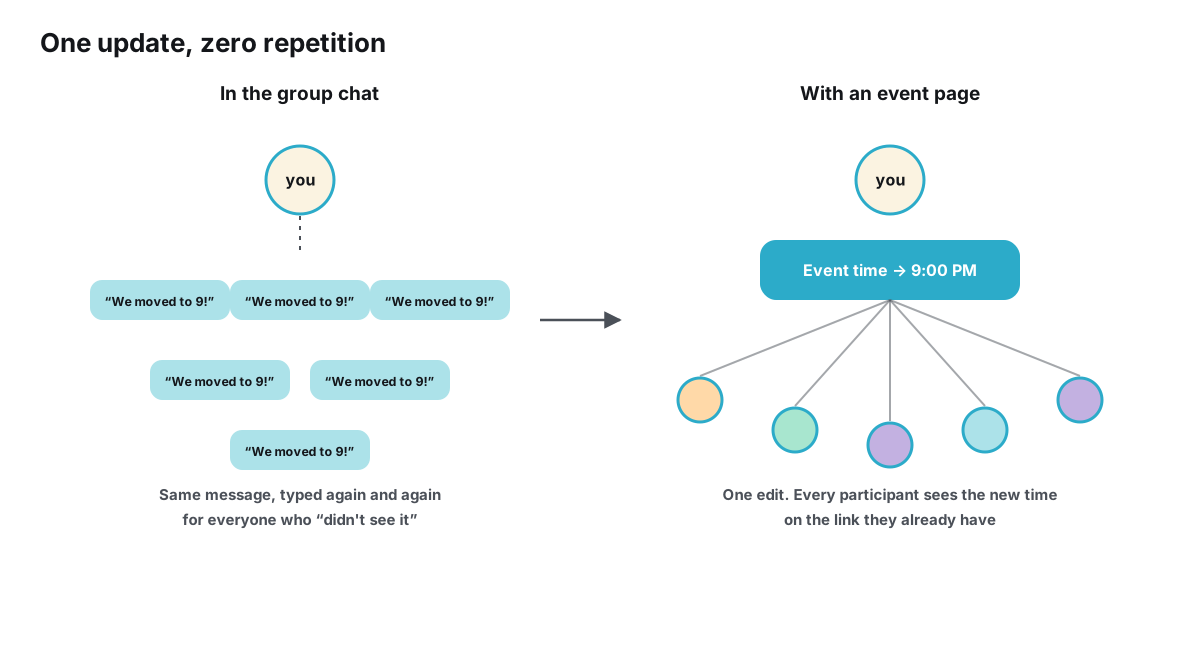
In the hybrid world, the same call produces one edit and one line in the thread: “Venue moved — link updated.” Every guest who opens the invitation from that point on sees the new time as if it had always been it. The difference is not effort, though effort is saved; it is certainty. There exists exactly one current version of the plan, and it is not a memory of the latest message — it is the thing itself, at a fixed address, current as of now. Guests who changed their RSVP after the switch are counted correctly; guests who never opened the thread since Tuesday still land on the right doorstep.
Mistakes in both directions
Most invitation mistakes come from applying the right tool at the wrong size. Over-tooling shows up as a forty-dollar solution to a two-person coffee — creating a page, a poll and an RSVP flow for an event that one sentence and a thumbs-up would have settled. The guests can feel the machinery, and the machinery adds friction where none was needed. If the plan fits in a sentence and everyone is already in the thread, the sentence wins.
Under-tooling is the opposite and costlier error: trusting a casual thread with an event whose stakes outgrow it, usually recognized only afterwards — the empty seats, the double-booked cousin, the headcount that was “about fifteen” until it was eleven. Between the two sit the social mistakes: forcing relatives to install an app they will use once, or adding a colleague to a decade-old friend thread just to invite them once. Every one of these has the same root cause: the organizer treated the channel and the invitation as the same thing. They never were.
Frequently asked questions
Is sending a calendar invite enough?
A calendar file delivers the time and place into the guest’s own calendar, which is genuinely useful — but on its own it is a poor invitation. Accept/decline responses are easy to ignore and impossible to discuss, changes create conflicting entries rather than one current record, and there is nowhere for the plan’s social and logistical texture to live. Treat it as a companion to an event page, not a replacement for one.
What should I do if half the group doesn’t use iPhones?
That is the clearest signal to move the plan to a link that behaves identically on every device. You can still write the invitation message from your iMessage thread — the words are yours; the destination is neutral. Trying to run a mixed group entirely through one ecosystem’s app taxes exactly the guests least able to push back.
How many guests are too many for a group chat invitation?
There is no hard number, but the symptom is unmistakable: when you find yourself scrolling upward to count who confirmed, or messaging people privately to check what their emoji meant, the thread has stopped being an invitation and started being an archive you mine. For most organizers that begins somewhere around a dozen guests, and earlier if plus-ones are involved.
Isn’t an event link impersonal compared with a message?
The message stays personal — you write it, in your own thread, in your own voice, to people you know. The link simply carries the facts so your words can carry the warmth. What guests remember is being asked by a friend and then never having to guess the details; the link delivers the second half of that experience.
How do plus-ones work with a dedicated invitation?
Guests respond for themselves and the people they are bringing, updating their own status as plans firm up or collapse. The host watches a tally instead of interrogating a thread, and the friend who texts “can I bring my sister?” gets an answer that updates the headcount for real rather than evaporating into the scroll.
Conclusion
iMessage is a superb invitation channel and a poor invitation container. It reaches Apple-using friends instantly, carries the social energy that makes plans feel alive, and asks nothing of anyone. It just cannot hold a final time, a changeable venue, a dependable headcount and a growing list of guests as data — only as words, which every reader must reassemble and will reassemble slightly differently.
The workable answer is a partnership. Ask in the thread, where the people are; host the plan at an address of its own, where the facts can be current for everyone at once. Judge each event on the seven criteria — devices, size, stability, circle boundaries, headcount stakes, lifespan and change likelihood — rather than on habit. Small, settled, all-Apple gatherings lose nothing by staying in chat, and gain nothing from machinery. Everything else deserves an invitation that can stand on its own, change quietly, and still be right when Friday comes.
Ask in the thread. Give the plan one address of its own.
Invite with Ontaym