
How to Invite People Without Exposing Everyone’s Phone Number
Adding a guest to a group chat shares more than the plan — it shares the guest. Here is how an invitation can carry every detail of an event without carrying everyone’s contact information along with it.
Quick answer
Most group chats are built on phone-number identity: the moment someone is added to a group, their number, name and photo typically become visible to every other member, and none of that was the guest’s decision. The fix is to separate the invitation from the contact graph. Instead of assembling a persistent group, share a single event link through whatever channel each person already uses. The link carries the plan — time, place, options, RSVPs — without demanding membership, and guests appear to each other as names and responses rather than reachable phone numbers. Numbers stay where they belong: between people who chose to exchange them directly.
What actually happens when you tap “add participant”
From the organizer’s side, adding someone to a group chat feels like a courtesy: one tap, and the new person has everything. From the new person’s side, the same tap does considerably more. In messengers whose membership is based on phone numbers — WhatsApp is the clearest example — being added to a group places your number, your display name and your profile photo in front of every existing member. The group info screen becomes a shared directory, and the directory updates itself as people join.
This is not a bug or an oversight. Contact-based identity is what makes these groups effortless: no accounts, no usernames to remember, no passwords to reset. That convenience is a genuine design achievement, and it is why billions of people use these apps daily. But the same mechanism means that every invitation is also a small data transfer, made by the organizer on the guest’s behalf, without the guest reviewing the recipient list.
The scale of the transfer is easy to underestimate. A birthday dinner for twelve people sounds intimate. It becomes less intimate when you notice that the coworker you added as a courtesy can now see the phone numbers of your school friends, your cousin, and your neighbour — and they can all see theirs. Nobody in that list chose to become discoverable to the others; the organizer chose for all of them, in a fraction of a second, while thinking about cake.
The invitation is also a data transfer
It helps to look at a group invitation the way a careful host would look at a guest list: what is being handed over, to whom, and with what permission. The table below breaks down what a typical contact-based group chat shares when someone is added.
| What is shared | Who receives it | Did the guest choose this? | Can it be undone? |
|---|---|---|---|
| Phone number | Every member, current and future | No — the organizer decided | Only by leaving the group, which is usually visible |
| Display name and profile photo | Every member who opens the group info | Indirectly, via app privacy settings | Partially — settings changes may lag or not apply to existing views |
| The fact of membership | Everyone who sees the roster, including screenshots | No | No — a screenshot is permanent |
| Message history and future messages | Everyone in the group, including people added later | No | No — content, once sent, is out of the sender’s hands |
| Association with the group’s purpose | Anyone who later sees the roster in another context | No | No |
That last row deserves a pause. Being visible in a roster says something about you: that you were part of this wedding committee, this flat hunt, this parents’ group. Most of the time that association is harmless. Sometimes — a divorce, a leaving do, a surprise party that includes someone who should not know — it is the most sensitive part of the whole arrangement, and it is the part nobody thinks to check.
There is also a legal backdrop, though nothing here is legal advice. Both the EU’s General Data Protection Regulation and California’s consumer privacy law treat phone numbers as personal data — information about an identifiable person, with obligations attached to how it is collected and shared. The GDPR’s official text and the California attorney general’s CCPA overview spell this out in detail. For everyday organizers the practical takeaway is simpler and older than any statute: handing out someone’s contact details is a decision you are making for them, so it deserves a moment of thought.
Why the number itself is the part worth guarding
A phone number is not like a nickname or an emoji avatar. It is a durable, globally unique handle that reaches one specific person across every context of their life. The same string of digits that lets a friend confirm dinner also unlocks password resets, banking verification codes, and account recovery on half the services that person uses. That is precisely why it is valuable — and why sharing it widely has consequences that outlast any event.
Three properties make numbers unusually risky to spread. First, they are over-privileged: possessing someone’s number grants more than membership in one chat; it grants a channel to them forever. Second, they are non-revocable in practice: you cannot quietly issue a new number the way you would change a password, because too much of your life is anchored to the old one. Third, they link contexts: the number you gave a yoga class connects that class to your family chats, your work messages and your marketplace sales. One shared roster quietly merges circles that were never meant to meet.
Two companion articles go deeper on each side of this problem: why phone numbers make a poor identity system for events examines the over-privilege problem from the design side, and how privacy works inside large WhatsApp groups walks through the mechanics of number visibility at scale.
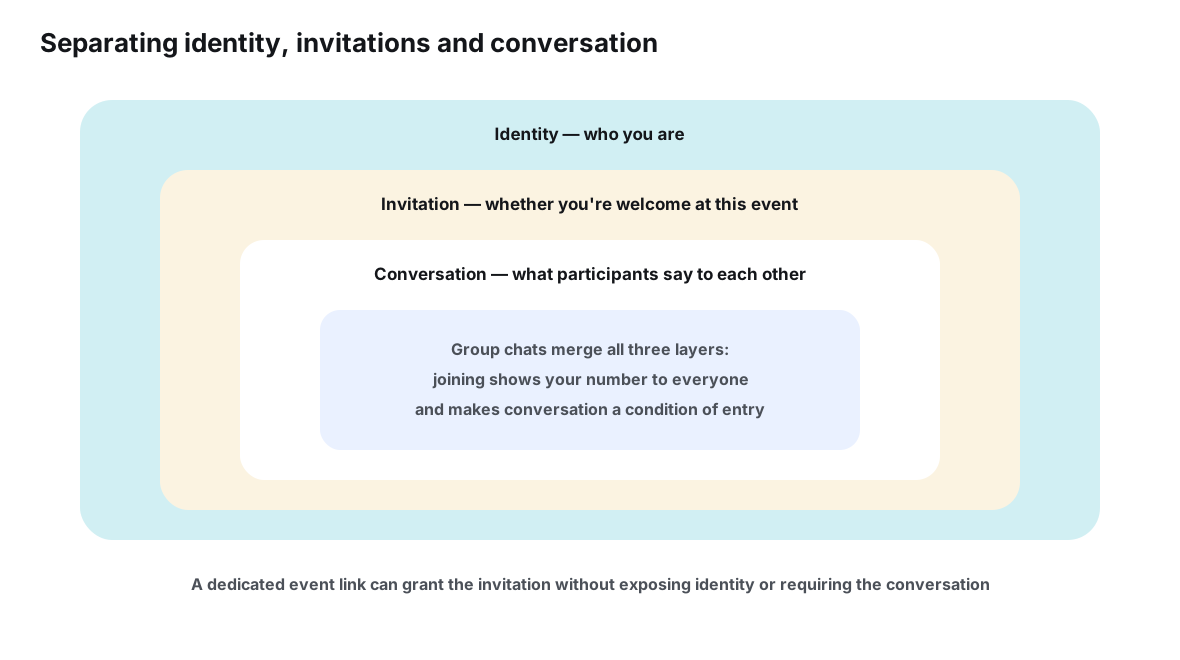
The diagram above is the crux of the whole matter. A well-behaved invitation only needs the outer layers: it needs to reach you, and it needs to let you respond. It does not need your identity to be permanently welded to the conversation. Group chats make no such distinction — joining confirms your identity, your presence and your participation in one irreversible gesture.
The consent gap nobody mentions
Picture a normal scenario. Maya is organizing a farewell dinner for Tom. She creates a group, adds Tom’s fourteen closest people, and the planning begins. A week later, one of those people — a former colleague of a guest, someone Maya barely knows — messages that guest directly about a completely different matter, because the group made the number available. Nobody did anything malicious. The system simply moved a piece of personal information from a private context into a semi-public one, and it did so as a side effect of an act of hospitality.
The guest in that story never got to say yes or no. Consent flowed through the organizer: Maya assumed her guests would be fine with it, the guests assumed Maya had thought about it, and the assumption was never tested because testing it feels paranoid. This is the consent gap — the space between “someone decided to share my details” and “I agreed to share my details.” It is widest exactly where social pressure is highest: workplace groups, school class groups, family groups, and any event organized on someone’s behalf.
The gap also cuts the other way. Guests who would rather not be added often cannot decline without friction, because refusing a group invite from your manager or your mother-in-law carries a social cost that has nothing to do with privacy. Any real solution has to make the private choice easy and the social cost low — which is why norms matter as much as tools, a point this article returns to at the end.
Ways to invite people, compared
Fortunately, “add everyone to one big chat” is not the only invitation design available. The options differ mainly in what each guest must hand over and what the other guests receive. The comparison below covers the five approaches most organizers actually use.
| Method | What each guest must share | What other guests can see | Best suited for |
|---|---|---|---|
| Adding people directly to a group chat | Phone number, name, photo — automatically | Everything in the shared directory, plus all messages | Tight groups where everyone already knows everyone |
| Sharing a contact card | Whatever the card contains, permanently | Only the person you sent it to | Deliberate one-to-one introductions |
| A group invite link | Number and identity once they join | The full roster after joining | Open communities that intend to be directories |
| Individual messages to each guest | Nothing new — you already had their number | Nothing about each other | Small dinners, sensitive plans, mixed audiences |
| An event link with RSVPs | A display name and a response | Names and going / maybe statuses, not contact details | Almost any event, especially mixed or larger ones |
Two rows repay attention. Individual messages scale badly — the organizer becomes a switchboard, repeating every update by hand — but they leak nothing, which is why experienced hosts of sensitive gatherings still use them. The event link is the design that scales without leaking: one address carries the plan to everyone, responses roll up into a headcount, and no guest becomes reachable to another guest unless they choose to exchange details themselves. It is, in effect, the individual message and the group chat’s convenience without either one’s downside.
It is worth being honest about the trade-offs, because no option is free. Individual messaging preserves privacy but concentrates all the coordination work on the organizer, and every change means starting the chain again from the top. Group chats distribute the work but collectivize the data. Event links sit in between: the organizer still owns the plan, but updates propagate on their own, and the data exposure stays at roughly the level of a poster on a wall — visible to those who look, carrying nothing that reaches anyone after the event is over. Choosing well is mostly a matter of matching the method to how much the circles involved would care about being merged.
A useful test before settling on a method: imagine the most private person on your guest list, and ask what they would say if they could see exactly what each option shares about them. If the answer makes you wince, the method is too generous with their details — regardless of how convenient it is for you.
Note the subtlety with group invite links: the link itself is convenient and low-friction, but the moment someone joins, the directory effect returns in full. A link that opens a conversation is not the same as a link that opens an event. The distinction between those two shapes — and when each is the right call — is covered in detail in the comparison of private event links and group chats.
A minimal-exposure invitation, step by step
Putting this into practice is less about tools and more about sequence. The order below keeps contact details out of the invitation path from the first message to the day after the event.
- Create the event before the audience. Set up the event page first, with whatever is known — date options, the rough plan, open questions — so the invitation leads somewhere real rather than to an empty room that will fill with chatter.
- Invite each person through a channel you already share. Send the same link by whatever means suits each guest: a direct message, an email, a text. The channel is disposable; the link is the constant. No new group is needed for the invitation itself.
- Let responses happen at the destination. Guests RSVP on the event page — going, maybe, not going — and the organizer sees a headcount instead of a wall of reply-alls. Guests see who else is coming as names and statuses, not as reachable numbers.
- Keep conversation optional and where it already lives. If a clique wants to banter, let them use the thread they already have. The event does not need to contain the conversation; it needs to answer “what’s the plan?” on demand.
- Close the loop when the event ends. Update the page with a thank-you and any photos’ whereabouts, and let the invitation’s job be finished. Nothing persists that needs cleaning up, because no roster was ever built.
This is the pattern Ontaym was built around: one link per event, votes on options, RSVP statuses, updates that reach everyone who has the link. But the sequence matters more than any particular product — any system that gives the event its own address, separate from everyone’s contact details, achieves the same result.
Tricky cases: plus-ones, classrooms and coworker mixups
The general principle — invite to the event, not to each other — covers most situations, but a few scenarios deserve specific handling because the exposure asymmetry is worse than it first appears.
- Plus-ones and newer partners. The guest is vouched for by one person, but a group chat grants them the entire roster. An event link lets them attend, respond and belong for the evening without acquiring permanent reach into the group.
- School and class groups. These mix parents who would never otherwise share numbers — different friendship circles, different workplaces. They also live for years and accumulate churn. An event-scoped invitation for each trip, party or parents’ evening keeps the long-lived roster from ever forming.
- Work events with personal friends. The moment both circles land in one chat, the contexts merge permanently. Keep the invitation at the event layer and let each circle keep its own conversations.
- Surprise parties and sensitive goodbyes. Here the roster itself is the leak: membership reveals the plan’s existence. A link shared only with invited guests keeps the guest list as invisible as the secret needs it to be.
Notice the recurring shape. In every case the problem is not that information flows — invitations are supposed to move information — but that a group chat moves the wrong information, permanently, to the wrong people, as a condition of participating at all.
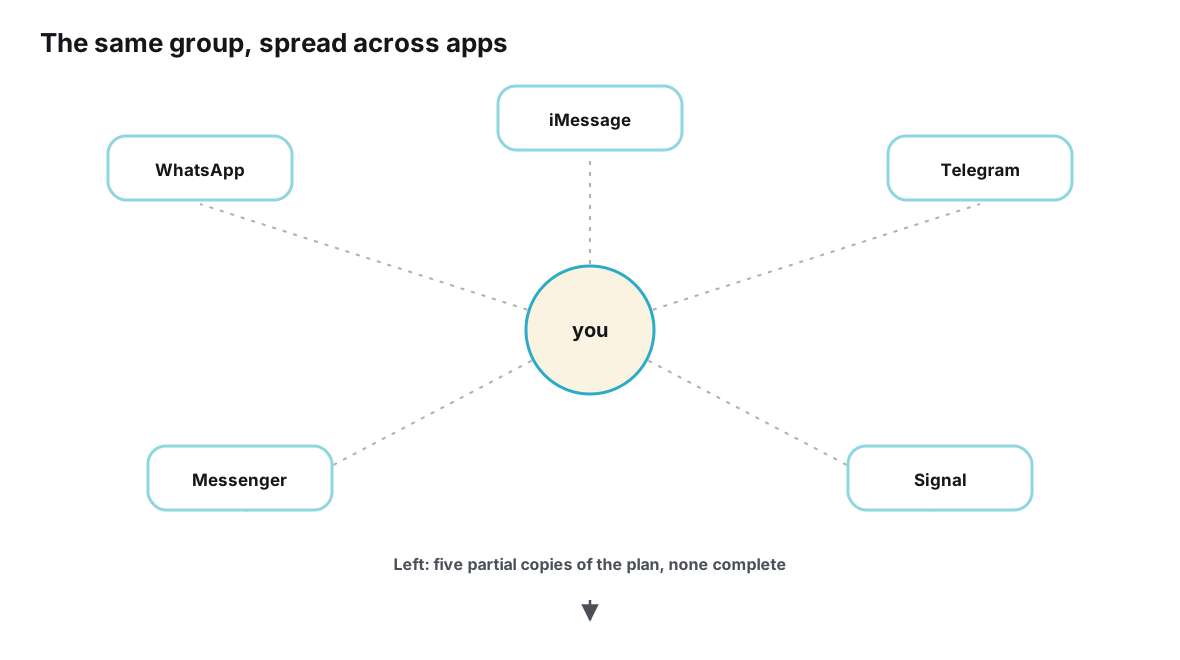
The diagram above shows the compounding version of the problem. Real gatherings rarely stay in one app: the family uses one messenger, the friends another, the committee a third. When the same event gets planned in three separate groups, the organizer’s contact exposure problem quietly triples — three directories, three rosters to outlive the event, three sets of members who now hold everyone’s details. A single event address, shared into all those existing threads, collapses the duplication without asking anyone to switch apps.
Setting norms that outlive one event
Tools only carry you so far; the durable fix is a small set of habits that groups can adopt once and reuse. None of them require paranoia, and all of them make life easier for the person doing the inviting.
The first norm is the easiest: ask before adding. A one-line message — “mind if I add you to a group for this, or would you rather I just send you the plan?” — costs ten seconds and converts an imposition into a choice. Most people say yes, and the ones who say no have been given a graceful exit rather than a silent obligation. The second norm is to default to links for mixed audiences: the more circles an event blends, the stronger the case for an invitation that does not merge them. The third is to retire groups when their purpose ends, or better, never create them for one-off events at all — a group built for a single Friday dinner is a directory with a one-day purpose and an indefinite life.
It also helps to give guests a script for the other direction. “I’d rather not join big groups — send me a link if there’s a plan?” is a sentence more people would use if they knew it was allowed. Making that sentence normal is partly the organizer’s job, and it pairs naturally with the broader reluctance many people feel about joining yet another chat — a reluctance this article’s companion piece on why not everyone wants to join another group chat explores in depth. And if you are rethinking how much of your social life should run through persistent chats at all, the case for giving each occasion its own bounded home is laid out in why an event needs its own digital space.
What guests can do on their side of the invitation
So far the burden has sat with organizers, but guests are not powerless. A handful of personal habits meaningfully shrink the blast radius of any group you do end up joining, and none of them require quitting anything.
Start with the visible layer. Most messengers let you restrict who can see your profile photo, your “about” line and your last-seen status — tightening these to contacts-only means a large group sees little beyond your name and number, rather than a full dossier. It is a partial defense, since the number itself remains visible in contact-based groups, but it removes the decoration that makes a roster feel like a social profile.
Next, treat your number like the scarce resource it is. People who organize a lot — coaches, freelancers, class representatives, community volunteers — often keep a separate number for exactly this reason, so that their coordination life and personal life share a device but not an identity. That is a heavier habit, and not everyone needs it, but the underlying logic applies universally: every context you hand your primary number to is a context that can reach you at midnight, years later, long after the event it was for has been forgotten.
Finally, practice declining early. A polite “no thanks, a link works for me” at the invitation stage costs one message; extracting yourself from a group you never wanted to join costs an awkward departure that everyone sees. Guests who set expectations the first time rarely need to repeat them — and organizers, for their part, tend to remember which friends prefer links and start sending them unprompted.
Frequently asked questions
If I use an invite link instead of adding people, does that protect phone numbers?
It depends on what the link opens. A link that opens a group still merges everyone into a shared roster once they join. A link that opens an event page protects numbers because guests never become members of anything — they see the plan, respond under a display name, and leave nothing behind but their RSVP.
Can I hide my number from other members of a group I am already in?
In messengers whose groups run on phone numbers, generally not — the number is the membership card, so it is visible to the roster by design. You can usually limit what else is visible, such as your photo or “about” line, through privacy settings. The structural fix is not joining contact-based groups for events, so the question never arises.
Is sharing someone’s number without asking actually a problem?
Legally, phone numbers are personal data under both the GDPR and California’s CCPA, and sharing them is exactly the kind of act those frameworks care about — though this article explains norms, not law. Practically, most people simply expect to be asked, and the asking costs almost nothing. Treating a number as something you borrow rather than own is the safest default.
My event already has a group chat. Is it too late?
No. Stop the bleeding first: keep the chat for banter, and move the plan itself to an event page whose link you post once with a note that details live there. New invitees get the link instead of being added, so the roster stops growing, and the existing chat fades into what it was always good at — conversation.
How do I tell people I’d rather not be added to groups?
Keep it short, warm and specific to the event: you’d love the plan, you just don’t need to be in the discussion thread. Offering the alternative — “a link works perfectly for me” — signals that you are not rejecting the people, only the format. Organizers who hear this enough times usually change their default.
Conclusion
An invitation is one of the small social technologies that civilization got right long before software existed: a clear host, a clear occasion, a clear way to say yes or no. Group chats accidentally broke that design by welding the invitation to a permanent exchange of contact details. Every guest became reachable by every other guest, forever, as the price of knowing what time dinner starts.
The repair is to unbundle. Invite people to the event, not to each other. Let one link carry the plan to every guest through whatever channel they already prefer, let responses be names and statuses instead of reachable numbers, and let the whole arrangement expire when the evening does. Organizers who make this switch usually notice two things: nobody misses the giant chat, and the people who used to go quiet in big groups start responding again. That second effect is not a coincidence — it is what participation looks like when joining no longer costs a piece of your privacy.
Invite with a link, not a copy of your address book.
Plan your next event with Ontaym