
How to Move an Event From WhatsApp to a Dedicated Event Page
Your event is already being planned in a WhatsApp group, and the group is already drowning in its own plan. Here is how to move a live event onto a dedicated event page mid-flight — without losing a single guest, decision or shred of momentum.
Quick answer
Moving a live event out of WhatsApp is a one-hour project, not a renegotiation of your friendship group. Freeze new decisions for a few hours, read the thread once, and reconstruct the plan’s current state: working time, working place, settled decisions, open questions and likely guests. Create an event page that holds those facts as labeled fields. Post one short bridge message in the group saying what changed, where the plan now lives, and the single action you’re asking people to take. Then answer every planning question with the link until the reflex takes hold. The group stays open for conversation; only its job as the plan’s system of record changes hands. Nothing is deleted, nobody is lost, and the plan stops decaying with every new message.
The fear that stops most migrations
Technically, moving an event out of a WhatsApp group is trivial. You copy a handful of facts into a page and paste one link back into the chat. What makes organizers hesitate is not the mechanics — it is the social weight of the move. The group feels like the event. It is where the jokes happened, where the venue was debated, where the plan came to life. Moving the plan somewhere else can feel like telling everyone that the last two weeks of messages no longer matter.
There is also a quieter fear: that people will not follow. Half the group will miss the announcement, a quarter will keep asking questions in the chat, and the organizer will end up running two systems at once — the page and the thread — which is worse than running one bad system. That fear is reasonable, because it describes exactly what happens when a migration is done carelessly.
The good news is that the failure modes are few and specific. Groups lose people when authority is split (some facts live in the chat, some on the page), when the bridge message is buried instantly by new chatter, and when the organizer privately relapses into answering questions the page was supposed to answer. Every one of those is preventable with the sequence below. And if you have not yet decided whether your group should migrate at all, the signals worth watching are laid out in when a group should stop using WhatsApp for event planning; this article assumes the decision is made and the move is on.
Take stock before you move anything
Before you create anything new, make one patient pass through the group from oldest message to newest. You are not reading for entertainment; you are excavating. The goal is to identify every piece of event state currently living in the thread, because anything you fail to carry over will cause a “wait, what was decided about X?” message three days later — the exact message you are migrating to avoid.
As you read, sort what you find into three piles: facts (a time, an address, a dress code), commitments (“I’m in”, “I might make it”, a thumbs-up on a proposal), and conversation (everything else). Only the first two piles move. The third stays in the group, where it belongs and where it will keep happening regardless.
| What you find in the group | What it actually is | Where it goes |
|---|---|---|
| A pinned confirmation message | A frozen snapshot of a decision that may have changed since | The matching field on the event page, corrected to current reality |
| A poll about the date | A preference tally taken at one moment in time | An options list on the page while open; a single settled field once decided |
| Replies like “I’m in” and “maybe!” | Soft commitments that decay as the date approaches | A going / maybe / not-going status each guest sets for themselves |
| An address message with a screenshot of a map | A fact buried under whatever was discussed afterwards | The location field on the page, visible without scrolling |
| The group’s member list | The chat’s membership, not the event’s guest list | Invitations sent through the page, one per actual guest |
| Side conversations about food, gear or playlists | Genuine conversation, not event state | Nowhere — they stay in the group chat, which keeps that job |
Notice how little of the thread actually needs to move. A group that has discussed an event for two weeks typically contains a dozen facts, a dozen commitments and several hundred messages of context. The migration is small precisely because the event object inside the thread is small — it was just distributed across everything else.
The migration, step by step
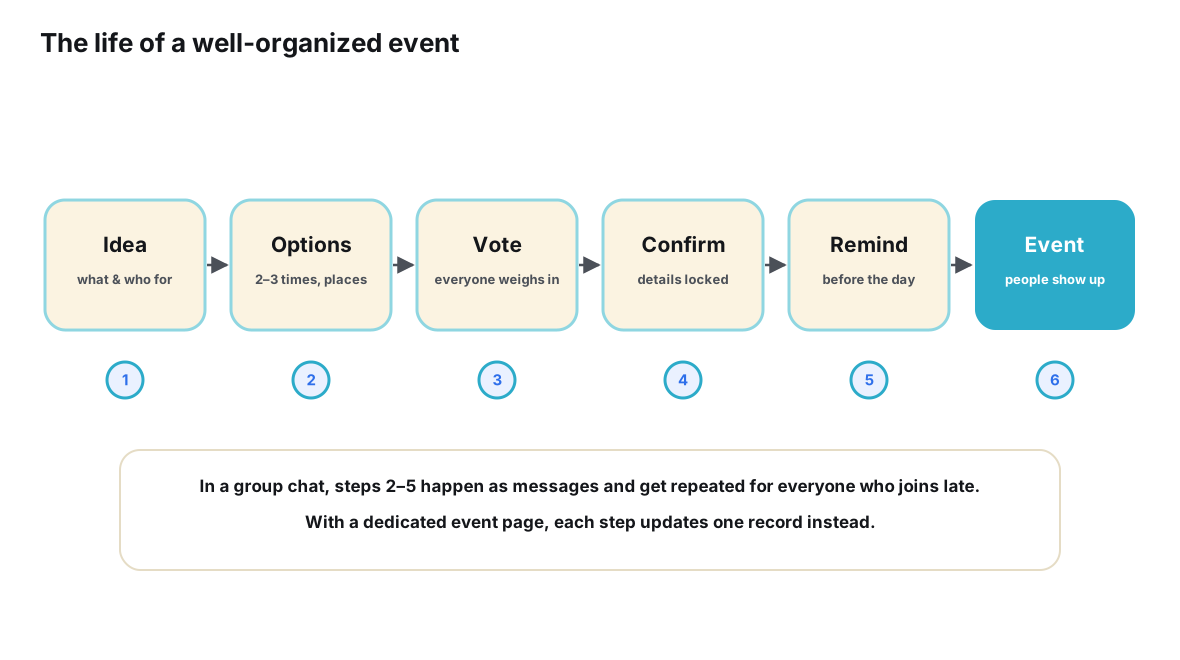
The sequence matters more than the speed. Each step exists to prevent one specific failure: capturing a stale state, losing the announcement, splitting authority, or quietly sliding back into chat-based answers. Follow it in order, and the whole thing fits comfortably inside an evening.
- Freeze the plan for one conversation cycle. Tell the group that nothing new will be decided for the next few hours, so the state you capture is not obsolete the moment you publish it.
- Reconstruct the current state from the thread. Read the group once from oldest to newest and write down the facts as they stand today: working time, working place, settled decisions, open questions and everyone who has expressed interest.
- Create the event page and load it with that state. Give the event a single address with time, place and details as labeled fields, mark anything undecided as open, and carry over the guest list so nobody starts from zero.
- Post one bridge message in the group. Announce the move in a short pinned message that says what changed, where the plan now lives, and the one action you are asking people to take.
- Move invitations onto the page. Share the event link directly or let the page handle invites, so joining the event stops requiring membership in a chat and everything that membership implies.
- Repoint every question to the page. For the next few days, answer every what-time-where question in the group with the link alone, because each repointed question is one repetition of the plan you never have to type again.
- Retire the group’s planning role, not the group. Keep WhatsApp for banter, side conversations and day-of chatter, while decisions, headcounts and changes live on the page from that moment on.
The bridge message that makes it work
The bridge message is the highest-leverage sentence you will write during the migration, and it should be short enough to read in one glance. A pattern that works in most groups:
“Heads up: the birthday plan now lives here → [link]. Time, place and the guest list are on the page and it’s always current, so I’ll stop re-posting details in the chat. Tap the link and set going or maybe when you get a minute. Everything else stays right here in the group.”
Each clause is doing a job. “The plan now lives here” names the change exactly once, so there is no ambiguity about what happened. “It’s always current” tells people why the page beats the thread, in terms of their own interest rather than yours. “I’ll stop re-posting details” sets the expectation that the firehose of plan-related messages will dry up — which, for most members, is a promise, not a threat. The single small action (“set going or maybe”) gives the migration an onboarding moment: once a guest has touched the page once, the psychological barrier to opening it again collapses. And “everything else stays in the group” preempts the fear that the chat is being shut down.
Pin the message after posting. If the group is lively, consider repeating it once the next day with a single line (“still the plan → [link]”) — once, not daily. The bridge is an announcement, not a campaign; anything longer than a few lines starts reading as a manifesto, and manifestos get skimmed.
What the page needs to hold
A migration only works if the destination is worth the walk, so it is worth being precise about what a good event page carries. The minimum is not a lot — the thread was never lacking information, only structure — but every element below earns its place by answering a question the group was already asking in chat.
The core fields come straight from your excavation: a date and time, a place (ideally with something tappable that opens a map), a short description of what the event actually is, and anything guests genuinely need to know — dress code, cost, what to bring, whether partners and kids are welcome. Undecided items should be visible as open questions rather than hidden, because an honest blank (“venue: choosing between two”) is more trustworthy than a silently missing field. Around those fields sit the two dynamic parts: a guest list where each person’s status — going, maybe, not going — is theirs to set and change, and an updates trail so that a change of time reads as one applied edit with a visible history, not as one more message in a river of them. Reminders belong to the page as well: a nudge that fires once before the event replaces the manual “don’t forget!” broadcast the organizer used to send into the thread.
Notice what is absent from that list: a comment stream, a feed, a member directory. The page does not need to host conversation, because the group already does that job and enjoys it. The page’s scope is deliberately narrow — current state, per-guest status, change history — and that narrowness is exactly what makes it readable in the five seconds a guest is willing to give it.
After the move: two homes, two jobs
The stable end state is a division of labor, not a divorce. The WhatsApp group remains the group’s living room: negotiation before decisions, jokes after them, coordination chatter on the day itself. The event page becomes the plan’s office: one address holding the current values for time, place and details, the guest list with statuses people set themselves, and every change applied as an edit rather than announced as a message.
Get the update flow right and the whole system holds. When something changes after the migration — the restaurant shifts the reservation an hour, the weather moves the picnic indoors — the sequence is always the same: edit the page first, then drop a single line into the group pointing at the change. Not a restatement of the plan, just the pointer. The first time you do this it will feel insufficiently loud; by the third time, the group will have learned that the page’s version is the live one and the chat’s mention is just the doorbell. Groups that skip the edit and only announce in chat end up maintaining a page that is a slightly stale copy of the conversation — the worst of both worlds, and the reason some migrations quietly fail a week in.
This split works because it matches what each medium is shaped for. A chat thread is an append-only stream — superb for presence and conversation, structurally incapable of holding “the current plan” as a thing you can look at. A page is the opposite: stateless conversation-free state, readable in seconds by anyone with the link, including people who are not in the group at all. When your invitee list includes a colleague who should not be added to the family chat, or a friend’s partner whose number you do not have, a link is the only form of invitation that carries no membership requirements with it.
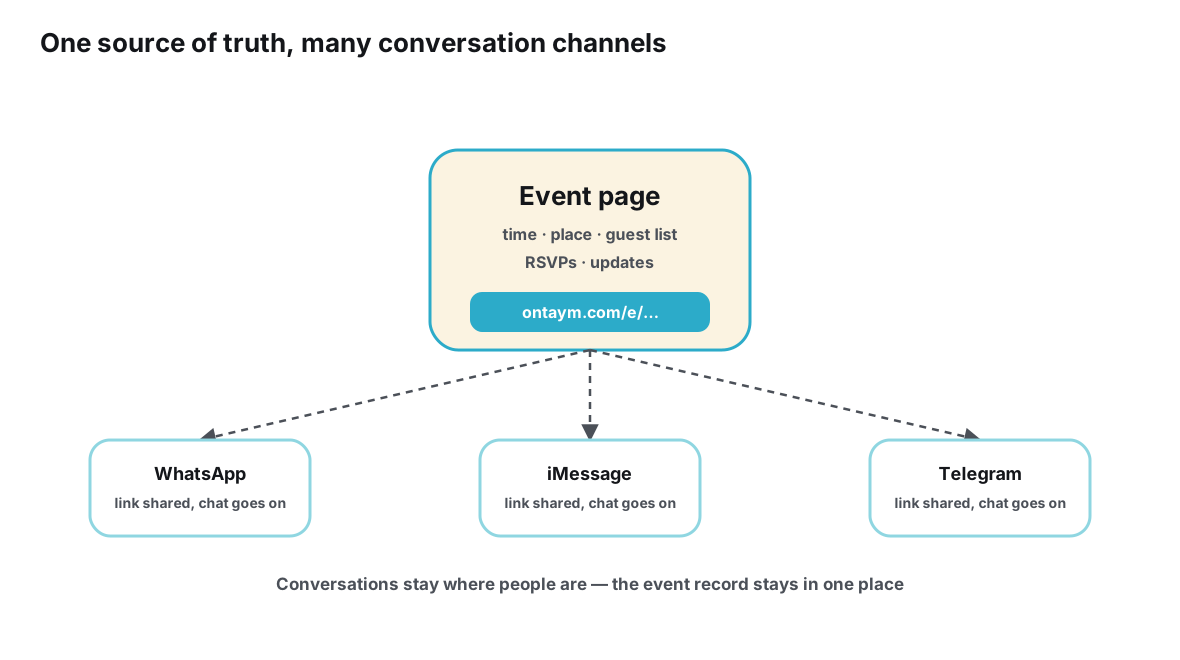
There is a privacy dividend here too. WhatsApp group membership is tied to phone numbers, as its own Help Center documentation explains, so every group invite exposes contact details to a roomful of people. An event page decouples the invitation from the member list: people respond to the event, not to a chat they had to join. If that decoupling is the part that interests you most, the broader pattern is described in our piece on creating one source of truth for a group event.
The idea of an event as a structured, addressable record is not exotic — the web has treated events this way for years, complete with shared definitions like the schema.org Event type that search engines use to understand what an event is. You are not inventing a new bureaucracy; you are giving your dinner party the same shape the rest of the internet already assumes events have.
The first forty-eight hours
A migration is not done when you post the link; it is done when the group’s reflexes change. The first two days decide that. Your only jobs in this window are to keep the page impeccably current and to be slightly boring in the chat: every planning question gets the link, every change gets applied to the page first and mentioned in the group second.
| Phase | What you do | What good looks like |
|---|---|---|
| First hour | Post and pin the bridge message; set your own status on the page so the guest list is not empty | The link is visible in the group without scrolling |
| First evening | Answer every planning question with the link; personally nudge the two or three most active members | A visible chunk of the guest list has set a status |
| Day two | Apply any change to the page immediately; thank people who have responded | Questions arrive as page visits instead of scroll requests |
| By event day | Send one reminder from the page; stop monitoring the thread for plan signals | The headcount is current without you asking anyone anything |
The nudge to active members deserves emphasis. Every group has two or three people whose behavior the rest copies. If they set a status on the page within the first evening, the migration reads as something the group is doing. If they hold out, it reads as something the organizer is imposing — and imposed tools get quietly ignored. Spend your social capital on those specific people, not on broadcasting reminders to everyone.
Special situations
When the event is tomorrow
Emergency migrations are not only possible; they are sometimes the most valuable ones. The night before an event, the plan’s state is at its most volatile — the final headcount, the last venue confirmation, the “running ten minutes late” messages — and the thread is at its least readable. Building the page late still gives you a single address to drop into the group at midnight, one that shows the final facts instead of burying them under forty messages. Compress the steps: reconstruct only the final values, skip open questions (there should be none left), post the bridge message with a note that this is the plan of record from now until the event ends.
When the group is actually a Community
Some events are planned not in one group but across a small constellation of them — a core organizer group, a wider announcement group, maybe a side group for one slice of guests. WhatsApp’s Communities feature exists precisely to link related groups and broadcast announcements across them, as the product’s own materials describe. A migration from a Community follows the same sequence with one addition: post the bridge message wherever announcements normally go, and let the announcement layer do the distribution for you. The event page actually simplifies a Community’s life, because the thing every subgroup needs — the current plan — no longer has to be re-broadcast into each group to stay true.
When someone refuses to click
There is usually one member who responds to the link with a question the link answers. Do not fight it and do not transcribe the page into the chat for their convenience — that restarts the old system with you as its API. Answer once, warmly, with the link and the specific fact: “It’s 7 at the usual place — all on the page: [link].” People who resist tools are usually resisting the expectation of diligence, not the technology. Once the page has answered them correctly three times without effort, the resistance dissolves on its own schedule.
When people join after the move
This is where the migration pays compound interest. A late joiner in the old system needed an archaeologist’s patience or a private briefing from you. A late joiner in the new system gets the link, sees the current state in seconds, sets a status, and is fully caught up — the group never has to know they arrived late. The same is true for plus-ones and guests who were never going to be added to the WhatsApp group in the first place. If your group’s next step is bigger than one event — a whole community that runs recurring gatherings — the same migration logic scales up, as covered in turning an existing Telegram community into an event community.
Mistakes that quietly lose people
Most failed migrations are not dramatic. They fail through one of five small errors, each of which feels helpful at the moment you make it.
| Mistake | Why it feels right | What it costs |
|---|---|---|
| Running both systems in parallel | You keep the sheet or summary in chat “just in case” | Split authority — the group learns neither source is reliable |
| Deleting or abandoning the group | The page works, so the chat feels obsolete | The conversation dies, and with it the social energy that made the event worth planning |
| Moving before anything is decided | You want to start structured from day one | An empty page with nothing to carry over feels like ceremony, and the group drifts back |
| Writing a manifesto instead of a bridge message | You explain the full reasoning behind the change | Nobody reads it; the link gets skimmed along with the paragraphs |
| Privately answering questions in chat | It feels kind to answer where you were asked | You become the interface again, and the page never earns authority |
The common thread is that every mistake reintroduces the old system alongside the new one. A migration is not the addition of a page; it is the transfer of one specific responsibility — being the plan — from the thread to the page. Tools like Ontaym are built around exactly this handover: one link per event, statuses guests set themselves, and updates that reach everyone who holds the link. But the pattern is tool-agnostic, and the fuller playbook for groups moving beyond chat-based planning altogether is in how to move from group chats to structured event planning.
Frequently asked questions
Do I have to delete the WhatsApp group after the move?
No — and you probably shouldn’t. The group keeps its real job: conversation, jokes, side threads and day-of chatter. What changes is narrow and specific: the group stops being the place where the plan lives. Groups that delete the chat usually lose the social energy that made the event work in the first place.
What if some guests never leave WhatsApp?
They don’t have to leave it. The event link travels into any app — you can paste it into a WhatsApp message, an SMS or an email — and it opens like any web page, so a guest can see the plan and set a status without joining anything new. The migration moves the plan, not the people.
How late in the planning can I still move?
Any time up to and including the day of the event. The later the move, the more repetition it eliminates and the more valuable a single current-state address becomes — the night before, when the headcount and the final details are in flux, is when groups benefit most.
What happens to the history in the group?
Nothing. The thread remains as an archive of how the plan came together, and it keeps accumulating conversation after the move. The page simply states the current facts without requiring anyone to reconstruct them from history — which is the part the thread was never able to do.
What if the group ignores the page and keeps asking in chat?
Answer every question with the link, warmly and without commentary, and make sure the page is always current so the link never embarrasses you. Most groups need a few days of consistent repointing before the reflex forms. If you find yourself re-typing the plan into the chat “just this once,” that is the moment to notice you are rebuilding the old system by hand.
Conclusion
Migrating a live event out of WhatsApp is less a technical operation than a small act of role clarification. The thread was never bad at hosting your event’s conversation; it was only ever bad at being your event’s database. Freeze the plan for an evening, carry the dozen facts and dozen commitments across, post one short bridge message, and then hold the line by answering every question with the link until the group stops needing to ask.
The rewards arrive quickly and compound: the headcount becomes a fact you can check instead of a feeling you maintain, late joiners stop costing you private briefings, and the group chat gets to go back to being what it was always good at — the place where your group sounds like itself. Keep the group, move the plan, and let each medium do the half of the job it was actually designed for.
Your event deserves one address instead of a thousand messages.
Move it with Ontaym