
How to Keep Event Information Organized in a Telegram Group
Telegram groups give organizers real tools for fighting entropy — pinned messages, descriptions, topics, folders, admin rights. This is a complete, honest system for using them well, including the trade-offs each tool carries and the point at which the group itself runs out of road.
Quick answer
Keep event information organized in a Telegram group by designating one pinned message as the living plan, editing it in place whenever facts change, and announcing each edit with a one-line message. Set the group description as a permanent index — what the group is for, where the plan lives, who to contact. If the group hosts several events or many conversations, split it into topics so each event gets its own thread. Treat folders and mute settings as personal conveniences only; they organize each member’s view, not the group’s shared knowledge. The system’s success depends on maintainer discipline, and it cannot hold per-person RSVP state — so pair it with a current-state page or list for headcounts. Organize the conversation; record the event.
Why facts decay in a chat, even a well-run one
Every Telegram organizer knows the sensation: the event was discussed thoroughly, everything was said, and yet nobody can find the final time. Nothing went wrong in the ordinary sense. The group simply did what conversation does — it kept moving. Each new message buries the previous ones a little deeper, and importance is not a property messages carry, so the venue change and the joke about the venue change sink at exactly the same rate. In a stream, being right early and being findable later are different achievements, and only the second one matters on event day.
The second force is subtler: facts change, and changes in chat are additive. When the start time moves from seven to eight, the group now contains both statements, each phrased with equal confidence, and the only thing distinguishing them is position. A reader who finds one at random has a fifty-fifty relationship with the truth. Multiply by several changes across a two-week plan and the thread stops being a record and becomes an archive of everything that was ever believed.
The fix, within Telegram, is to make a small number of artifacts carry the load — and to maintain them deliberately. That is what the rest of this article builds. The platform supplies better raw material than most messengers for this, as its own FAQ makes clear; what follows is the craft of assembling it.
The tools already inside a Telegram group
Pinned messages: the living plan
The pin is the workhorse of chat-based organization, and Telegram’s implementation is more capable than most: messages can be pinned, and crucially, edited after the fact. That edit capability changes everything, because it converts the pin from a frozen screenshot into a small database with one record. The pattern that works: a single pinned message, titled unambiguously (“THE PLAN — edited whenever anything changes”), containing the current facts in a fixed order — what, when, where, cost, what to bring, how to get there. When a fact changes, you edit the pin, you do not post a new one. Pinned messages decay for one reason only: someone stopped editing them.
The trade-off is concentration of responsibility. One pin means one place to look, and also one person — or a small set of admins with pin rights — performing every update. A group that pins three different messages (the plan, the carpool list, the packing notes) multiplies maintenance and divides attention; a group that pins everything pinpoints nothing.
The description: the permanent index
Group descriptions are underused for events. They render near the top of the group for every member and cannot be buried, which makes them the right home for the facts that never change during a plan: what this group is, which event it concerns, the date range, and — most valuably — a pointer to wherever the full plan lives. Think of the description as the placard on the door and the pin as the noticeboard behind it. Because descriptions hold limited text, resist the temptation to duplicate the whole plan there; duplication creates a second copy that will silently go stale.
Topics: one thread per subject
Telegram groups can be organized into topics — parallel threads inside a single group, so that the carpool conversation stops interleaving with the costume debate. For event work this is a genuine structural improvement: each topic is a self-contained mini-chat with its own history, and a group running several events can give each event its own topic instead of spawning a new group per event. The trade-offs are real, though. Topics fragment the social energy of a single room — some of the best event conversations happen precisely because everyone is together in one stream. Members who don’t browse by topic may never see a thread that matters to them. And topics organize conversation, not facts; the pin problem reappears inside every topic that acquires decisions.
Folders and mutes: personal views, not shared organization
It is worth being precise about folders, because they’re often recommended as an organization tool and often disappoint. Folders in Telegram organize your own chat list — the way one member’s app displays their groups. They are a per-account view, configured individually, and invisible to everyone else; you cannot put “the group” into a folder for other people. For the individual organizer juggling six event groups, folders are excellent personal hygiene. For keeping an event’s information organized for the group, they do nothing, and it’s a common category error to expect them to. The same honesty applies to muting and notification settings: they manage each member’s attention, which affects whether organized information is seen, not whether it is organized.
Edits, admin rights and the rules of the room
Two smaller mechanisms complete the toolkit. Message editing, already the engine of the living pin, is also worth using on your own posted facts generally — correcting an address by editing the original beats posting a correction that must itself be found later. And admin rights let you distribute the load deliberately: a co-organizer trusted to edit the pin but not to remove members, a moderator trusted with both. The full set of permissions that can be granted per admin is spelled out in Telegram’s platform documentation, and the organizing principle for choosing is simple: grant the smallest right that lets someone do their job. In a group with explicit, posted rules — “facts go in the pin, discussion goes everywhere, changes get announced in one line” — the machinery of organization can survive an organizer’s busy week, because more than one person knows how to operate it.
| Tool | What it holds well | Who maintains it | The trade-off |
|---|---|---|---|
| Pinned message | The living plan: current, edited facts | Admins with pin rights | One artifact, total dependence on edit discipline |
| Group description | Permanent identity and pointers | Admins | Very limited space; not for changing details |
| Topics | Parallel conversations, multi-event groups | Admins create; everyone fills | Splits the room; pins reappear per topic |
| Folders | Each member’s own chat list | Each member privately | Not shared — organizes views, not knowledge |
| Message editing | Corrections in place | Each message’s author | Invisible — readers may not notice a fact changed |
| Admin rights | Distributed maintenance and moderation | The group owner | Requires trust and clear roles |
The system, step by step
Assembled into a workflow, the tools above become a repeatable system. It is deliberately boring: most of it is naming things and then defending the names.
- Name the group for the event. A group called “Sara’s Birthday — Oct 12” self-identifies in every member’s chat list forever, while “Party Planning” acquires three unrelated events by spring. The name is the first organization decision you make, and the cheapest.
- Write the description as an index, on day one. State what the group is for, the event date if known, and where the full plan lives. Do not duplicate the plan’s contents; the description points, the pin holds.
- Create the plan as a pinned message with a fixed structure. Use the same labeled sections every time — What, When, Where, Cost, Bring, Getting there — so members learn where to look for what. Label the message itself: “THE PLAN — edited whenever anything changes.”
- Edit in place; announce in one line. When a fact changes, edit the pin first, then post a single message saying what changed — “Start time moved to 8, pin updated” — so that people who never open the pin still learn the change, and people who see the message know the pin is trustworthy.
- Route conversations into topics if the group outgrows one stream. One topic per event for multi-event groups, or per subject — logistics, gear, chatter — when a single event’s discussion gets loud. Keep the pin at the general level, above the split.
- Post the rules of the room once, and enforce them gently. Three lines suffice: facts live in the pin, changes get announced in one line, questions are always welcome anywhere. New members absorb the system from the rules message instead of from confusion.
- Archive deliberately when the event ends. Post a short final message — what happened, thanks, where the next event’s group will form — and either hand the group a new purpose or let it rest. Dead event groups accumulate in members’ lists and quietly erode the credibility of the next one.
Run honestly, this system keeps a mid-sized Telegram group genuinely organized for the life of an event. Its costs are two: it depends on discipline, and it has one blind spot it cannot fix — the headcount.
The headcount, the system’s blind spot
Everything above organizes facts. Attendance is not a fact; it is a per-person state that changes over time, and neither pins nor topics can hold it. The usual improvisation is a poll — “who’s coming?” — which produces a tally of one-time taps, not commitments people can update as their week evolves. The mismatch is structural, and it is the same distinction examined in the difference between a conversation and an event object: a plan you can store as text, but “Priya: maybe, becoming going on Thursday” is data, and chat has nowhere to put it.
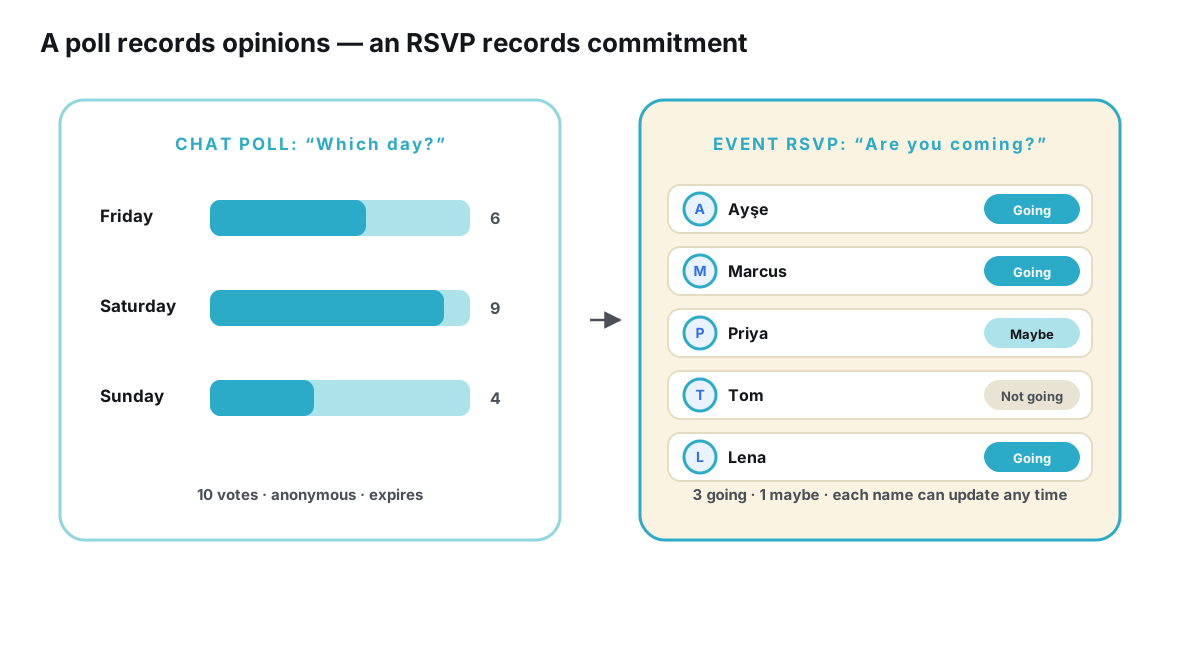
The practical bridge, inside Telegram, is to nominate one admin as the headcount keeper: members message their status changes, and the keeper maintains the count in a pinned list, edited like the plan. This works at small scale and quietly fails as the guest list grows past what one person can track in messages. The structural bridge is external: a page or list designed to hold RSVP state — going, maybe, not going, editable by each guest — linked from the group’s description and pin. Tools like Ontaym exist for exactly this split, one link per event carrying the final facts and statuses while the group carries the conversation.
A worked example: the hiking group
Consider a realistic application. A weekend hiking group — forty members, a different route every two weeks — historically ran everything through one loud thread. By applying the system, its organizer makes a small set of changes. The group is renamed to the season’s schedule. The description becomes a three-line index: what the group is, which event is next, and the link to the plan. One pinned message, “NEXT HIKE — THE PLAN,” holds the route, meeting point, train time, difficulty and gear list, edited whenever the forecast shifts anything. Topics arrive a month later, when a subgroup starts planning an overnight trip alongside the day hikes — the trip gets its own topic instead of its own group, and the main pin gains a line pointing to it.
The visible result is modest: fewer “wait, where are we meeting?” messages, and the ones that arrive get answered with a pointer instead of a paragraph. The invisible result is larger. The organizer stops being the group’s memory, because the memory has a location. A member who missed two weeks re-enters through the pin in seconds. And when the hike’s train time changes the night before, one edit plus one line reaches everyone who looks anywhere — the pin, the description’s pointer, or the chat itself.
Keeping the system alive over time
Systems of this kind fail by neglect, not by confrontation, so the maintenance question deserves its own attention. Three habits keep it standing. First, attach edits to triggers rather than memory: the pin gets reviewed whenever the group size changes, a supplier confirms, or a deadline passes — events, not vibes. Second, share the keys early: a second admin with pin rights turns the system from a person into a role, which is what allows the organizer to have a flu-filled weekend without the plan decaying. Third, audit from the outside in: once before the final headcount deadline and once the day before, open the group as a newcomer would — description first, pin second — and fix whatever a newcomer would get wrong. The audit takes two minutes and reliably finds the stale line that everyone active had stopped seeing.
| Test | Question | Passes when |
|---|---|---|
| Findable | Can a member locate the plan in one action? | The pin is the plan, labeled as such |
| Current | Is every fact the latest version? | Every change so far has been an edit, not an addendum |
| Complete | Does it answer the big five — what, when, where, cost, bring? | All sections present, even where the answer is “TBD” |
| Unambiguous | Could two readers disagree about any fact? | One value per field; options marked as undecided, clearly |
| Change-ready | Is it obvious how an update will be made and announced? | The one-line-announcement rule is posted |
| Newcomer-ready | Can someone joining today get current without asking? | Description plus pin suffice, tested from a fresh account |
Where the group’s own tools run out
Every technique in this article has a ceiling, and it helps to know where it is. The pin-and-discipline system scales with the organizer’s attention: it thrives at dozens of participants and strains at hundreds, where message volume buries announcements faster than edits can be made and the headcount outruns any keeper. Multi-event communities feel the ceiling first — the moment there are several concurrent plans, each needing a current pin and a live count, the group’s machinery is being run in parallel by people, and parallel manual systems drift. How coordination actually behaves past that line is the subject of what happens when a Telegram event has hundreds of participants.
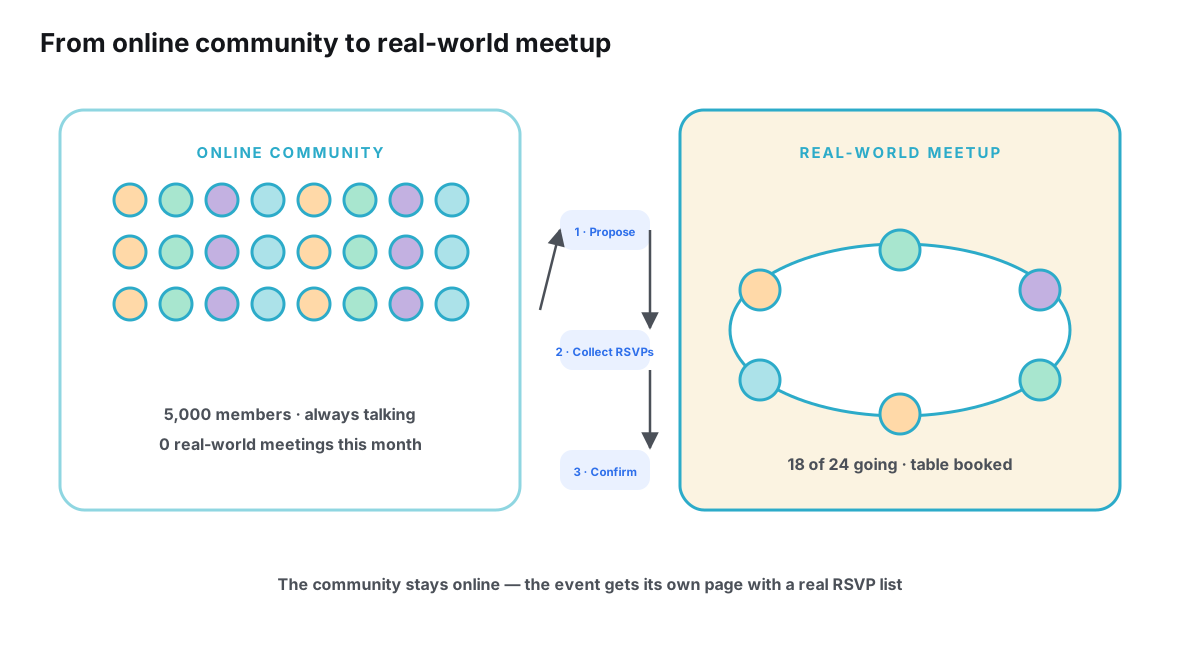
The deeper ceiling is conceptual, and it arrives even at small scale the moment an event has real stakes. A chat, however organized, stores statements about an event; it does not store the event — its current facts as fields, its guest list as living statuses, its changes as edits to a record rather than additions to a scroll. That distinction, and what it implies for how you plan, is developed in Telegram group planning: chat versus structured event information. The groups that coordinate best treat Telegram as an excellent venue for conversation and place the record one link away — the description points to the pin, and the pin points to the plan’s home.
What organized feels like from the member’s side
It is worth closing the loop from the member’s chair, because organization is ultimately experienced, not administered. For a member, an organized Telegram group is one where joining requires nothing and catching up costs seconds: the name says what the group is, the description says where the plan lives, and the plan answers questions in the order a human asks them. They never scroll to learn a fact. When a change happens, they encounter it wherever they happen to be looking — in the chat as a one-line notice, in the pin as the new truth — and the two never disagree, because the discipline guarantees they can’t.
Members also relax in ways organizers don’t always anticipate. In an unorganized group, the safest social strategy is silence: asking “what time is it again?” a second time feels like admitting you weren’t listening, so people guess instead — and guessed plans fork. In an organized group, the plan is public, labeled and current, so asking costs nothing and guessing gains nothing. Questions become welcome signals rather than small embarrassments, and the organizer’s private message load drops accordingly. Organization, done well, is not the removal of conversation in favor of bureaucracy; it is the removal of anxiety from conversation. The chat stays loud, funny and chaotic in exactly the ways a good event group should be — the difference is that the chaos no longer carries the facts.
Frequently asked questions
Should I pin more than one message in an event group?
As a rule, no — or as few as the plan allows. Multiple pins divide attention and multiply maintenance, and members can never be sure which pin is current. One living pin for the plan, with everything else linked from it, beats a bar of stale snapshots. If you genuinely need a second artifact, say a packing list, link to it from the main pin rather than pinning it separately.
Is it better to use topics or separate groups for recurring events?
Topics suit one community with several concurrent events: membership is shared, and each event keeps its own thread. Separate groups suit events with genuinely different audiences — the attendees shouldn’t all see each other’s chatter, or one event is much noisier than the rest. The cost of topics is a quieter, more fragmented social space; the cost of separate groups is asking people to join and monitor another chat.
How often should the pinned plan be updated?
Whenever a fact changes — the discipline is event-driven, not calendar-driven. Edits are cheap and silent; the one-line announcement costs more attention, so reserve announcements for changes members must act on, and let cosmetic edits happen quietly. If you notice facts changing without the pin changing, that is the system failing, and it is better fixed the moment it is noticed than scheduled for later.
Do folders help keep the event’s information organized?
They help you, not the group. A folder tidies your own chat list so the event’s group sits where you can find it — useful for the organizer running several events, invisible to everyone else. Shared organization happens in artifacts every member sees the same way: the name, the description, the pin, the topics.
What do I do when members keep asking things the pin already answers?
Two moves, both gentle. Answer with a pointer — “it’s in the pin, top of the group” — every single time, so the group learns where knowledge lives; and check whether the pin is failing rather than the members: a question asked repeatedly is often a signal that the answer is buried in a long pin, ambiguously worded, or genuinely missing. Repeated questions are free usability testing.
Can this system work without any tools outside Telegram?
Up to a point, yes — that is precisely what the system is designed to squeeze out of the platform, and small groups run happily on it indefinitely. The two things it never fully delivers are per-person RSVP state and effortless cross-app reach: the moment your headcount matters or your guests don’t all use Telegram, a current-state page linked from the group becomes the natural next step rather than a betrayal of the chat.
Conclusion
Keeping an event organized inside a Telegram group is a real, achievable craft. Name the group for the event; make the description an index; keep one pinned plan with a fixed structure and edit it in place; announce changes in one line; split into topics only when the stream genuinely overflows; treat folders as the personal views they are; and share the keys so the system outlives any one person’s busy week. None of it requires new software, and all of it repays the small discipline it asks.
What the craft cannot do is change what a chat is. The pin will organize your facts beautifully and still hold no per-person attendance; the topics will quiet the noise and still store decisions as statements in a stream. Knowing that boundary is part of the craft too. Organize the conversation with everything Telegram gives you — and when the event needs a memory of its own, give it one address outside the thread, pointed to from the description and the pin. The group stays what it is best at being: the place where the event is talked into existence.
Keep the chat for chatting — give the plan one link that stays current.
Plan it with Ontaym