
How to Organize an Event Without Creating a WhatsApp Group
The reflex when planning anything with more than three people is to create a WhatsApp group. That reflex is worth questioning — because a conversation container is not a plan, and most events never needed the container in the first place.
Quick answer
You can organize an event without creating a WhatsApp group by separating two jobs the group merges: talking about the plan and storing the plan. Write the event’s facts onto one page or link — time, place, open questions, and an RSVP list. Reach each guest through a channel you already share: a one-to-one chat, an existing group, a call. Ask them to answer on the page, not in replies. When something changes, edit the page once and mention it wherever conversation is already happening. A group chat is a many-to-many conversation tool; most events need broadcast plus statuses. Skip the group and the event still happens — usually with less scrolling for everyone.
Why the group is the default reflex
Nobody sits down and chooses a planning system for a birthday dinner. Someone says “we should do something for Priya,” someone else replies with three date ideas, and within ten minutes a group exists with a name and a photo. The group is not a decision; it is gravity. Everyone is already on WhatsApp, the message goes out instantly, and for the first evening it works beautifully.
But notice what actually happened in that first evening, because it explains everything that follows. The group was created before anyone knew what the event was. Its membership was assembled by whoever was easiest to reach at that moment, not by the final guest list. And its entire memory — every option, every joke, every half-agreement — started accumulating in a single chronological stream that would still be there, unsorted, three weeks later on the night itself.
The instinct to group-chat an event into existence is universal because the friction is front-loaded at exactly zero. The costs arrive later, quietly, as scrollback. If you want a sense of how that accumulation turns into work, the companion piece on why WhatsApp groups become messy when planning events breaks down the mechanics. This article takes the other direction: how to avoid creating the problem container at all.
What creating a group actually costs you
A WhatsApp group is a remarkable piece of engineering for what it is designed to do: sustain an ongoing many-to-many conversation among up to 1,024 participants. That figure, documented in the WhatsApp Help Center, tells you something important about the tool’s ambitions. Groups are built for large, durable conversation — families, classes, teams, neighborhoods. An event borrows that machinery for two weeks and then abandons it.
The borrowing has a price, and it is worth making it explicit, because none of it is obvious at creation time:
- Membership is a commitment. Joining a group ties you to its notification stream until you leave, and leaving carries a small social signal of its own. Guests who want to attend one dinner did not necessarily volunteer for a channel.
- Identity is a phone number. Group membership on WhatsApp is based on phone numbers, so every member becomes visible to every other member as a contact. For a group of close friends that is nothing; for a mixed crowd — colleagues, friends-of-friends, a partner’s family — it is exposure some people would rather not make.
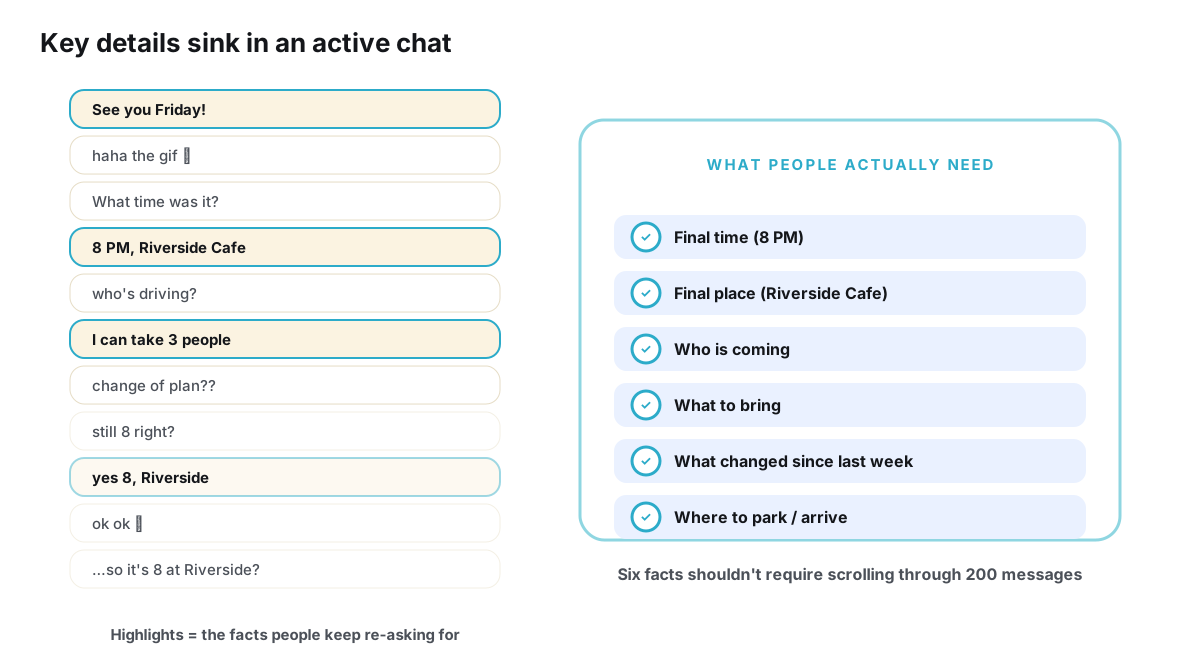
- History is undifferentiated. Decisions, questions, cancellations and banter all enter the same stream with the same visual weight. Nothing marks “this is the final time” except its position near the bottom.
- The group outlives the event. Long after the dinner, the group sits in everyone’s chat list, occasionally reviving for the next thing — at which point two events share one history and the confusion compounds.
None of these are flaws in WhatsApp. They are properties of a conversation tool being used as a planning system. The table below makes the mismatch concrete.
| Dimension | What a group chat provides | What the event actually needs |
|---|---|---|
| Membership | People who join a durable conversation | People who are invited to one occasion |
| Access | Visible to members as contacts, tied to phone numbers | Reachable through whatever channel the organizer already shares with them |
| History | One chronological stream mixing talk and decisions | A short list of current facts, readable in seconds |
| Voice | Everyone talks to everyone, all the time | Mostly organizer-to-guests, with side conversation welcome elsewhere |
| Answers | Replies, reactions and votes mixed into the stream | Per-person RSVP statuses that roll up into a headcount |
| After the event | A group that lingers in every member’s chat list | Nothing to leave, mute or clean up |
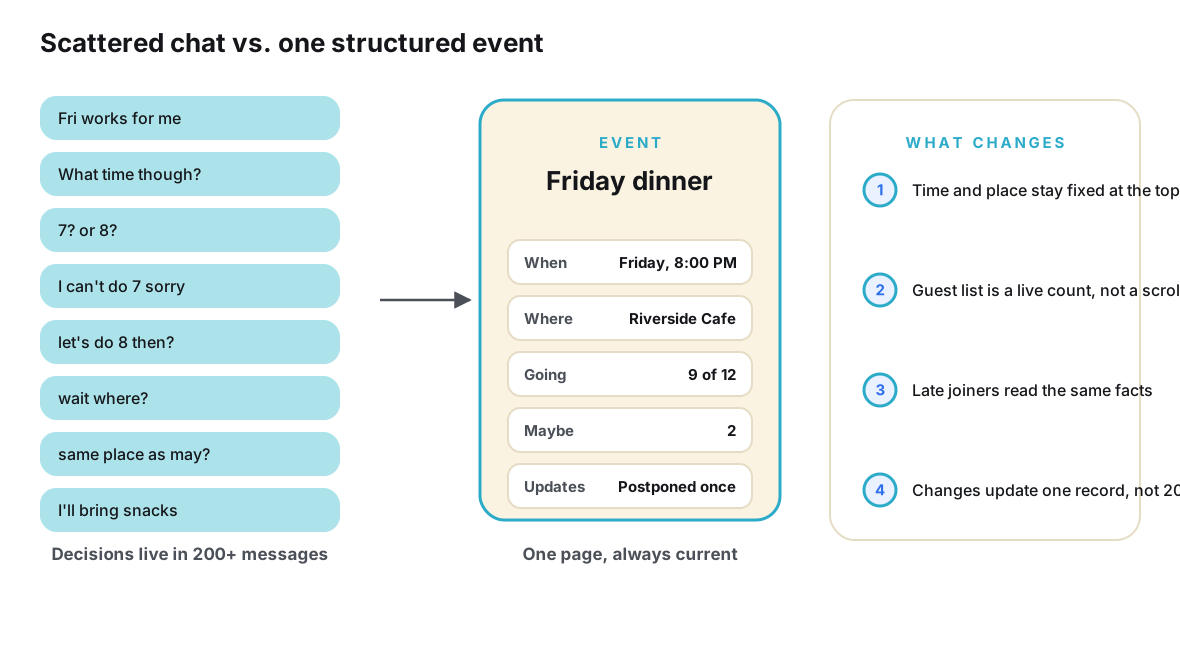
Read that table as a design brief rather than a complaint. If your event needs “a short list of current facts” and “per-person statuses,” then what you need is a record with an address — and a record does not require a group around it.
Start with the event brief, not the guest list
The single biggest improvement you can make costs five minutes and no software. Before inviting anyone, write down the event as facts. Call it a brief. It needs almost nothing:
- What it is. Dinner, hike, surprise party, weekend trip — one line.
- What is already decided. The date that is fixed, the venue that is booked, the budget that is agreed.
- What is genuinely open. The two or three questions the group’s input should settle: which Friday, restaurant or barbecue, kids welcome or not.
- What each guest must do. Usually just: say whether you are coming, by a certain date.
Writing the brief first changes everything downstream, because it forces the questions to exist before the audience does. Organizers who skip this step end up conducting the planning and the clarification simultaneously in front of everyone — which is precisely the behavior that turns a thread into noise. A brief also reveals how little is actually undecided. Most events have two open questions wearing the costume of twenty.
The brief becomes the seed of your event page. Whatever tool you use for the page — and it can be almost anything that holds text at a stable address — the brief is what goes on it first.
Give the event one address
Here is the core move: the plan lives at one link, and the link is the event’s identity. Not a message to be forwarded and superseded, not a thread to be scrolled — a single address that always shows the current state. Guests do not need an app membership to read it, and you do not need their phone numbers to reach it to them.
This is the pattern event tools are built around. A service like Ontaym gives each event its own page with the facts, polls for the genuinely open questions, RSVP statuses for the headcount, and one link you can send through any channel — which is exactly the division of labor this workflow needs. But the principle is tool-agnostic: even a shared document at a stable link beats a group thread, because it separates where the plan is from where the talking happens. The idea has deep roots — the web’s own vocabulary treats an event as a structured thing with properties, the way schema.org’s Event type defines one.
The workflow, step by step
- Write the brief before inviting anyone. Spend five minutes listing what is decided, what is open, and what guests must do. This document becomes the content of your event page, and it prevents you from planning in public.
- Give the event one address. Create the event page and put the brief on it. Mark open questions as open. The page starts nearly empty and that is fine — what matters is that a current-state address exists before the first invitation goes out.
- Poll only what is genuinely open. If two dates are on the table, run a poll on those two dates on the page. Scheduling polls are a solved problem — services like Doodle built an entire product on them — but keep the poll scoped to real questions. Everything decided stays a fact on the page, not a re-litigated topic.
- Invite people where they already are. Send the link through whatever channel you genuinely share with each guest: the one-to-one WhatsApp chat you already have, the family group that already exists, a text, a call for the relative who never clicks anything. One sentence each: what it is, what you need from them, the link.
- Let RSVPs happen on the page. Guests mark themselves going, maybe or not going on the event page, and the headcount composes itself. You stop counting reactions and start reading a number. If someone replies in chat anyway — they will — answer pleasantly and point at the page.
- Make changes as edits, not announcements. When the venue shifts or the time firms up, edit the page. Then, if the change is significant, say one line about it wherever conversation naturally happens. The line is a courtesy; the page is the truth.
- Keep the conversation you already have. Nobody in this workflow is asked to stop chatting. Banter lives in the one-to-one threads and existing groups it already lives in. The only thing that changed is that the plan stopped depending on the banter being findable.
Notice what is absent from that list: creating a group, naming it, curating membership, managing who was missed, and apologizing when the sixth person to join asks which day is final. The workflow is not anti-social — it is anti-container. Conversation continues in the places it already existed; only the record is new.
The workflow in practice: a birthday, planned in five touches
Abstractions are cheap, so here is the whole workflow played out on a hypothetical occasion. Maya is organizing a birthday dinner for Priya. Eleven guests, one of whom does not use WhatsApp much, one of whom is abroad until the week before.
Touch one — the brief. On Monday, Maya writes five lines: it is a birthday dinner; the budget is moderate; the two candidate dates are the 14th or the 21st; the open question is restaurant versus a hosted evening at Diego’s place; guests should answer within a week. Total elapsed time: five minutes, zero messages sent.
Touch two — the page. She creates the event, pastes the brief, and adds a two-option poll for the date and a second one for restaurant versus home. The page is now the entire state of the plan, and it took less time than choosing a group name and photo would have.
Touch three — the invitations. Eight guests hear about it in the one-to-one chats Maya already has with them, each with one personal sentence and the link. The remaining three are in an existing “Friday regulars” group, so she posts the link there once with the same sentence. The friend abroad gets the link over email. Nobody is added to anything; nobody’s number is shared with anyone new.
Touch four — the quiet part. Over three days, statuses accumulate on the page without a single group message. The poll settles on the 21st; Maya closes the poll, marks the date as final on the page, and books the restaurant against the going count. When the venue calls back and the time shifts thirty minutes, she edits one field. That is the entire change-management effort — no announcement to compose, no one to chase down who missed it.
Touch five — the stragglers. Tom hears about the dinner on Thursday and messages Maya. She sends the link; Tom is fully current thirty seconds later, sets his status, and the headcount updates itself. Priya’s cousin, who never clicks links, gets a call; Maya marks her down as going and adds “plus one” to the note.
Count the artifacts this plan produced: one page, one poll, one edit, a handful of personal messages, one phone call. Count the artifacts the group version would have produced: a new group with twelve members, several hundred messages, at least one “wait, which day is final?”, a headcount assembled from reactions, and a group that still exists in twelve chat lists the following month. Same birthday. Same guests. Radically different amount of remembering.
Where to send the invite instead
“But how do I reach people without the group?” is the first objection, and it dissolves on inspection, because you already have channels to every person you would have added. The group was never the only route — it was the lazy route.
| Channel | Best for | One caution |
|---|---|---|
| One-to-one WhatsApp message | Close friends; personal occasions; plus-ones | Slightly more effort per guest — but you were going to message them anyway |
| An existing group | Events for a circle that already has a chat | Post the link and the essentials once; do not let planning migrate back into the thread |
| Text or call | Relatives and guests who ignore links or rarely use chat apps | Capture their answer yourself and add it to the RSVP list |
| Formal occasions, mixed generations, colleagues | Feels heavy for casual plans; excellent for invitations with detail | |
| Another messaging app | The friend who lives in Telegram or Messenger | The whole point of a link is that it crosses apps — send it wherever they are |
The pattern in the table: match the channel to the relationship, and make the event page the destination all channels point at. Your invitation becomes a one-sentence personal note instead of membership in a new venue — which, quietly, also makes it feel more like an invitation and less like an administrative act.
Collecting answers without a reply thread
The moment invitations go out, the group-based workflow starts collecting answers as artifacts: a thumbs-up here, a “I’ll try!” there, a poll vote that may or may not mean attendance. Your workflow collects them as data instead — each guest sets a status, and the statuses compose into the number you actually need for the restaurant.
This is the part organizers feel the most relief from, because headcount is where chat-based planning hurts worst. A reaction is not an attendance record; it is a gesture at a moment in time. Statuses on a page persist, update when minds change, and reconfirm as the date approaches. The full anatomy of why chat signals fail to add up — and how to run a count you can trust — is covered in how to track who is actually coming from a WhatsApp conversation.
Two small disciplines make the page-based count trustworthy. First, give it a deadline: a respond-by date printed on the page, after which you chase the non-responders personally — a chase that takes four one-to-one messages, not a group-wide “please confirm” that the confirmed resent and the unconfirmed miss. Second, do the arithmetic in public: when the page shows the going count, guests police their own plus-ones, and the friend who said maybe three weeks ago gets a gentle, private nudge from you rather than a public interrogation. The headcount stops being your secret burden and becomes a shared fact the whole group can see.
When a group is still the right answer
None of this is a case against WhatsApp groups as such. There are events — or things adjacent to events — where a group is genuinely the correct instrument, and pretending otherwise would be dogma.
The dividing line is whether the thing you are organizing is a conversation. A standing football squad that argues about positions every week wants a durable many-to-many channel; that is a community with recurring events, not an event with a chat attached. A surprise-party conspiracy among four organizers is a working group that dissolves on the night. A class reunion where the chatter is half the point has a legitimate case, though even there the plan benefits from living at a link the group can point to. WhatsApp’s own materials, at whatsapp.com, describe Communities as a way to organize related groups and broadcast announcements to them — a container for ongoing collective life, which is exactly what a one-off dinner is not.
| Signal | Points toward | Why |
|---|---|---|
| One occasion, fixed date | No group | Broadcast plus RSVP statuses cover it; conversation fits existing channels |
| Recurring activity with debate between sessions | Group | An ongoing conversation genuinely exists to host |
| Guests who barely know each other | No group | Avoids exposing phone numbers and forcing small talk among strangers |
| Organizing committee that disbands after | Small group | Temporary working team with real back-and-forth — then delete it |
| Two or more events sharing one crowd | Link per event | Each event gets its own record; one group would tangle both histories |
If you do create a group for a legitimate reason, the discipline still applies: the plan should live at a link, and the group should point at it. The group hosts the conversation; the link hosts the truth. Groups that adopt that split stay pleasant at any size — and for the deeper reasoning, how to create one source of truth for a group event is the extended treatment.
The privacy dividend
There is a quieter benefit to skipping the group, and it deserves a sentence or two of its own. Group-chat membership on WhatsApp rests on phone numbers, and phone numbers are personal data in the legal sense as much as the practical one — the European Union’s GDPR and California’s CCPA both treat them that way. When you add eleven people to a group, you have introduced them to each other’s contact identity, permanently, for the sake of a dinner.
Most of the time, among friends, this matters not at all. But mixed crowds are common: the birthday where work meets family, the trip where someone’s new partner meets everyone, the club night where the friend-of-a-friend just wants to show up. A link-based invitation asks nothing of anyone’s identity. Guests arrive with exactly as much exposure as they choose. That is a courtesy your guests will never name and occasionally deeply appreciate.
Frequently asked questions
Won’t people find it strange not to be added to a group?
Far less than you fear. What guests actually notice is whether the plan was easy to find and whether their answer was correctly counted. A personal message with a link reads as more thoughtful than membership in a new group, not less — you are inviting a person, not populating a channel.
What if my guests refuse to click links?
Some will, and you handle them the way hosts always have: a call or a text, and you record their answer yourself on the page. The link is for the majority who find clicking easier than scrolling a two-week thread; the personal route remains for everyone else.
How does the banter happen without a group?
In the places it already happens — the one-to-one chats, the existing friend group, the ride there. This workflow removes the record-keeping burden from conversation, not the conversation itself. If a genuinely new many-to-many discussion is part of the occasion, that is the signal a small group is warranted, per the decision guide above.
What about friends who don’t use WhatsApp at all?
They are the strongest argument for this approach. A group-based plan forces a choice between excluding them or running a parallel conversation. A link is app-neutral: the friend on Telegram, the aunt on SMS and the colleague on email all get the same current plan from the same address.
Isn’t a broadcast channel the same as skipping the group?
A broadcast list solves one half of the problem — outbound announcements without a reply-all stream. It does not solve the other half: collecting structured answers and keeping a current state guests can check. Broadcasting still pushes messages that age; a page is pulled on demand and never goes stale.
How far in advance should the link go out?
Early enough that the open questions can actually be settled by the people affected, and late enough that the plan is more than a rumor. For a dinner, a week or two; for a weekend trip, as soon as the dates are serious. The link can go out while half the details are still blank — that is what the “open questions” section is for.
Conclusion
Creating a WhatsApp group is the path of least resistance, and resistance is exactly what an event plan accumulates once the group exists: scrollback instead of a brief, reactions instead of a headcount, announcements instead of edits, and a lingering chat for an occasion that lasted three hours. The alternative is not a different app so much as a different shape: write the brief first, give the plan one address, invite people through the channels you already share, let answers land as statuses, and make changes where everyone can find them.
The dinner, the trip and the surprise party all still happen either way. The difference is who does the work of remembering. In a group-based plan, every guest re-derives the plan from history every time they check. In a link-based plan, you write the current truth once and everyone reads it in five seconds — and the conversation, freed from its clerical duties, gets to be nothing but conversation.
Your next event needs one link, not one more group.
Plan it with Ontaym