
Private Event Links vs Public Group Chats
Every invitation has a surface — the thing you actually hand to someone. A group chat and a private event link are two very different surfaces, and the difference decides who can find your event, what strangers learn about your guests, and what is still connecting everyone a month later.
Quick answer
A group chat and a private event link can bring people to the same plan, but they grant access on opposite terms. A group chat is built on membership: to see the event you join the room, share whatever identity the app requires — often your phone number — and stay connected after the evening ends. A private event link is built on access: holding the link lets you see the event page and respond, without enrolling in anything permanent. That one difference changes discoverability (who can find the event), data exposure (what strangers learn about each guest), and the social cost of declining or leaving. Neither surface is universally correct — recurring clubs often genuinely want membership — but for one-off gatherings and mixed crowds, scoped access usually fits better.
Two doors to the same evening
Picture an organizer with a plan: a birthday hike, a pickup football session, a farewell drinks for a departing colleague. The plan itself is identical regardless of how people are invited. What changes — dramatically — is the experience on either side of the invitation.
If the invitation surface is a group chat, the guest’s first act is enrollment. They join a room. The room has a name, a member list, a history, and a future that extends well past the event. Their second act, having joined, is to work out what the event actually is, because the plan lives somewhere inside the conversation.
If the surface is a private event link, the guest’s first act is looking. They open the link and see the event: time, place, description, who else has said they’re coming, and a place to mark their own answer. Enrollment, if it happens at all, comes later and on their terms.
These two orders of operations — join then understand, versus understand then decide — sound like a small procedural detail. They are not. They determine who sees whom, who can find the gathering, what personal data flows to which strangers, and how much cleanup the event requires after it ends. The rest of this article takes the comparison apart dimension by dimension.
Access: joining a room versus holding a key
The core distinction is the access model. In messaging apps, access to a conversation is granted to members. Membership is a real technical state: the platform knows you belong, ties your membership to an account, and usually to an identifier like a phone number. WhatsApp group membership is expressed through phone numbers — the WhatsApp Help Center describes groups of up to 1,024 participants organized around exactly that identity. Telegram groups scale far higher, and Discord organizes participation around server membership, complete with roles and channels that only make sense once you are inside.
Membership has properties. It is persistent — you are in the room until you leave. It is visible — other members can typically see that you belong. And it is bundling: joining the room for Saturday’s hike also joins you to every other conversation the room will ever have.
A private event link works differently. The link is simply the address of an event page. Anyone who holds it can view the page and, depending on how the organizer has set it up, mark themselves as going or maybe. There is no room to belong to. There is no member list joining you to everyone else. Access is scoped to one event and expires naturally when the event passes. The person who opens the link has not been enrolled; they have merely been shown something.
It is worth pausing on how different those two gestures are socially. Membership is a relationship; a link is a key. A relationship implies mutual recognition and duration. A key implies a door that opens for whoever holds it, for as long as it works, and connects them to nothing else. Neither is wrong — dinner parties and public squares both exist — but they are different objects, and treating them as interchangeable is where most invitation awkwardness begins.
Link-to-join is not link-to-attend
At this point someone usually raises a fair objection: chat apps have invite links too. They do. A WhatsApp group can be entered through a shareable invite link; Telegram groups and channels can be joined the same way, and the Telegram FAQ documents how invite links function across its groups. These are genuinely useful — they remove the organizer’s bottleneck of adding people one by one.
But look closely at what the link leads to. In a chat app, an invite link is a door into membership. You tap it, you join, your number or account becomes visible to the room, and you are now a persistent member of a conversation. The link solved the distribution problem while keeping the membership model intact.
A link to an event page is a different species. It leads to the event, not to a conversation about the event. The distinction sounds pedantic until you watch it play out: the friend who would happily look at a page and click “maybe” will hesitate at a “join group” button, because they understand, correctly, that they are not being asked whether they’ll attend — they are being asked to become part of something.
Discoverability: who can even find the event
The second dimension is discoverability — the set of people who can come to know the event exists. The two surfaces sit at nearly opposite ends of the spectrum.
A group chat is quietly discoverable in several ways. Members forward invites to others, and forwarding a chat invite is frictionless by design — which means the boundary of the room is whatever the most enthusiastic member decides it is. Communities and linked groups widen the surface further: WhatsApp Communities let organizers connect related groups and push announcements to all their members at once, and large Discord servers host events that are visible to everyone browsing the server. None of this is accidental; it is what these platforms are optimized for. But it means the organizer’s control over the guest list is soft, a social convention rather than a structural property.
An event page behind a private link is discoverable in a much narrower sense: it is unlisted. There is no directory entry, no community listing, no search result. The set of people who know about the event equals the set of people who were told, plus anyone a recipient chose to forward the link to. For most private gatherings that is exactly the shape you want — the event is findable precisely by the people you invited and invisible to everyone else.
Discoverability is not a virtue or a flaw on its own; it is a dial. A neighborhood fundraiser may want to be spreadable, and a public community gives it reach. A surprise birthday wants the dial near zero. The problem with using a public group chat for the second kind of event is not that the platform is bad — it is that the dial is stuck on high, and the only brake available is asking thirty people, individually, to please not forward.
Data exposure: what each surface reveals
The third dimension is the one guests feel most and discuss least: what personal information the invitation itself hands out.
Joining a chat-based event means presenting your platform identity to a room of people you may not know. Because WhatsApp membership rests on phone numbers, every participant in that hike group now holds a durable, portable identifier for you — one that works outside the app, can be saved to contacts, and links back to your profile photo, your name, and your presence in the app. Multiply that across a room with dozens of members, some of whom are strangers or friends-of-friends, and the exposure is substantial: not because anyone misbehaves, but because the access model requires it. Signal groups, which also organize membership around phone numbers, and Telegram groups, which can be joined via username, sit at different points on the same axis — the identity you present is whatever the platform’s membership model demands.
An event link exposes almost nothing by design. The page shows the event; the guest shows the page whatever name they choose to attach to their response. No phone number is exchanged, no profile is revealed, no persistent handle is created. The organizer learns who is coming, which is the information the event actually needs. Everyone else learns only what the page tells them — typically a first name next to a status.
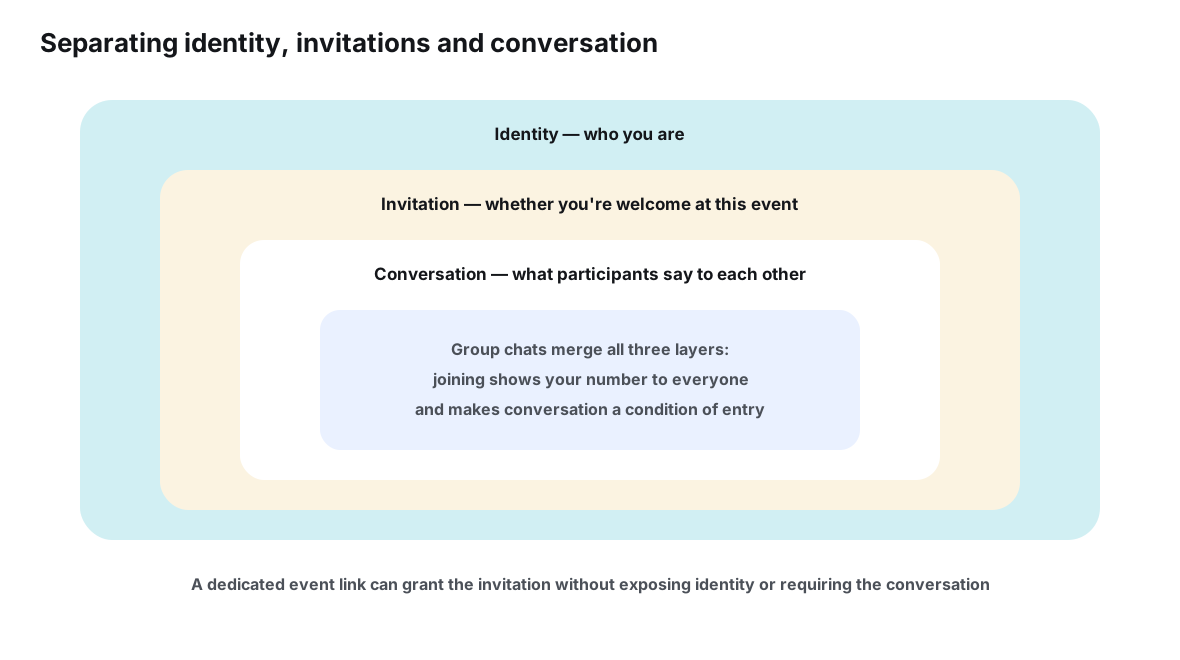
There is a legal echo here as well as a social one. Phone numbers are personal data in the sense used by the EU’s General Data Protection Regulation (GDPR, Regulation 2016/679), and California’s CCPA similarly treats contact information as covered personal information — the official texts are published by the EU and the California Attorney General. This article is not legal advice, and private dinner plans are a very different context from a business processing customer data. But the underlying principle those laws encode — collect and expose only the personal data a purpose actually requires — happens to be excellent etiquette for invitations too. An event needs to know who is coming. It does not need every guest’s phone number, and a surface that avoids demanding them is practicing data minimization without anyone filing paperwork.
| Dimension | Public group chat | Private event link |
|---|---|---|
| What access requires | Installing the app, holding an account, and joining the room | Opening the link, in whatever browser the guest already has |
| What guests expose on entry | The identity the platform requires — often a phone number — to the whole room | Whatever name they attach to their response |
| Who sees whom | A full participant list, usually visible to every member | Only what the organizer chooses to show on the page |
| Discoverability | Forwardable invites, community listings, browseable member rosters | Unlisted: known only to people who received the link |
| Declining | Visible — never joining, or leaving, can be noticed and read as a statement | Private — a “not going” or simple silence is just a status |
| Scope of the relationship | Open-ended: the room covers every future topic it touches | Bounded: the page is about one event and nothing else |
| Cross-app reach | Only people who use that particular app | Anyone, regardless of which messenger they prefer |
| After the event | The room usually lives on until someone dissolves it | The link simply goes quiet; there is nothing to leave |
The membership tax
Every membership charges a small recurring fee, paid in attention and exposure. The new room sits in the chat list, accruing unread counts. Its notifications compete with family messages. Its member list quietly persists as a directory of people connected to you. None of these costs is large on its own; the trouble is that they are charged for every event planned this way, indefinitely, including events the guest never intended to follow.
The tax also has a social dimension that pure software analysis misses. Joining is legible. When a newcomer is added to a group, everyone sees the addition; when someone leaves, the departure is often visible too. That legibility is precisely what makes chat invitations socially heavy — it converts what should be a private decision (“is this event for me?”) into a semi-public one. We explore that dynamic in depth in the social awkwardness of adding someone to a group chat; for now it is enough to note that a link-based invitation removes the audience from the decision entirely.
Where a room is genuinely the right answer
This comparison is not an argument that group chats are bad. Membership is exactly right when the group is the point. A standing weekly football crew, a close friend group that plans many events together, a hobby club with shared norms and running jokes — these are communities, and communities deserve homes. Discord servers, with channels, roles, threads and scheduled events, are built for precisely this, and WhatsApp Communities serve a similar purpose for families and neighborhoods that want announcements to reach linked groups. The room gives the group continuity, memory, and identity.
The mistake is not using rooms for groups. It is using rooms for events — taking a one-off gathering with a shifting cast and forcing it through a container designed for permanent membership. A farewell drinks where half the invitees are colleagues who will never meet again does not need a room. It needs a plan and an RSVP list. For a fuller treatment of that mismatch, see why messaging apps were never designed to be event databases.
| Situation | Better-fitting surface | Why |
|---|---|---|
| Dinner among close friends who already share a chat | Either — often both | The room adds warmth; a link keeps the facts findable when details change |
| One-off event mixing different social circles | Private event link | Avoids merging friend groups, colleague groups and strangers into one visible roster |
| Gathering with friends-of-friends and newcomers | Private event link | No phone-number exposure between people who barely know each other |
| Group spanning several messaging apps | Private event link | The link works for everyone; a room only reaches one app’s users |
| Recurring club with stable membership and shared identity | Group chat or community | Continuity, norms and history genuinely matter between sessions |
| Public-facing session — a class, workshop or open meetup | Private event link | Anyone can attend without enrolling; the organizer keeps control of the guest view |
One link can travel; a room cannot
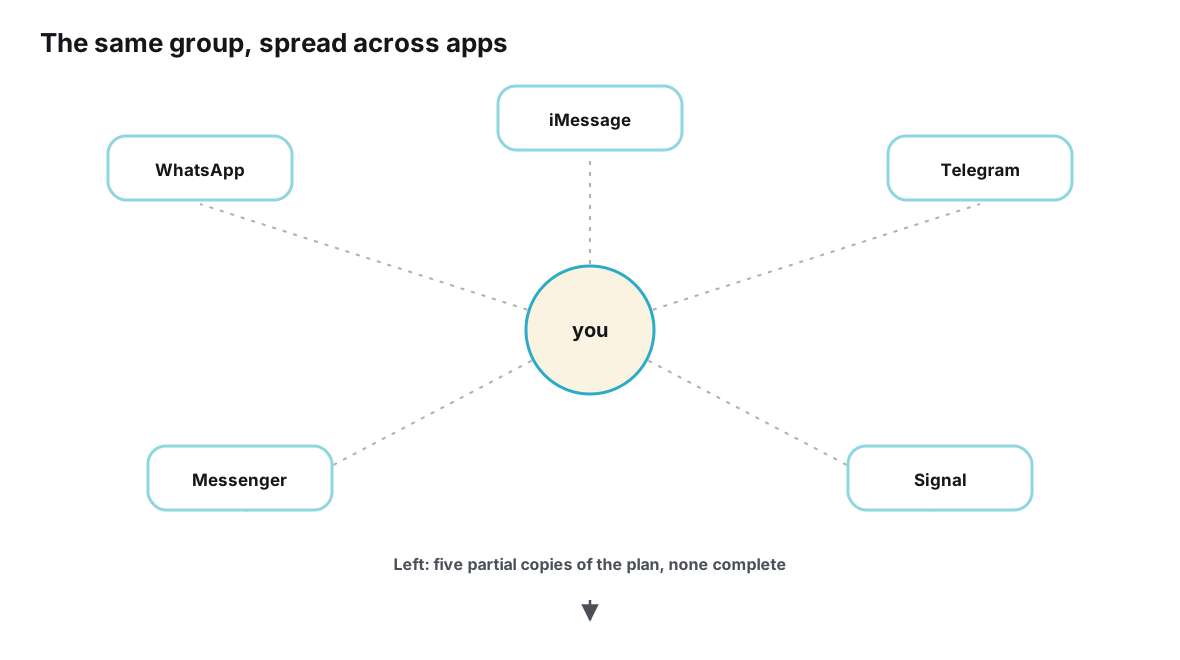
There is a practical asymmetry between the two surfaces that deserves its own section: portability. A group chat is anchored to its platform. If your hiking crew spans WhatsApp loyalists, iMessage holdouts and a Telegram enthusiast, a room can only ever hold a subset — each app’s room excludes everyone who does not use that app. The usual workaround is parallel groups per app, which multiplies the membership tax and splits the plan into several copies that drift apart.
An event link is indifferent to where it travels. The same address can be pasted into a WhatsApp conversation, sent over iMessage, dropped into a Telegram channel, emailed, or written on a whiteboard. Every recipient lands on the identical page, sees the identical current state, and their RSVPs roll into a single list. The conversations about the event stay distributed — which is fine, because conversation is what each app is good at — while the event itself stays in one place.
Running an event on a private link, step by step
If the comparison has you leaning toward link-based invitations, the practical pattern is simple. It is also, deliberately, compatible with the chats you already have — nothing about it requires abandoning conversation, only separating it from the plan.
- Create the event page before the discussion heats up. Give the event its own address with whatever is known — date, place, cost, description — and mark the rest as undecided. A page that says “time: voting in progress” is still better than a thread that says everything and decides nothing.
- Choose your distribution channel. Send the link through the channels you already trust: your existing small group chat, individual messages, email. The link rides on relationships that already exist; it does not create new obligations.
- State your forwarding policy out loud. If plus-ones are welcome, say so on the page. If the guest list is deliberately small, say that too. A written rule replaces the unspoken anxiety about who is allowed to pass the link along.
- Let responses live on the page. Going and maybe statuses collect into a headcount by themselves, so nobody has to send the dreaded “who’s in?” message and nobody has to answer it publicly.
- Keep the banter where it already lives. Your close friends’ chat can stay exactly as chatty as it is — it just stops being the storage system for the plan. When someone asks “what time?”, the answer is the link.
- Let the event end. After the hike, the link goes quiet on its own. There is no group to dissolve, no lingering roster of members, nothing to leave. The event ends the way events used to end.
Tools built around this pattern make the steps nearly invisible — Ontaym, for example, gives each event one link with RSVP statuses and updates attached to it — but the pattern itself matters more than any particular tool. Any system that puts a current, self-contained event behind a single shareable address gives you the access model described above.
Frequently asked questions
If anyone can forward a private link, is it really private?
Private here means unlisted and scoped, not secret. A link-based event is visible only to people who receive the link, and what they see is the event — not a member roster, not other guests’ phone numbers, not profiles. Forwarding can widen the audience, which is why stating a plus-one policy on the page matters. But the ceiling on exposure is low: the worst case is that an extra person learns the hike is on Saturday, not that thirty strangers each acquired your number.
Don’t group chats reach everyone instantly?
Within one app, yes — and for a group that already shares an app, that immediacy is real value. The reach collapses at the first person who doesn’t use that app, at which point the organizer is managing parallel groups or relaying messages by hand. A link keeps the immediacy of paste-and-send while removing the platform requirement.
My circle already has a chat we all use. Should we switch?
No — keep the chat, and add the link rather than replacing anything. The chat remains your conversation; the link becomes the plan’s address. This division of labor is usually the stablest setup: warmth from the room, accuracy from the page.
How do guests hear about changes if there’s no group?
Changes are made on the page, which is the one place every guest was already pointed to. Tools designed around event pages typically pair updates with notifications or reminders, so a change of time reaches people who opted in — without the organizer re-announcing it into a scroll of messages. The page is also self-updating for late lookers: it always shows the current state.
Which surface is better for a recurring weekly event?
A recurring event with a stable cast is the strongest case for a room or community — continuity genuinely adds something between sessions. Even then, a per-event link helps at the edges: newcomers can attend once before committing to the group, and the plan for each session stays findable. The hybrid — community for the regulars, link for each event — is common among well-run clubs.
Is using a link instead of a group rude or impersonal?
It can feel that way for a group of four close friends, where the chat is the friendship. For anything larger or more mixed, guests generally experience the link as considerate: it asks for less, presumes less, and lets them answer in private. Many people quietly prefer it — a preference they rarely announce in a room full of members.
Conclusion
The choice between a public group chat and a private event link is really a choice about what your invitation asks of people. The chat asks for membership: an identity, a persistent connection, and visible enrollment in a conversation that outlives the event. The link asks for attention: look at the plan, answer if you’re coming, close the tab.
Three practical takeaways fall out of the comparison. First, match the surface to the relationship — rooms for groups that persist, links for events that end. Second, notice what each surface exposes; an invitation that hands every guest’s contact details to every other guest is asking for more than the event needs, whatever privacy law would say about it. Third, the two surfaces compose: the healthiest setups keep the warm conversation in the chat and put the cold facts behind one link.
Events are bounded by design. They start, they happen, they end. An invitation surface that shares that shape — scoped, visible only to whom you choose, and silent afterwards — is not a niche privacy preference. It is simply an invitation built to the same dimensions as the thing it invites people to.
Invite people to the event — not to a lifetime of notifications.
Plan it with Ontaym