
How to Replace RSVP Forms With a Better Event Workflow
An RSVP form takes each guest’s answer exactly once — the moment the guest fills it in. An event keeps moving after that, and the workflow you use has to keep up or the headcount quietly stops being true.
Quick answer
An RSVP form is a collection tool: it records each guest’s answer once, then holds it still. Events don’t hold still — people change their minds, details move, guests join late, and the organizer needs the current headcount the day before, not the one from two weeks ago. Replacing a form with an event workflow means giving the event a single living record: one link guests open, RSVP statuses they can update themselves, changes that reach everyone who has already answered, and reminders that arrive before the date. The form’s one real job — structured collection — gets absorbed as the first stage of that record, instead of remaining a separate artifact whose output you reconcile by hand.
What RSVP forms are genuinely good at
Before criticizing the tool, it helps to be precise about what it does well, because the answer is: quite a lot. A form — whether a paper reply card or an online questionnaire — is a mature, well-understood instrument for a specific transaction. It asks a fixed set of questions in a fixed order. It constrains the answers, so you get tidy data instead of prose. It works for everyone you can reach, regardless of which messaging app they prefer, because it asks nothing of the recipient except a browser or a pen. And it keeps individual replies private by default: one guest cannot see what another guest answered.
Those properties explain why forms dominate the events where the transaction really is one-way and one-time. Wedding invitations with meal choices. School permission slips. Club membership registration. A conference collecting dietary requirements. In each case the organizer needs specific, comparable, private answers, and needs them once. The form is not a lazy choice here; it is the correct one.
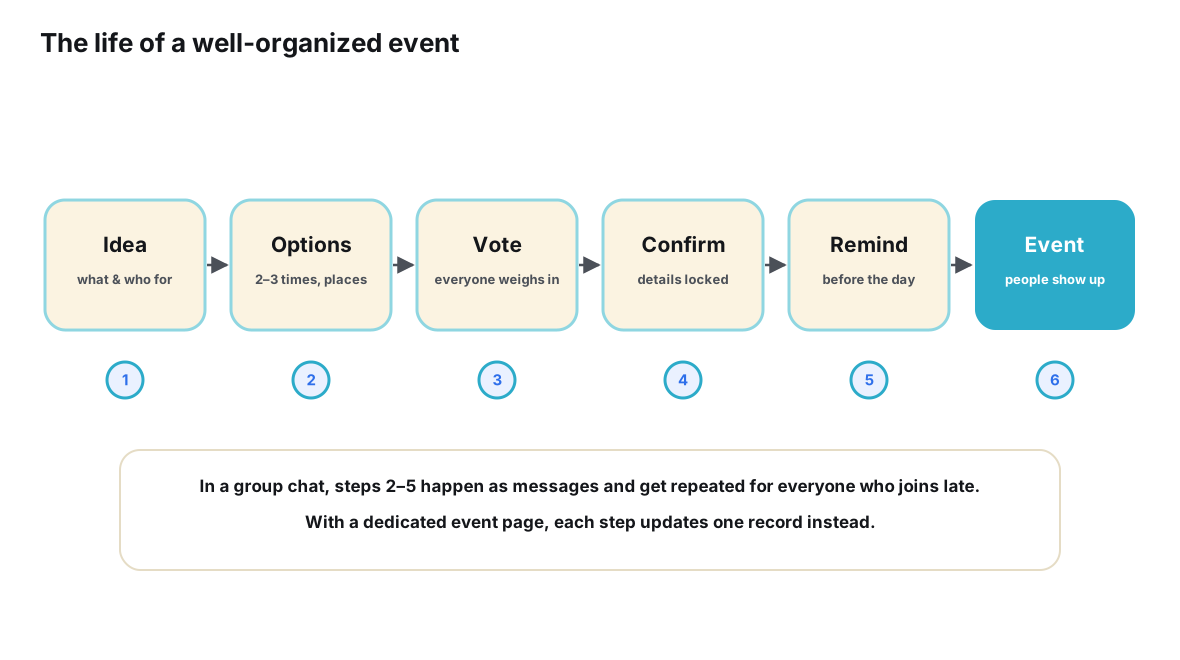
The trouble is that form habits migrate into events that don’t have that shape. A birthday dinner, a hiking trip, a quarterly team outing, a recurring games night — these are not one-shot transactions. They are plans with a lifecycle: they form, they attract people, they change, they remind, they happen, and they leave a residue of who actually came. A form addresses exactly one slice of that lifecycle and has nothing to say about the rest.
The transaction a form was built for
Look closely at how a form behaves and a design philosophy emerges. A form is one-shot: it expects a single submission per person. It is unidirectional: information flows from guest to organizer, never back. It is static: the questions and the event details printed on it are frozen at the moment of sending. And it is append-mostly: when someone submits twice, you get two rows, not one updated row.
Every one of those properties is a feature during the collection window and a liability after it. The single-submission model means a change of plans has no legitimate channel — so it arrives as a text message at 10 p.m. The unidirectional flow means the form cannot tell guests anything new — so when the venue changes, the form keeps confidently describing the old one. The static wording means a late invitee who opens the form link sees the plan as it was weeks ago. The append behavior means your response sheet accumulates duplicates the moment reality gets messy.
None of this is the form’s fault. A form models the invitation as a completed transaction. But an event is not a transaction — it is a small piece of shared state that a group of people maintain together over days or weeks. The mismatch is structural, and it shows up at every lifecycle stage the form wasn’t designed to see.
| Lifecycle stage | What the organizer needs | What a form workflow gives |
|---|---|---|
| Collecting replies | A structured answer from every invited guest | Exactly this — the form’s home ground |
| A guest changes their mind | The guest’s status updates in place | A resubmission that duplicates the first entry, or a message the organizer must merge manually |
| Event details change | Everyone who answered sees the new facts | A separate broadcast; the form still displays the old details |
| Someone joins late | The current plan, readable in seconds | The original form link, still describing the original plan |
| Final headcount | A live count of current commitments | A manual tally across the export, corrections and memory |
| Reminders | A nudge tied to the event date | A reminder the organizer writes and sends by hand |
| After the event | A record of who actually attended | Whatever notes the organizer kept separately |
Where the seams start to show
The failure of a form workflow is rarely dramatic. It leaks. Consider a book club dinner for eighteen members. The organizer sends a form link on Monday: name, attending yes or no, plus-one. By Wednesday there are eleven responses and the spreadsheet looks healthy. Then life happens. One member texts that her shift changed and she can no longer come. Another replies to the group chat with “count me in now!” — though his form says no. A third discovers she can bring a friend and says so verbally at a coffee, trusting the organizer to remember. The venue asks for a final number on Friday.
At this point the organizer is running three systems in parallel: the form, the chat threads, and her own memory. The form still holds the Wednesday snapshot. The corrections live where they happened to land. The headcount exists nowhere — it must be recomputed, by a human, on demand, and recomputed differently every time something slips. This is the quiet tax of the form workflow: it converts every change into personal labor for exactly one person, and it makes that person the only interface to the truth.
The pattern generalizes. Scheduling polls suffer from a cousin of the same limitation — they capture preference at one moment and then hand the aftermath to whatever channel takes over, which is why moving from a date poll to a complete planning process is its own migration, covered in how to move from Doodle polls to complete event planning. And the chat side of the leak is its own well-documented problem: moving from group chats to structured event planning requires the same realization, approached from the conversation side — the chat can’t be the record either.
The workflow that replaces the form
The replacement is not a better form. It is a different shape of thing: a single event record with a stable address, which absorbs collection as its first stage and then keeps working through every stage that follows. The anatomy is worth spelling out, because each part exists to close one of the seams above.
The record has one link that every guest can open without installing anything or joining anything. It holds the event’s current facts — time, place, what to bring — as editable fields, not as frozen text. Each guest has a named status on the record: going, maybe, or not going, chosen by the guest and changeable by the guest. When details change, the organizer updates the record once, and every subsequent visit shows the new facts — including visits from people who answered weeks ago. A reminder attached to the event handles the day-before nudge without anyone composing it. And after the event, the record still exists, holding the final list of who came.
Notice what this does to the form’s virtues. Structured collection is preserved — statuses are more structured than form fields, not less. Universality is preserved — a link is at least as reachable as a form. Privacy is configurable rather than fixed, which fits social events better than mandatory secrecy. What disappears is the freeze: the moment of answering stops being the moment of truth.
There is a deeper way to say this. The difference between the discussion that produces a plan and the plan itself is the difference between a conversation and an object — an idea developed in detail in the difference between a conversation and an event object. A form tries to be the object, but it is really a questionnaire about a future object, filled out before the object exists and never updated after. The event record is the object itself, living where everyone can see it.
It is not a coincidence that this is how the web itself models invitations. Schema.org, the shared vocabulary behind structured data on the web, defines an Event type with a start time, a location and attendees — and, tellingly, a dedicated RsvpAction type, because a reply to an invitation is significant enough to be its own first-class thing, with a status that can change. When the infrastructure of the web treats an RSVP as a living, typed object rather than a form row, that is a strong hint about which model matches reality.
Making the switch, step by step
Replacing a form workflow is a migration like any other: it goes badly if you switch mid-event and unannounced, and smoothly if you prepare the record, move the traffic once, and set expectations in a single clear message. The following sequence works for a single event or as a permanent change for a recurring group.
- Audit what your form workflow really costs. Before changing anything, write down every place an answer can arrive — the form itself, the group chat, direct messages, verbal confirmations — and every artifact you maintain to reconcile them, from the response sheet to your memory.
- Define the event record before choosing a tool. List the fields the event actually needs — date and time, place, per-guest status, and the notes people rely on — so the record is shaped by the event rather than by whatever template comes first.
- Create one address for the event. Set up a single event page holding those fields, where each guest controls a going, maybe or not going status of their own.
- Replace the form link with the event link. Send your invitation traffic to the event page from the first message onward, so every reply lands in the record instead of in a parallel sheet.
- Route corrections to the record. When someone reports a change in chat, answer with the link and ask them to flip their own status — politely, every time, until the habit forms.
- Run updates and reminders from the record. Change details once where every respondent can see them, and let a scheduled reminder rather than your memory handle the day-before nudge.
- Close the event deliberately. Afterward, mark who actually came, note where the headcount was wrong, and start the next event from the same pattern so the workflow compounds.
Tools matter less than the shape, but the shape needs a tool that supports it. Ontaym, for instance, is built around exactly this anatomy: one link per event, RSVP statuses guests update themselves, updates that reach people who have already answered, and reminders tied to the date. Any system offering those four things can host this workflow; the point is to stop shopping for a smarter form and start maintaining a single record instead.
| Moment | Form-based workflow | Event-based workflow |
|---|---|---|
| Sending the invitation | Form link pasted into messages | Event link pasted into messages — the same move |
| First reply | A new row in the response sheet | A named status appearing on the event page |
| A guest changes their mind | A message the organizer translates and merges | The guest flips their own status; the count moves |
| The venue changes | A broadcast into the chat, plus hope | An edit to the record everyone reopens |
| Someone joins late | They fill a form built for the original plan | They open the link and see the current plan |
| Headcount for the booking | Export, deduplicate, count, repeat | Read the list as it stands |
| The day before | A reminder written and sent by hand | A reminder attached to the event |
| The week after | A sheet nobody reopens | A record of who came, ready for the next time |
When a form is still the right tool
Honesty cuts both ways. Some events genuinely match the form’s transaction shape, and forcing them into a living record adds ceremony without value. A traditional wedding with paper replies is the obvious case: the reply card is part of the ritual, the answers are final by convention, and the day’s logistics are handled by professionals who want a list, not a workflow. Regulated or quasi-official collection — a school needing signed confirmations, an organization with audit requirements — may demand exactly the private, one-shot, exportable artifact a form produces.
There is also a legitimate hybrid. Formal events often keep the form for the formal reply and run a small event record alongside it for the parts that move: the after-party for the younger guests, the informal brunch the next morning, the helpers who need day-of coordination. The record handles the living pieces; the form handles the ceremony. The mistake is not using a form — it is using a form for the parts of an event that are still alive.
A useful test: ask whether any fact on the form could still change after submission, or whether any guest could sensibly change their answer. If yes to either, that portion of the event belongs in a record. If genuinely no — the meal choice is locked, the date is immovable, the reply is binding — the form remains the honest instrument.
Migrating the replies you already have
The most common practical worry is the sunk cost of answers already sitting in a form or spreadsheet. The good news is that history does not need to be perfect, because history is exactly what the new workflow stops depending on. Extract what the form knows — names and current best guesses at status — and seed the event record with it. Where a correction arrived in chat after the form was filled, seed the corrected value instead; the record should start life holding the truth as best you know it, not the truth as the form recorded it.
Then send one message and send it well. Something like: “We’re keeping the plan for Saturday in one place from now on — this link always shows the current details, and you can change your own going or maybe status there if anything shifts.” One sentence of explanation, one link, one expectation set. Expect a transitional event where a few people still reply in chat out of habit; route each straggler to the link without drama. By the second event, the muscle memory forms, because the record is genuinely the easiest place to answer — it asks less of guests than the form ever did.
Finally, retire the old artifacts on a schedule rather than in a purge. Leave the spreadsheet where it is, untouched, as an archive. The moment you stop updating it is the moment it stops competing with the record — and the moment the group has exactly one place to look. For groups arriving from an even messier starting point, the companion guide on combining chat apps with dedicated event tools covers the conversation side of the same migration: what stays in the chat, what moves to the record, and how the two coexist without duplicating each other.
Frequently asked questions
Does an event workflow make sense for formal events like weddings?
For the formal reply itself, often not — the paper card or official form is part of the occasion and its answers are final by convention. Where a living record earns its place at formal events is the parts that keep moving: the informal after-events, day-of coordination among helpers, and the plans that surround the ceremony. Many weddings quietly run both.
Won’t guests treat an event link as just another form?
Some will, the first time. The behavioral difference is that returning to the link a second time shows their own previous status and lets them change it — something no form offered them. Set the norm explicitly in your invitation message (“update your status here if anything changes”) and correct stragglers gently by answering their chat messages with the link. The habit usually forms within one or two events.
What happens to the answers already collected in my form or spreadsheet?
Seed the event record with the form’s current best information, preferring any corrections that arrived afterward, and leave the original sheet untouched as an archive. Then announce the change once, with the link and a one-sentence expectation. The record only needs to be right from today forward; historical purity is not required.
Isn’t a form more private, since guests can’t see each other’s replies?
Forms are private by default, and for some events that default is the right call. Event records vary: some show the guest list to participants, which for social gatherings is usually a feature — seeing who else is coming is part of deciding to come. Choose based on the event. Where discretion matters, keep that portion on a private instrument and use the record for the logistics that genuinely need to be shared.
How is this different from running a poll in my group chat?
A poll records an opinion at a moment, usually anonymously and without any way to revise it as plans evolve; an RSVP is a named, updatable commitment that rolls up into a live headcount. Groups that poll when they need commitments discover the difference on the night, when the tally and the table don’t match. The two can work together — poll to explore options, record to hold commitments — but only the record can answer “who is coming, as of today?”
Conclusion
RSVP forms are well-built instruments attached to the wrong duration. They photograph intentions at one moment and then stand still while the event — the thing the intentions are about — keeps moving. Every seam that opens afterward is paid for by the organizer: merging corrections, recounting heads, re-explaining changes, remembering who said what in which channel.
The replacement is not a smarter form but a shorter memory of work: one event record with one link, statuses guests control, updates that reach the already-answered, reminders that fire on schedule, and a final list that closes the loop. Audit what your current workflow really costs, shape the record around your event, move the invitation traffic once, and let the corrections land where they belong — on the record, not on you. Groups that make this shift don’t become more organized people; they simply stop paying, on every event, for a tool that stopped helping halfway through.
Collect replies that can keep up with your event.
Plan it with Ontaym