
How to Organize an Event Without Asking Everyone to Download the Same App
Most groups never share one messaging app — they share a plan. The way to organize across WhatsApp, iMessage, Telegram and everything else is to stop choosing an app and start giving the event an address that works inside all of them.
Quick answer
To organize an event without a shared app, stop treating the app as the venue and treat the plan as the venue instead. Put the event on neutral ground: a browser-based event page with its own link, readable on any phone without installing anything or creating an account. Invite each person wherever they already are — WhatsApp, iMessage, SMS, email, Discord — and send the same link through every channel. Collect responses on the page rather than in scattered replies, so the headcount lives in one place. When details change, edit the page once and post a one-line pointer in each chat. Nobody downloads anything, nobody joins anything, and the plan stays current for everyone at the same time.
The quiet cost of “just download this app”
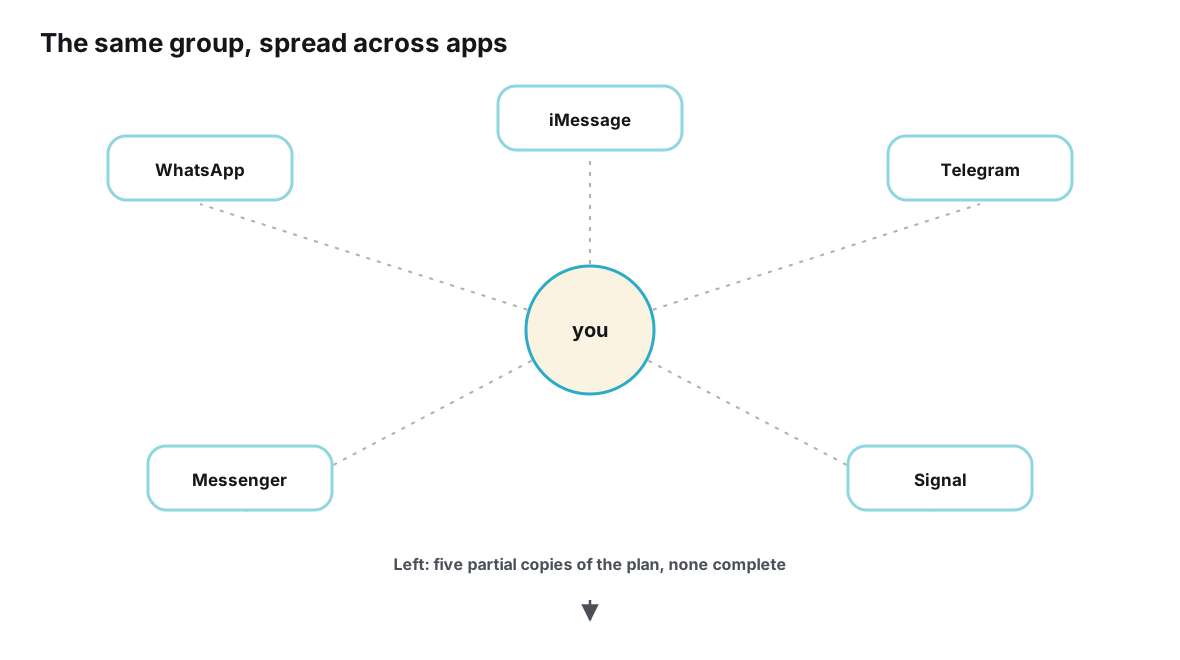
The request always sounds reasonable. It’s free, it takes three minutes, everyone else already has it. But “everyone else” is doing a lot of work in that sentence. Ask a mixed group to converge on one messaging app and you are asking several different kinds of people for several different kinds of favor: to install software they don’t want, to create an account they’ll never reuse, to expose a phone number to near-strangers — or, in the iMessage case, to own a different phone entirely.
Each app has a membership model, and each model quietly excludes somebody. WhatsApp is built on phone numbers: joining a group means your number becomes visible to everyone in it, which is precisely what some guests won’t accept for a one-off dinner. iMessage groups are tied to Apple devices, so friends on Android are simply out of reach no matter how willing they are; Apple’s own support materials, at support.apple.com, describe how deeply messaging is woven into the Apple ecosystem. Telegram and Discord require accounts, and Discord typically asks a guest to join a server — a whole community with its own channels and culture — just to read one invitation.
Then there is the honest reality of app fatigue. Most people already run more messengers than they want, each with its own notification settings, contact list and unread count. Adding “one more, just for Saturday” is a small but permanent tax on someone else’s device and attention, collected for a temporary event. Guests rarely refuse out loud. They just don’t install, don’t join, and quietly stop being part of the plan — and the organizer never finds out which step lost them.
Why voting on “which app should we use” never works either
Groups often try to democratize the choice. Someone starts a poll: WhatsApp, Telegram or the group chat we already have? The vote itself spends goodwill, because it forces people to argue about tools instead of the event. The app with the most current users wins, the people whose app lost comply half-heartedly, and the two friends outside the winner’s network get special arrangements that everyone resents slightly — screenshots, copy-pastes, a side thread that drifts out of date.
The deeper problem is that any chosen app is somebody’s home and everybody else’s foreign territory. Home advantage matters more than features: people read the app they live in and skim the one they joined under duress. A plan posted where a third of the group is skimming is a plan with a slow leak. You can’t fix that with a better poll; you can only fix it by not requiring the app in the first place.
There is also a timing problem with the vote itself. App decisions made for one event tend to leak into the next, because the group now “has a chat” — and the next organizer inherits both the chat and its exclusions. The couple who couldn’t join last time still can’t join this time, except now nobody re-examines the choice because the infrastructure already exists. Neutral-by-default breaks that inheritance: every event starts from its guests, not from last year’s software decision.
| If the group standardizes on… | What joining actually requires | Who tends to get lost |
|---|---|---|
| The app, plus sharing your phone number with every member of the group — the phone-number basis of membership is documented in the WhatsApp Help Center | Guests who don’t want their number visible to near-strangers, and anyone who has deleted the app for privacy or digital-break reasons | |
| iMessage | An Apple device; there is no full cross-platform way in | Android friends — entirely, regardless of enthusiasm |
| Telegram | An account and number-based discovery | The holdouts who already resent juggling multiple messengers |
| Discord | An account plus joining a server with its own channel sprawl and norms | Casual friends, less technical guests, and anyone who finds servers overwhelming |
| A new planning app | An install, a signup and a new habit — for a single event | Almost everyone, mildly; the friction is small but universal |
None of these are flaws of character. Phone-number identity buys WhatsApp spam resistance and a frictionless contact graph; ecosystem integration is why iMessage feels seamless inside Apple; server structure is what lets Discord host enormous communities. These are defensible trade-offs. The mistake is assuming an event can require one particular membership model from every guest. In a mixed group, it can’t — so the design principle has to flip.
The principle: give the plan an address, not a membership
There is exactly one network every guest already belongs to: the web. Whatever combination of phones, apps and accounts your group runs, every one of them can open a link. That makes the humble URL the only genuinely neutral object in digital life — it carries no brand loyalty, requires no install, asks for no identity beyond a tap, and expires politely when the event is over.
Applied to planning, the principle reads: the plan lives at an address; the conversation lives wherever it wants. A browser-based event page holds the current facts — time, place, the guest list as it firms up — and every chat, message or call about the event points back to it. Nobody downloads anything. Nobody joins anything. The organizer stops choosing between apps and starts using all of them as delivery routes for one link.
This is the same pattern as creating one source of truth for a group event: a single authoritative record that many conversations reference. The no-shared-app version simply leans harder on the record being link-based rather than account-based, because the whole point is that your aunt on SMS and your gamer friend on Discord interact with exactly the same object, each from their own corner of the internet.
The workflow, step by step
- Create the event page before you send any invitation. Open a browser-based event page and write down what is already settled — the purpose, the rough window, the city — and mark everything else as an open question. A page with visible gaps is an invitation to participate; a finished-looking plan is an announcement people react to silently.
- Invite each person through the channel they already use. The WhatsApp crowd gets a WhatsApp message, the cousins an iMessage text, the gaming friends a Discord DM, the offline uncle a phone call with the link noted down for later. It is the same link everywhere; only the wording changes to fit each audience.
- Make the link the only place where facts live. The first time someone asks “what time?” in a chat, answer in one line and point to the page — then keep doing it, cheerfully, every time. The repetition is not nagging; it is teaching the group where to look, and it usually takes about three rounds before people check the page first.
- Collect answers on the page, not in replies. Turn the open questions into structured input: a poll over the two candidate dates, going/maybe RSVP statuses for attendance. One recorded answer per person replaces the archaeology of scrolling back through four chats to reconstruct who said what.
- Update once, announce briefly. When a fact changes, edit the page first. Then post a single short line in each still-active chat — “start time moved to 8, details on the page” — so every channel carries the signal while only the page carries the substance.
- Give every late joiner the same link. The colleague who hears about the dinner on Thursday gets exactly what the first invitee got. There is no summary message to compose and no backlog to scroll: on the page, the newest guest and the day-one guest are equally up to date.
A word on page anatomy, since the page is doing the structural work here. It needs surprisingly little: a title a stranger would recognize, the current time and place in plain fields, the open questions stated as questions, a visible RSVP list, and — once decisions land — a short changelog so returning visitors can see what moved since they last looked. What it does not need is length. Every paragraph a guest must read to find the start time is friction wearing an informative costume.
Picture how this runs in real life. Maya is organizing a leaving dinner for twenty-two people drawn from four different circles. On Monday she builds the page with the date range, two candidate restaurants and everything else marked open. She then sends twenty-three individual messages — one per guest, each in that person’s native app — containing two sentences and the link. Every question that arrives in any chat gets a one-line answer plus the link. By Thursday she has a headcount she trusts, two restaurant votes settled, and she has never once asked anyone to download anything.
The effort curve matters here. Maya’s Monday was slightly heavier than creating one group would have been, because she wrote personal invitations instead of adding contacts to a list. But every day after that was lighter: no group to moderate, no repeated answers, no reconciliation between what different people remembered. The shared-app approach is cheap on day one and expensive every day after; the neutral-link approach is the reverse.
Choosing the neutral backbone
A dedicated event page is the strongest backbone, but it isn’t the only structure that respects the no-install rule. The honest comparison below shows what each option holds well and where it strains.
| Backbone | What it handles well | Where it strains |
|---|---|---|
| Browser-based event page | One current version, RSVP statuses, polls on options, updates that reach everyone at once | Requires choosing a tool you trust to stay online and keep links stable |
| An email thread | Universal reach; attachments; comfortable for every generation | Chronological like chat — the latest message buries the current plan, and the headcount lives nowhere |
| A group SMS | Reaches essentially every phone with no app at all | No structure and no RSVPs; reply-all confusion grows fast beyond a handful of people |
| A shared document or spreadsheet | Editable details, a visible guest list, familiar to everyone | No notifications or RSVP semantics; editing permissions become the new membership problem |
| A scheduling poll | Settling one field very well — the date; Doodle is the long-standing example of the date-and-time poll | Stops at the date; time, place and attendance still need somewhere else to live |
The pattern across the table is consistent: the further a backbone sits from a chat stream, the better it holds state — and the closer it comes to a living page with built-in RSVPs, the less manual labor remains for the organizer. For a one-off mixed group, the event page earns its keep immediately. Email and SMS remain respectable backbones for smaller, simpler plans, and a scheduling poll is an excellent supplement for the one decision it was built for.
Neutrality is also a privacy decision
The membership cost of a shared app is not just an install. Every group chat functions as a small exchange of personal data: in phone-number-based apps, joining a group surfaces your number to everyone in it; in account-based apps, it exposes a profile, a username and often a photo to people you may barely know. For a birthday party among old friends that exchange is harmless. For an event that mixes circles — coworkers plus family plus a friend’s partner everyone just met — it asks guests to blend audiences they deliberately keep separate.
A link asks for none of that. Reading a page requires no identity at all, and answering an RSVP requires, at most, a name a guest chooses to type. That minimalism is not an accident of the technology; it reflects a broader direction of travel in how personal data is treated — regulations like Europe’s GDPR and California’s CCPA exist precisely because identifiers such as phone numbers are considered personal data worth protecting. The neutral-link approach simply applies that logic to social life: an event needs to know who is coming, not who everyone is.
Guests who won’t click — and guests who can’t
Neutral ground lowers barriers; it doesn’t eliminate the last mile of human nature. Some people treat every unfamiliar link with suspicion, some have phones where storage or data is scarce, and at least one beloved relative is resolutely offline. None of these people should be written off, and none of them force the group back to a shared app.
The technique is relaying. For the small minority who won’t engage with the page, the organizer — or a designated friend — carries the information by call, in person or by plain text, and records their answers on the page afterward. The group’s record stays complete even though one guest’s participation was analog. Accessibility belongs in the same breath: a well-built event page opens in any browser and should meet standards such as the W3C’s WCAG guidelines, so that a link really is the lowest-friction door for everyone able to use one.
Keep the relay proportional, though. If you find yourself relaying for half the group, the problem is no longer the guests — it is a signal that the page, the link or the invitation wording needs another look. A rule of thumb: the relay list should be a short column, not a page.
Keeping the plan alive without nagging
Momentum is the quiet job of every organizer. A plan with no pulse stalls; a plan with too many pings gets muted. The neutral-page workflow makes pacing easier because reminders can attach to the event itself rather than to the group’s patience: one nudge before the RSVP deadline, one when final details are posted, one the morning of the event.
Aim nudges at silence, not at crowds. The page shows who hasn’t answered; those specific people get a short private message, while everyone who already replied is left in peace. Compare that with the shared-app default — yet another “please reply in the group” broadcast that the people who already replied also have to read, and that the people it was aimed at have learned to skip.
One side effect deserves its own attention. The moment your single link coexists with the group’s existing chats, your event has multiple communication channels running in parallel, and each one starts developing its own habits. That deserves deliberate handling: chats carry signals, the page carries facts, and saying so once at the start saves a dozen corrections later. It also helps to internalize why the chats can’t simply hold the plan themselves — messaging apps were never designed to be event databases — because that understanding is what stops the group from backsliding into “let’s just use the chat” three days before the event.
When a shared app is genuinely fine
Honesty cuts both ways. If a group truly already lives in one place — a team on a work chat, a guild on its Discord server, a family that is entirely and happily on WhatsApp — planning there is natural, and the in-app conveniences can carry a lot of the weight. The no-shared-app workflow is not a doctrine; it is a response to mixed groups.
The test is the exception. The moment one meaningful guest sits outside the group’s app — one Android friend in an iMessage family, one privacy-conscious colleague who deleted WhatsApp, one aunt who only reads SMS — the shared-app approach starts paying for its convenience with exclusions and manual relaying. At that point neutrality stops being an ideological preference and becomes simple logistics. And when an event spans not just app preferences but whole communities — a family on WhatsApp, friends abroad on Telegram, a gaming circle on Discord — the sibling playbook for keeping one event organized across WhatsApp, Telegram and Discord at once extends this exact pattern to three apps.
Making it stick beyond the first event
The first neutral-link event is an experiment; the second is a habit. Groups that repeat the pattern notice a shift in what people ask. Instead of “which group is this in?”, the question becomes “what’s the link?” — and once a group has that reflex, the organizer’s job shrinks to building the page and sending it around. The training happens mostly by consistency: every fact question answered with the link, every update edited on the page first, every new guest handed the same object as everyone else.
For recurring events, the pattern compounds. Each gathering gets its own page and its own link, so the current event is never tangled with the previous one’s stale details; meanwhile the distribution list — who is reachable on which channel, with what wording — stabilizes after a round or two. The organizer ends up with something no group chat accumulates: a clean per-event record of what was planned, who came, and what changed, without a single “scroll up” in sight.
Frequently asked questions
Isn’t it just easier to create one WhatsApp group and add everyone?
Only if every guest already uses WhatsApp and is comfortable having their phone number visible to the whole group. Where that’s true, a group works. Where it isn’t, the “easy” option quietly excludes people or asks them for a favor they didn’t sign up for. A link asks everyone for exactly one tap and nothing more, which is why it scales across mixed groups better than any single app can.
Do guests need to install anything to use a browser-based event page?
No. The link opens in whatever browser the phone already has, and the page is simply there — no install, no app-store trip, no account creation in tools designed this way. That is the defining property of the approach: the event meets guests on hardware they already own, configured the way they already like it.
What if half the group insists on keeping their group chat?
Let them keep it. Chats are excellent at what chats do — banter, jokes, side commentary. The workflow doesn’t replace conversation; it separates conversation from the record. The chat keeps humming, and whenever a fact is needed, the answer is the link. Over time the group chat becomes more fun, not less, because it stops doubling as a filing cabinet.
How do I collect RSVPs without a shared app?
On the page. Guests mark themselves as going or maybe directly, the headcount updates in one place, and changes are recorded as they happen rather than reconstructed from replies. If a small number of guests can’t use the link, take their answer by call or text and record it yourself — the tally stays whole.
Won’t people ignore yet another link?
A link is not an app. It asks for one click, works instantly, and never asks again — which is a different category of ask than an installation with an account attached. In practice, ignoring a link is easy to fix privately (one short message to the person), while ignoring an app request is often final, because reinstalling goodwill is harder than re-sending a URL.
My group is only five people. Is all of this overkill?
Possibly, and that’s fine. If five people all share one app, read everything and remember the details, a single group chat can carry a simple plan. The workflow earns its keep when any of these appear: a guest outside the main app, a decision that changes after it was made, or a headcount someone actually needs. Small plans fail gracefully in chat; slightly bigger ones fail expensively, and the link costs almost nothing to have ready.
Conclusion
The app was never the venue. The dinner happens at the restaurant, the hike at the trailhead, the party at the house — and the plan needs a home that is as open as the guest list, not as closed as the tightest app ecosystem in the group. Choosing neutral ground is what makes an event feel like it belongs to everyone invited rather than to the platform the majority happened to prefer.
The working method is small enough to memorize: put the plan at one link, invite each person through whatever door they already use, answer every question by pointing, collect responses where they accumulate into a headcount, and edit facts in one place. Guests give one click and nothing else. The organizer gives up the fantasy of a single shared app and gets, in exchange, a plan that no longer leaks — no matter what mix of phones, platforms and preferences the next group runs.
One link your whole mixed group can open — no installs, no exceptions.
Set it up with Ontaym